Universal Robots (UR) are a global manufacturer of collaborative robots (or cobots), which enable companies of all sizes to take advantage of robotic automation. So high-tech, high-value, and highly effective products. But as you can imagine, they are a very considered purchase for many businesses.
We sat down with Sabine Vidrike, Global Lead Management Strategist at UR, to discuss how Leadoo has helped drive more of those considered purchases. And how within a year, it has become a global tool in Sabine’s Lead Acquisition strategy.
Why did Universal Robots need a Conversational Marketing platform?
With a purchase as considered and potentially complex as a robot, Sabine realised that conversational chatbots – particularly on key URLs like product pages – could achieve two core benefits:
Give a helping hand to potential customers to find information for themselves, and help them through their buying journeys
Qualify potential customers and pass key info about them to UR’s sales & support teams, ensuring leads through the site are legitimate MQLs
Sabine explains that “I looked at many different chatbot and conversational marketing options. Established providers like Drift or Intercom were more impersonal, and I knew I would struggle to get the onboarding support I needed. What drew me to Leadoo was the clear customer support and success plans laid out within the sales process.”
“What drew me to Leadoo was the level of customer support.
The onboarding plan was almost as important as the platform’s unique features – like the Inpage Bots.”
Sabine Vidrike
Global Lead Management Strategist, Universal Robots
“As someone who was going to be responsible for creating new bots and dynamic content internally, that level of guaranteed onboarding was almost as important as the platform’s unique features that we’ve made such wide use of – like the Inpage Bots”.
How are UR using Leadoo bots one year later?
All that early onboarding and support clearly paid off, because Sabine became a Leadoo AI power-user within Universal Robots extremely quickly.
With Leadoo’s help, she developed interactive chatbots on high-traffic top-nav pages like the Home or About pages, with the goal of immediately sign-posting as many users as possible. But the real stroke of genius was in the chatbot branding. The wonderfully named ‘ArthUR’ now assists you with any question you have. Whether it’s technical support, talking to a salesperson, or even applying for a job at UR!
Our Head of Marketing breaks down why ArthUR is so effective for Universal Robots in his #ConversionCaseStudies series
With ArthUR on all high-traffic pages, Sabine and UR were aiming for a discussion-to-lead rate of 10% from all Leadoo bots. But in 2023, they have averaged close to double this. A discussion-to-lead conversion rate of 17% across all bots.
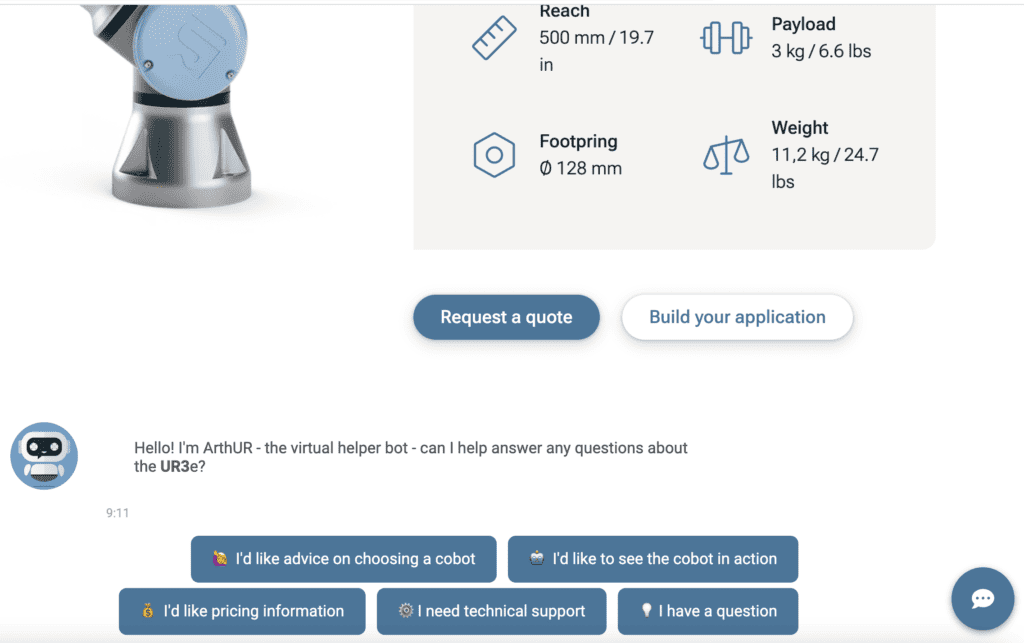
This has been aided by very good use of Inpage bots on product pages. As you scroll through any UR product page, underneath the technical specs and immediate CTAs, you’ll be greeted organically by an in-page version of ArthUR. This instantly allows you to see the product in action, check if it’s the right product for you, or ask technical questions that support & sales teams will proactively know is specifically about that product.
ArthUR showing he works just as well in-page on product pages
As Sabine explains: “the in-page bots have been a major factor in lead generation. From Leadoo’s Analytics and Attribution models, we know that 84 cobots have been sold to date – where the bots were the last pre-sale touchpoint.”
“For such high-value items, the bots have become an important sales tool in and of themselves. And they have the added benefit of providing our sales team with key information about customers. We pass info such as user name, company, country, contact details and bot responses directly into our CRM from Leadoo via integration.”
Over time, the bots have also become an integral part of UX on the site. In 2023 to date, the bots have received 69% more discussions than the corresponding period in 2022. That came despite an 11% decrease in overall site users.
Meaning the rate at which users engage with the bots is up 92% year-on-year. And overall conversion rate through the bots has increased 21% year-on-year.
This widespread adoption of the bots by users shows that while they are helping drive sales and efficiencies, they are also a key factor in Sabine’s goal of delivering enhanced customer experience onsite.
Going Universal
All these bot success stories have meant that Leadoo is now going global within Universal Robots. Having initially started on UR’s English language websites, Sabine has recently finished rolling localised and translated versions of the bots across 11 different languages!
As Gavin Greer, UR’s Customer Success Manager explains: “we pride ourselves on making our bots and insights as easy to use as possible. But even so, Sabine and Universal Robots have really run with the platform to an impressive level.”
“ArthUR is just ingenious. Both in its branding and in how UR have used it onsite. It shows not just how effective signposting tools like this can be on conversion rate. But also how creative and effective implementation is key to maximising conversion rates – even with conversion tools in play.”
“Sabine has been an absolute pleasure to work with, and her roll-out of the bot across 11 other languages is a testament to how determined she is to continuous improvement. And how quickly she has become a Leadoo power-user. We can’t wait to help get the most of 12 ArthURs all around the world!”
Leadoo AI Support:
How to set up links in Leadoo AI Bots
If you have any issues or need help you can contact [email protected]
Leadoo AI Support:
How to Embed Leadoo Bots
How to add Leadoo ChatBots / CTA Bots to your website?
Implementing Leadoo AI is extremely easy. Simply add the Leadoo bot script to your website header or the pages of your choice. You can also implement the chatbots to your website by using Google Tag Manager.
Adding script through a CMS (e.g. WordPress)
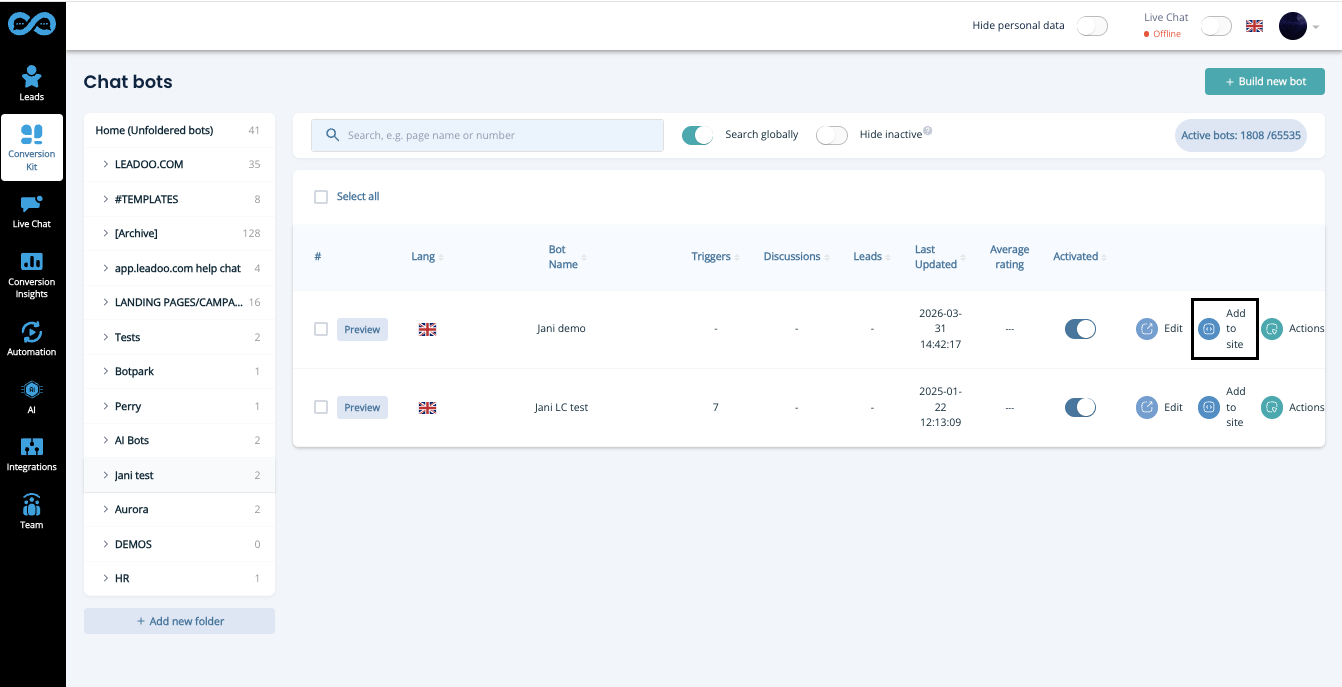
1. Open Leadoo admin panel and open the ChatbBot or CTAbot section. Click the blue “Add to site” button.
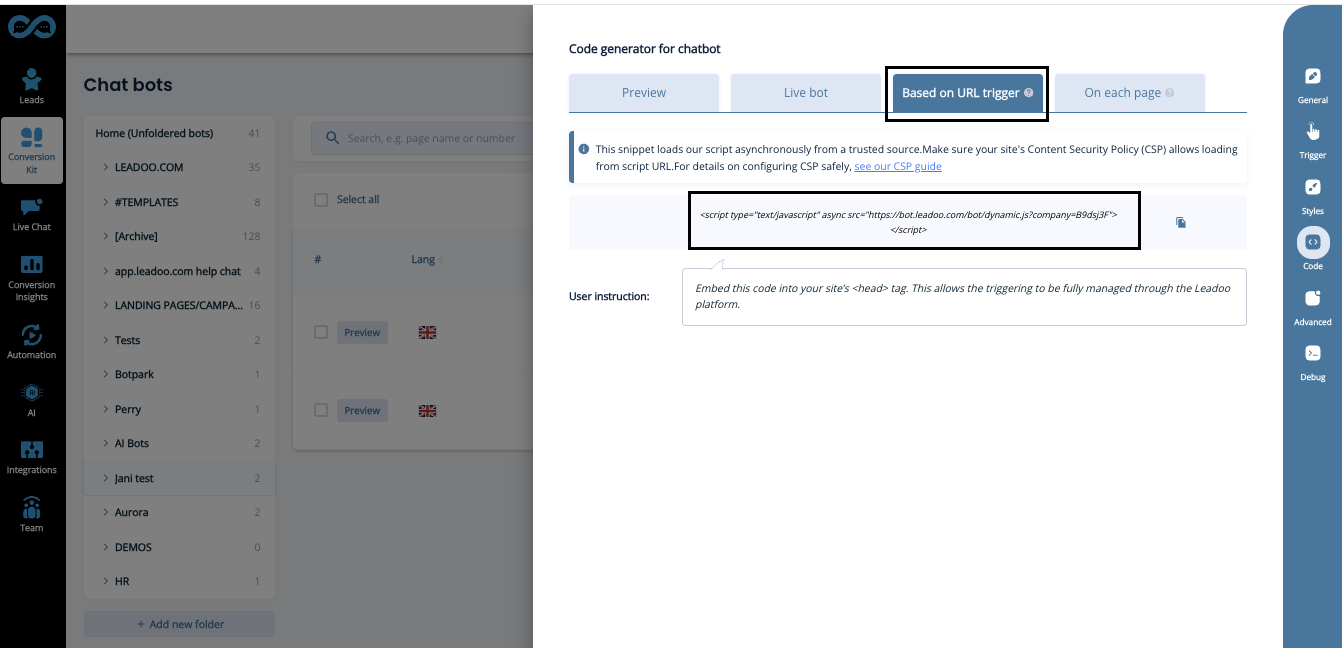
2. Select and copy the script you want to use on your site.
3. Go to your CMS and add the script to the place of your choosing.
We recommend placing the script within the <head> tags of you websites global header. This allows the triggering of the chat to be managed fully through your Leadoo platform and you never have to add any other Chat / CTA scripts. <head> tags can usually be found from the site’s “Theme editor” (within header.php file).
Alternatively, you can copy paste the script within <body> tag of each page you want the bot to appear in. The content of <body> is often accessible through the pages’ html (text) editor.
Adding script via Google Tag Manager
We advise you NOT to embed any Leadoo scripts through Google Tag Manager:
If you embed scripts through GTM, Leadoo bots won’t be visible to those who use ad blockers. That means that third, or even half, of your visitors can’t have conversations with bots. And that of course means less conversions and smaller ROI.
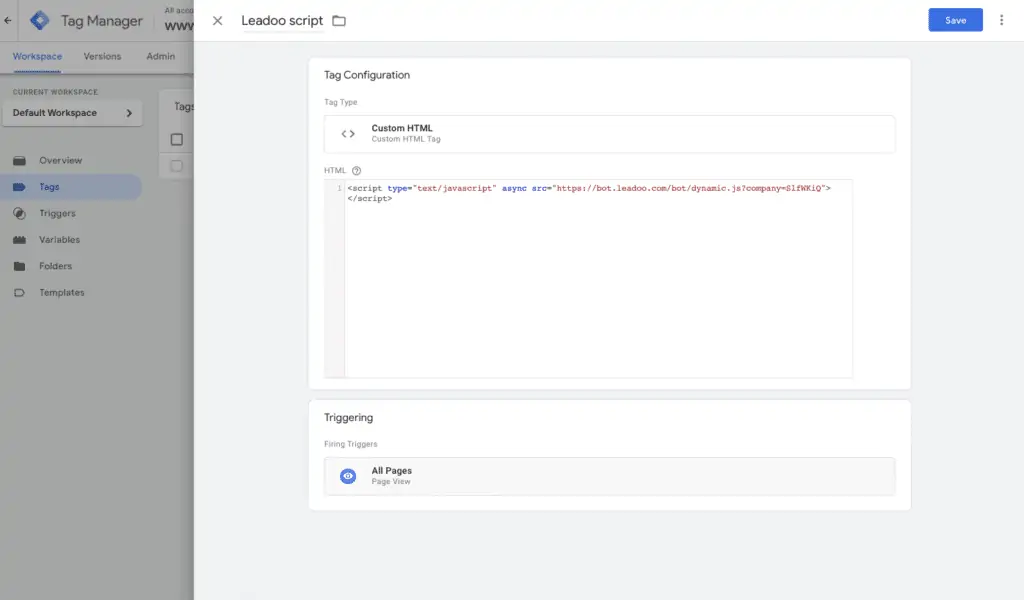
If you choose to embed via GTM, start by following the steps 1-2 above the find the script from your Leadoo platform.
On Google Tag Manager create a “Custom HTML” tag and set it to fire on All page views.
Name & publish the tag
How to embed Leadoo InpageBot and VisualBot
When you are embedding an InpageBot / VisualBot, you have multiple options to choose from to find the way to embed, that fits you best.
Both bot types are embedded similarly.
We recommend using the Dynamic Embedding method when embedding InpageBots and VisualBots. That way you can manage the bots on your website directly from Leadoo’s platform and you don’t need to access you CMS anymore every time you want to change the bots on your website.
How Dynamic Embedding Works?
Basically you create slots on your website (eg. Blog-post-slot & Front-page-slot-footer) and then you decide on Leadoo platform, which bot goes in to which slot. Now when you want to update all your blog post bots, you don’t have to change all those manually, but instead you just select different bot to be shown on that specific slot.
How to Create Bot Slots
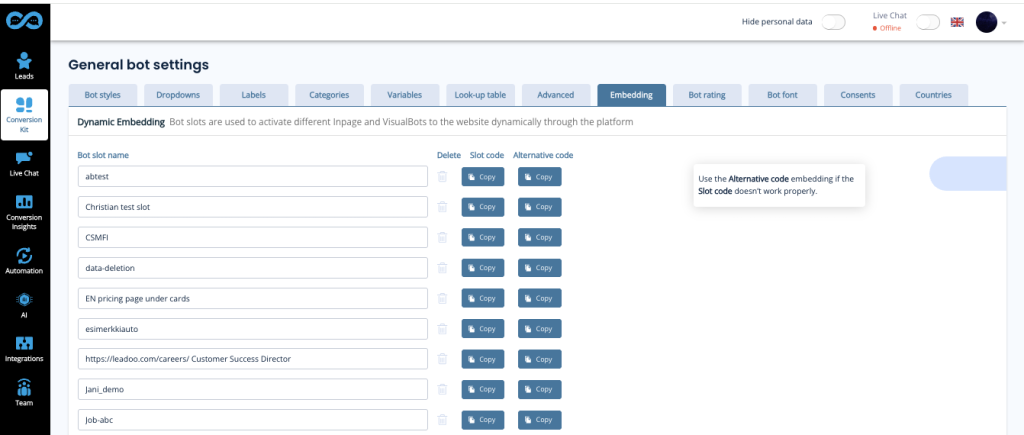
Go to Conversation Kit -> General Bot Settings -> Dynamic Embedding To create your first bot slot, click on + Add new bot slot. Once you click save the slots will automatically sort into alphabetical order to help you find them easier.
Naming Bot Slots
Use URLs to name the bot to make it easy to find and understand where the slot is used. If you use bot slots on multiple pages, use the same naming logic as in chatbots (wildcards / ie. *leadoo.com/*)
Another way of naming slots is like in the picture above ie. “Front-page-header” etc.
Note! If you rename the slot, you will need to update the script on your website too. Because of this, we don’t recommend renaming them after they have been embedded on your website.If you do rename them, you can always rename them back to what they were to fix this issue.
Adding Bots to your Bot Slots
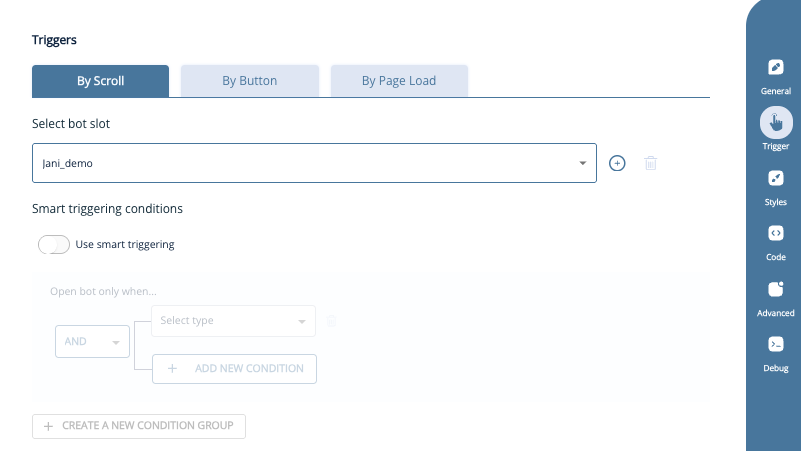
After creating bots slots, you can assign which bot will appear in each bot slot. For example, find the bot created for blog posts, go to settings then triggers, and select the correct clot e.g. Blog-post-slot. Save, and repeat for each InpageBot and VisualBot as needed. Note! You can only insert one bot into each slot unless you are running an A/B test.
Embedding Slots on Your Website
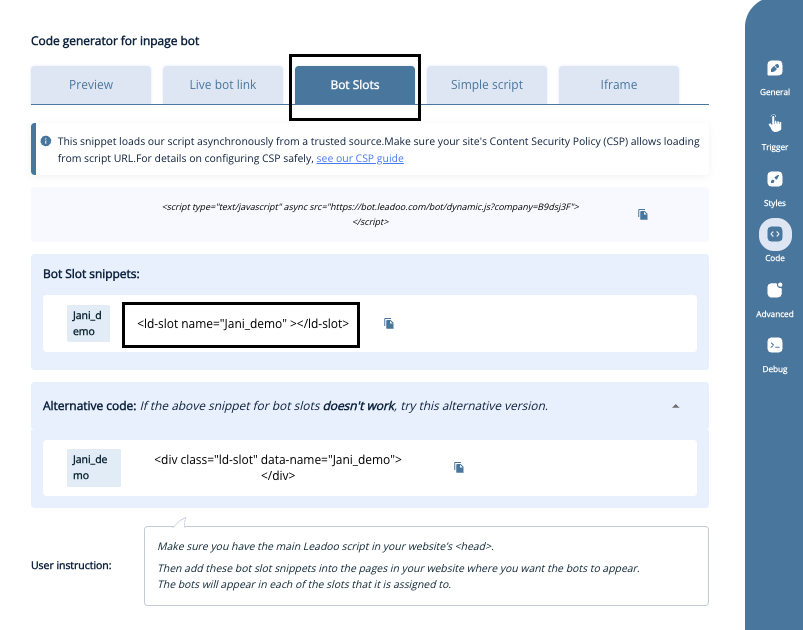
Now you can copy the slots from the Leadoo platform and add them to your CMS. (If you haven’t selected any bots to be seen on those slots yet, nothing will go live, so you can do this even before making the bots.)
Remember to add the Leadoo dynamic bot script (found in individual bot settings -> code) to your website header. This enables bot slots to work on your site.
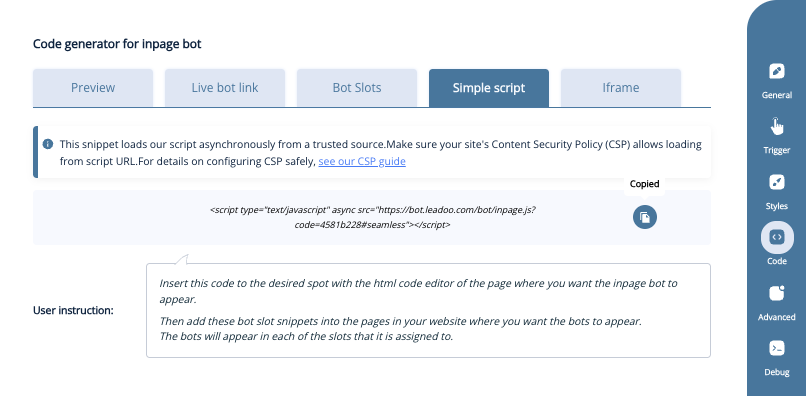
Step 1: Copy the code
Click the “copy” icon to get the code to your clipboard.
Step 2: Open your website management tool
Once you have the code copied, you can go to your website management. If you are using WordPress, the easiest way to embed the bot is to go to your editor. In this example we are embedding with Elementor. But this logic works for any other website management system.
Step 3: Embed the Code
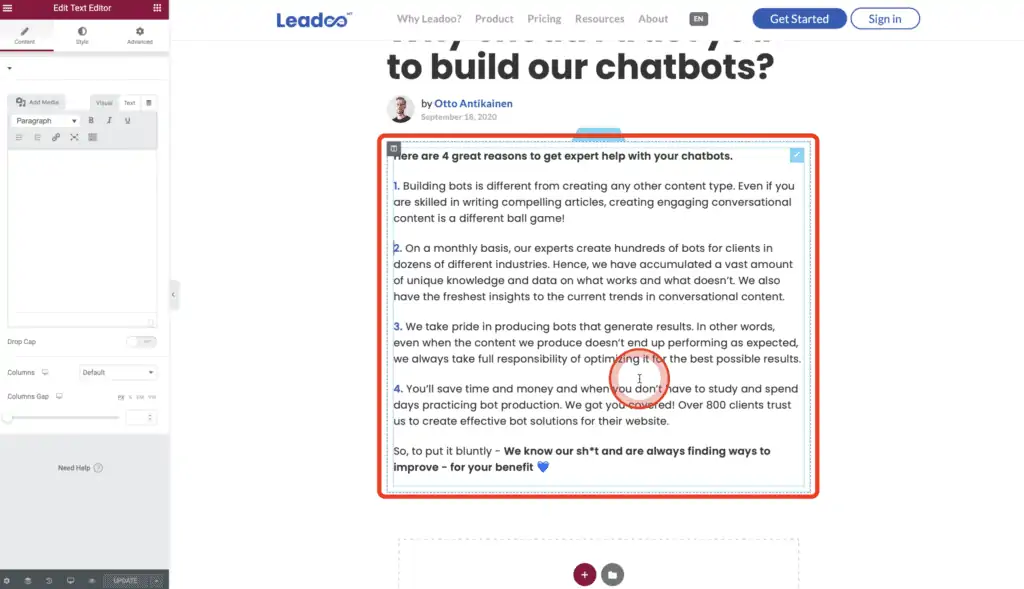
Choose the section where you want to embed the bot. Click on it to open it.
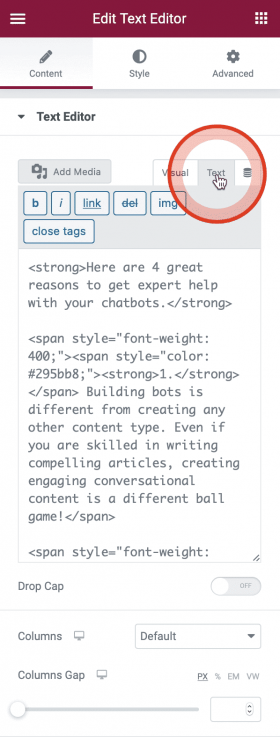
In the Text Editor you can see the visual editor and the text editor. What you want to do, is to work in the Text Editor because this is a HTML site of the website and this is where the bot will go. Switch to the text site and go to the place where you want to put the Bot.
Add a little bit of space between the text and the bot code. Copy-paste the Bot to where you want it to show. And update the page to see the end result.
Embedding With Simple Script
If you want to embed your Visualbots or Inpagebot using simple script, you can follow the same steps as you would with dynamic embedding. Only difference would be picking a different code. You also don’t have to create bot slots.
Click the “copy” icon to get the code to your clipboard. After this you can move on to Step 2
Using Page Performance tools on your page
Leadoo bots are much smaller than many other embedded tools you may be using on your site. We take extra steps to ensure that the bots themselves are small (transfer-size wise) and don’t impact page load performance. We also ensure that our caching rules are flexible enough to allow for caching on the browser-side so that subsequent navigations through your site don’t incur extra transfer costs in downloading our bot(s) more than once.
Leadoo AI uses a CDN (Content Distribution Network) to store cached copies of our bots close to all of our potential users.
Due to these features, Leadoo AI strongly recommends against attempting to improve page performance by including third party tools or custom tweaks to improve the performance of our bots. Doing so will, in most cases, result in a less efficient setup or our bots simply failing to run.
How to add your own Privacy Policy to Leadoo Bots?
When you are either an Owner-user or Admin-user, you can access your Leadoo backend’s settings.
From settings, you need to go to “General” and then to the tab “Other”. The first field you see is “Privacy Policy link” and you can add your own privacy policy link there. This will show up as a “By clicking or typing you accept our Terms of Service”. Terms of Service -part will be a hyperlink to your privacy policy site.
If you happen to have different privacy policies for recruitment and for other purposes, you can choose “Bot specific privacy policy” to be on “Yes” and then you’ll have the privacy policy link field in each of your bots’ settings.
Leadoo AI: How to Build AI Bots -Training
What is it about?
Want to learn how to quickly create, configure, and optimize powerful AI bots? Join our new hands-on training focused on building AI bots in Leadoo AI!
The goal of this session is to give you a solid understanding of the fundamentals of building AI bots and the confidence to start creating and improving your own.
Who is it for? Existing Leadoo AI clients and users who want to leverage AI features to build smarter bots
When? Monday 12.10. at 12:00pm at UK time
What Will You Learn?
AI Knowledge Base: How to build and maintain a knowledge base for your AI
Prompting: How to instruct and prompt your bot to generate the right kind of responses
Building an AI Bot: How to create and configure an AI bot in Leadoo AI
Best Practices: Key things to consider when building an effective AI bot
Host
Lukasz Jordan Product Director
Register Now
Leadoo AI Support:
Leadoo AI Overview
What is Leadoo AI?
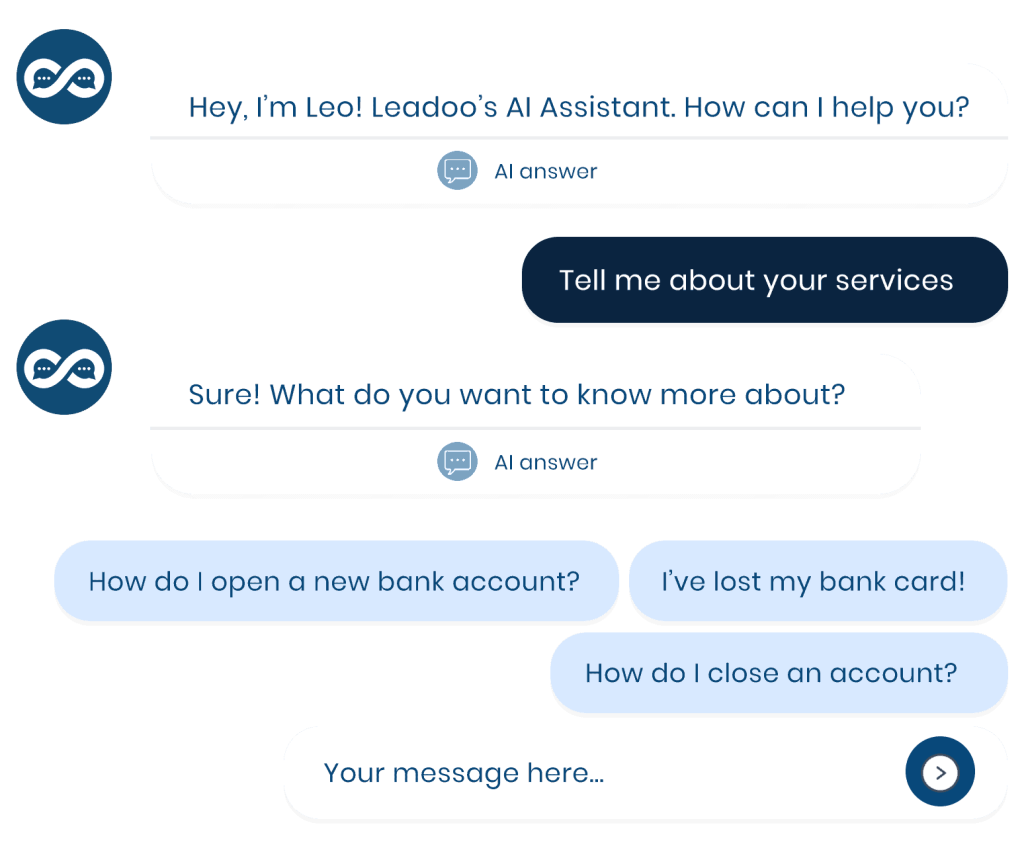
Leadoo AI elevates your existing chatbots with real-time, intelligent conversations. It’s trained on your website and documents, enabling it to instantly answer customer questions about your products or services—particularly in situations where manual mapping would be inefficient. Whether visitors are exploring if your offering suits their needs or looking for a specific product, Leadoo AI provides relevant, tailored responses.
It enhances structured journeys and supports more open-ended interactions, letting users navigate freely. Leadoo AI strikes the perfect balance between automation and live chatbot interaction, ensuring a smooth transition to human support when needed, improving user experience and increasing conversions.
Knowledge Base: Training AI on URLs, domains, and documents to personalise interactions.
System Prompts: Directing how AI handles customer interactions.
Dynamic Suggestions: Relevant questions your visitors can select to keep the conversation going with less effort.
Static CTAs: Fixed call-to-action buttons so your customers never get stuck in a conversation loop
Intent Mapping (Advanced): Responding to customer needs through intent mapping to ensure they follow the journey they need and the conversion you want
API Calls* (Advanced): Integrating real-time data into conversations such as product suggestions or customer service information.
*This tool can be used in conjunction with Leadoo AI or with other chatbot functionality.
Use Cases and Benefits
Lead Generation: Engages visitors in real-time, qualifying leads with relevant questions and guiding them through their decision process.
Customer Support: Acts as a 24/7 agent, instantly answering queries from your knowledge base, reducing wait times and easing pressure on support teams.
E-commerce: Provides personalised product recommendations and answers, improving conversion rates.
Service-Based Businesses: Handles complex offerings, providing up-to-date, accurate information to guide customers through diverse options.
How to Add Leadoo AI to Your Bots
If Leadoo AI isn’t yet part of your subscription, simply contact your Customer Success Manager to explore how it can benefit your business.
For those already subscribed to Leadoo AI and looking to integrate it into your chatbots, check out the additional articles below for detailed step-by-step guides on building AI functionality into your bots and optimising its potential.
Improving accessibility and speeding up service in transport and logistics
In the logistics industry, speed and easy accessibility are key competitive advantages. Operating since 1981 and employing around 130 people, Hemmon Kuljetus wanted to enhance its customer service and ensure uninterrupted availability across its digital channels.
The goal was to provide customers with a low-threshold channel to submit moving and transport quote requests or general inquiries at any time of day. Leadoo AI was selected as the partner thanks to its strong reputation and positive references from other companies.
“We wanted to improve our service and be accessible 24/7/365 so that customers could submit quote requests whenever it suits them, allowing us to respond as quickly as possible. We heard a lot of good things about Leadoo from companies already using it.“ – Hemmon Kuljetus
Multi-purpose bots for sales, recruitment, and site navigation
Hemmon Kuljetus integrated Leadoo AI conversion tools across various sections of its website. Tailored user journeys were built for submitting moving and transport quote requests, general navigation, and receiving job applications.
The bots are also used for marketing campaigns and periodic competitions. The platform’s flexibility and ease of use make it an efficient daily tool for both the sales and HR teams.
A strong monthly lead flow and an automated candidate pipeline
Deploying conversational bots brought immediate efficiency and smoothness to internal processes.
A consistently strong volume of moving and transport quote requests is generated monthly, with pre-structured data speeding up sales workflows.
The recruitment bot continuously collects high-quality open applications, allowing new drivers and transport personnel to be hired immediately from the candidate pool when needed.
Collaboration with the Leadoo AI team is tight, with new development ideas quickly turned into ready-to-use implementations.
“We have a really strong lead volume every month, whether it’s recruitment or a moving quote request. The recruitment bot works so well that we haven’t needed to formally advertise for new, skilled transport staff in a long time—they are hired directly from the database built by the bot. Leadoo AI supports our sales and boosts overall efficiency.“
– Hemmon Kuljetus
Recommending a partner that delivers
In addition to the platform’s versatility, Hemmon Kuljetus praises the seamless, collaborative approach to everyday teamwork.
“The collaboration has been exceptionally smooth from day one and continues to be with every new bot we build. Leadoo AI has been fantastically one step ahead of us: whenever an idea is born and shared with them, their response is already a fully fleshed-out solution. We definitely recommend Leadoo to others—it’s easy to recommend something that works so well.“ – Hemmon Kuljetus
Leadoo AI: Conversion Insights -Training
What is it about?
Do you know how your bots are really performing? Are they optimized for maximum impact? Join our Conversion Insights training and learn to read your data like a pro.
In this webinar, we’ll dive deep into Leadoo AI analytics. You’ll learn how to understand key metrics, identify bottlenecks in your bot flows, and use the collected data to continuously improve your conversion funnel. Stop guessing—start making data-driven decisions.
Who is it for? This training is designed for existing Leadoo AI clients and users who want to understand their analytics data and make informed optimizations based on it.
When? The training takes place every fourth Thursday of the month at 12:00 PM (UK time).
What Will You Learn?
Key Analytics Metrics: What data should you be tracking and why?
Identifying Bottlenecks: How to spot the exact drop-off points where potential leads are lost
From Data to Action: Turn your analytics figures into concrete optimizations that boost your bot results
Maximizing ROI: Ensure Leadoo AI delivers the best possible return on your investment
Host
Gavin Greer Senior Technical Account Manager
Register Now
Leadoo AI: Conversion Tools -Training
What is it about?
Want to take your bots to the next level and get the most out of the Leadoo AI admin platform? Join our popular Conversion Tools training!
In this practical webinar, you’ll learn how to edit and optimize your bots more efficiently and gain a deep understanding of the tools available in the Leadoo AI platform. Mastering these tools will help you generate more leads and achieve better results.
Who is it for? This training is designed for existing Leadoo AI clients and users who want to maximize the power of their bots and admin platform.
When? The training takes place every first Thursday of the month at 12:00 PM (UK time).
What Will You Learn?
Power Editing Your Bots: Learn advanced tips for bot content and flows so they best serve your conversion goals
How to Build Bots Using Our AI Bot Builder: Discover how to leverage AI to create complete, highly converting bot structures and copy in minutes
Platform Best Practices: Go through key features that streamline and speed up your daily workflow
Optimizing Question Sequences: How to craft questions that capture the exact data you need while enhancing the user experience
Time-Saving Features: Tips, tricks, and hidden gems within the platform
Host
Gavin Greer Senior Technical Account Manager
Register Now
Leadoo’s AI Capabilities
From AI-powered conversations that deliver personalised user experiences at scale, to agentic AI in our platform that let’s you build Leadoo bots from scratch,AI is integral to our Conversion and Customer Experience Platform
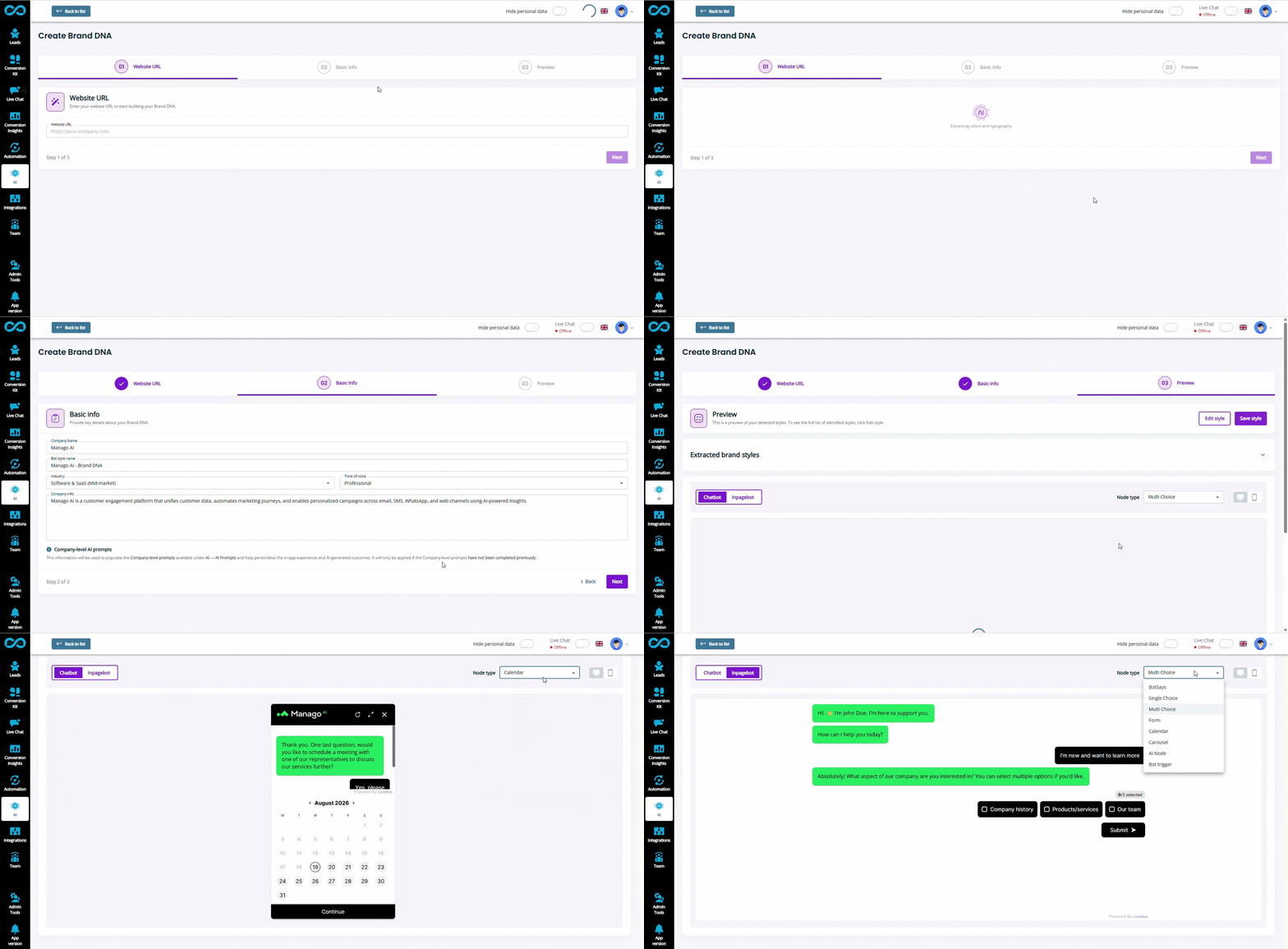
Brand DNA
Instantly bring your website’s visual identity and brand context into every conversational tool.
Just enter your URL, and Brand DNA automatically sets up on-brand bot styles, colours, fonts, and tone of voice. All through the power our agentic AI.
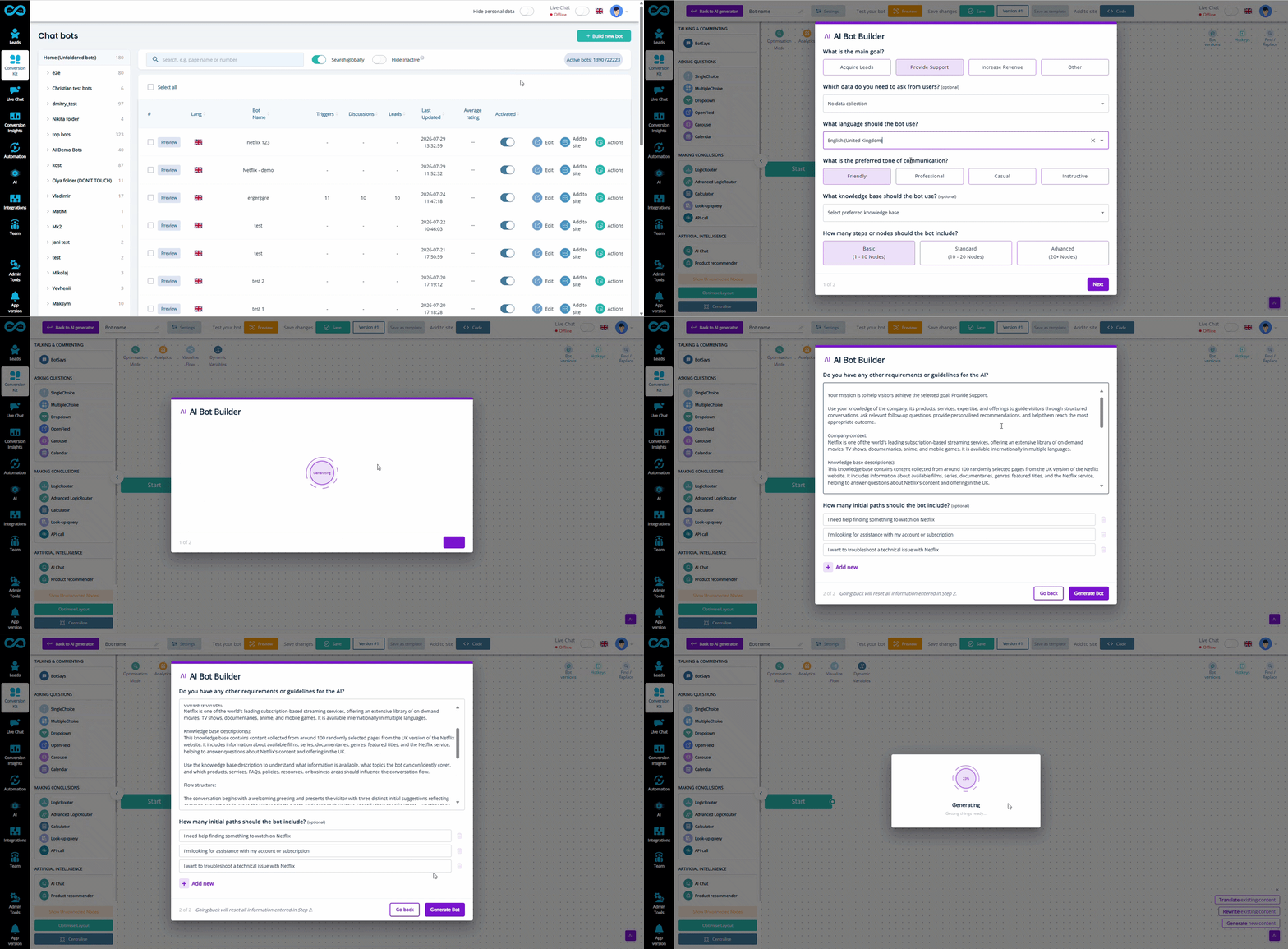
Generate complete, fully functional conversational tools structures, messaging, and workflows simply by answering a few questions about your bot’s purpose and objectives.
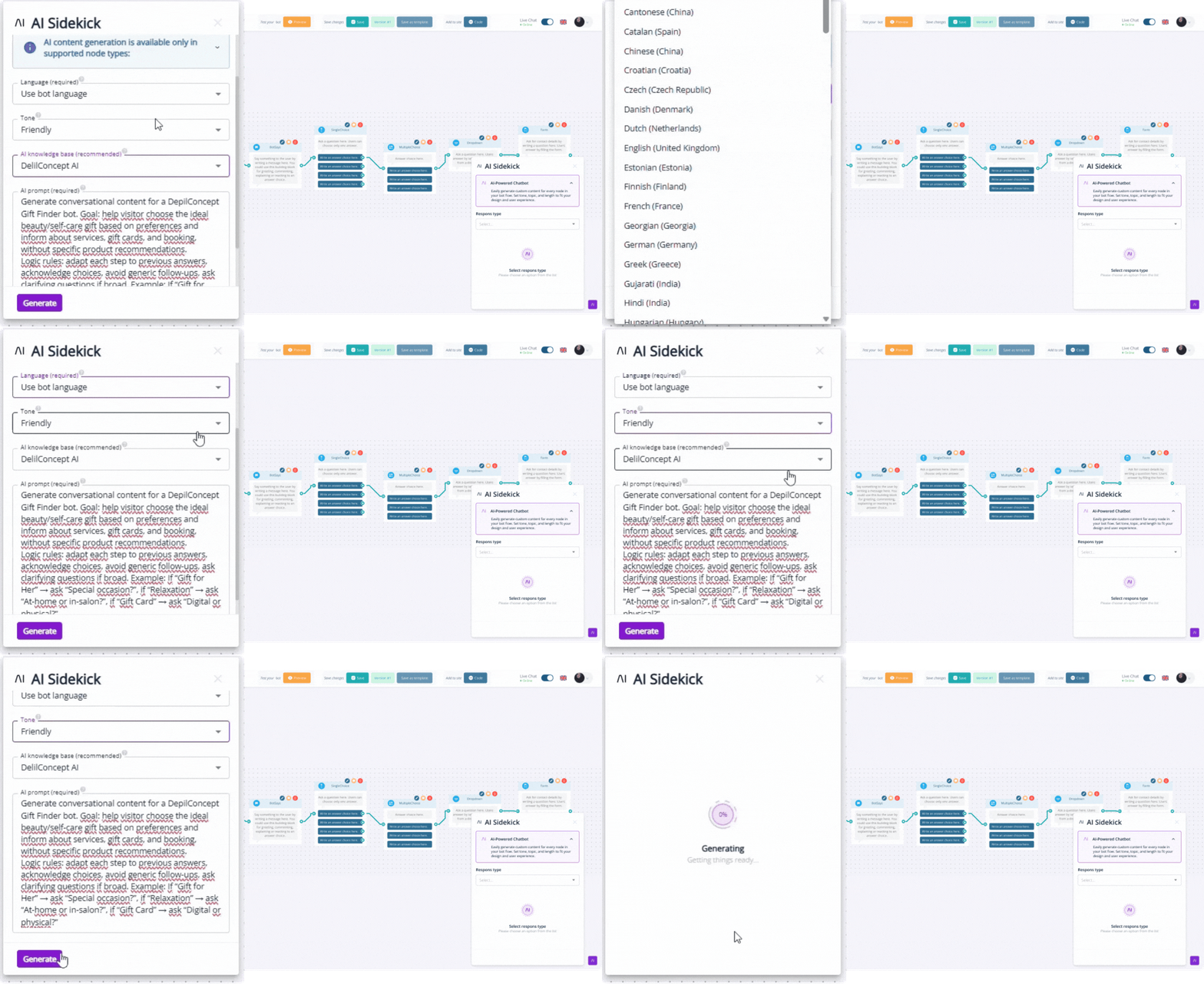
Automatically generate, rewrite, or translate all text-based bot content directly inside our bot builder to scale your conversion pathways across markets and use cases.
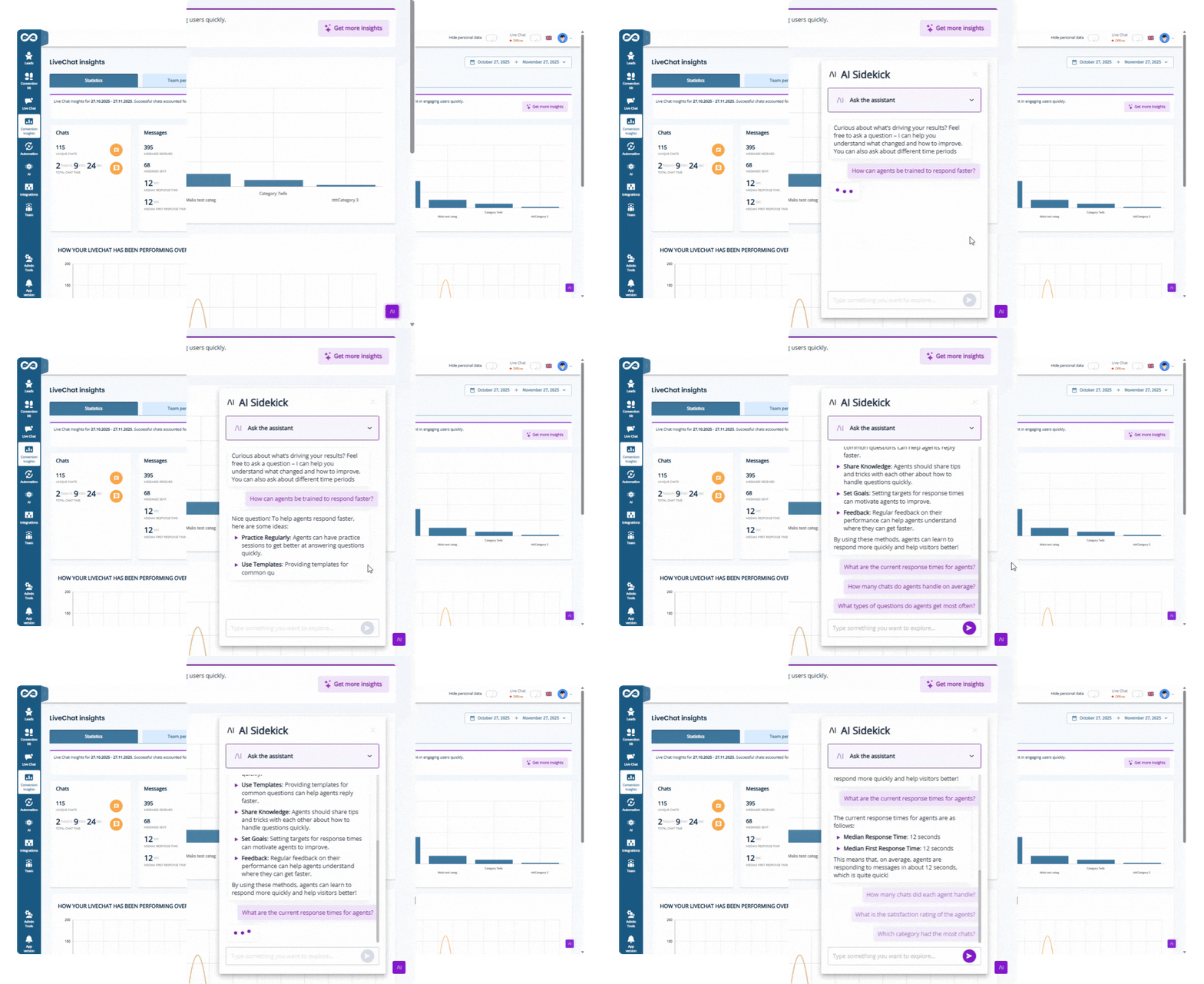
Go beyond numbers and static charts, with our AI-powered reporting.
Chat directly with your built-in AI sidekick 24/7 to understand your conversion data, and what changes you can take to get even more out of Leadoo’s conversational tools.
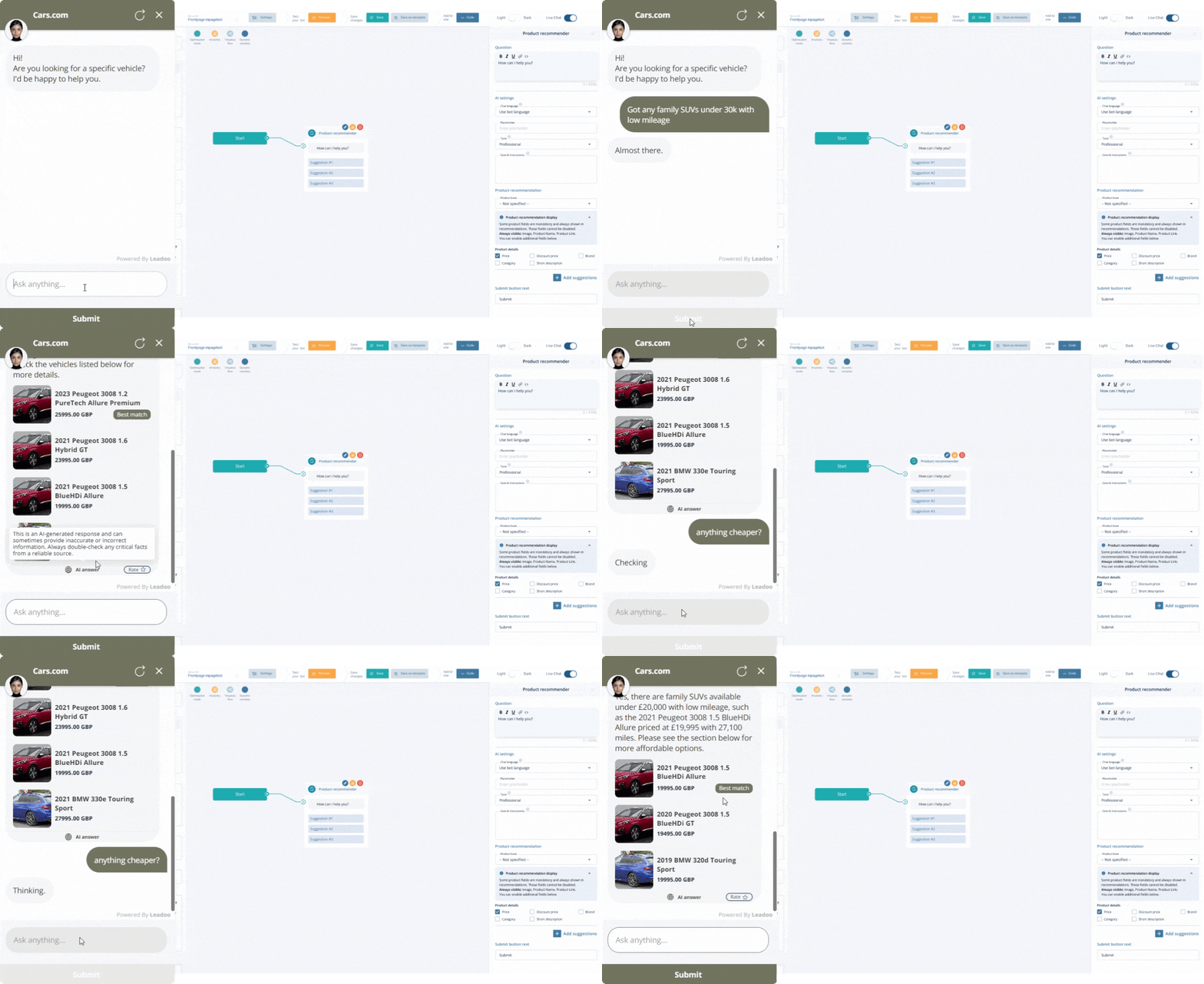
Connect your eCommerce store or product list directly to Leadoo AI’s conversational tools to visually recommend the right products at the exact moment buyer intent is highest.
Provide support and guidance on every page, without being intrusive, to help your customers convert.
You can configure our conversational tools to pop-up automatically, to trigger when users have read a certain amount of a page’s content, or to stay as an ever-present option for users to engage with when they want. Turn website visits into conversations.
Optimise Based on User Behaviour
User discussions can be pre-set based on how you want to signpost and nurture users, or AI-driven, so that users can get specific answers to specific questions.
Either way, in our platform you’ll see what users are clicking on or asking, what options they engage with most, and where they drop off in their conversion journeys. So performance can be optimised and improved over time.
Technical Excellence
We know that marketers and website managers worry about site speed and experience.
Often, extra tools on your site slow it down. This isn’t the case for our conversational bots. They are designed not to negatively affect page performance or SEO, with the loading of conversations and storing of leads all processed through our platform – not your website.
Hybrid Solutions
Let your customers choose how they want to be helped by offering hybrid chats. Automating most conversations with AI-powered responses, while still allowing your customer support agents to focus on more complex cases or selling opportunities through LiveChat if they wish.
Want to see these AI features in action?
Learn more about how Leadoo’s AI-driven Conversational Tools can transform your website’s user experience and turn visits into high-converting conversations.