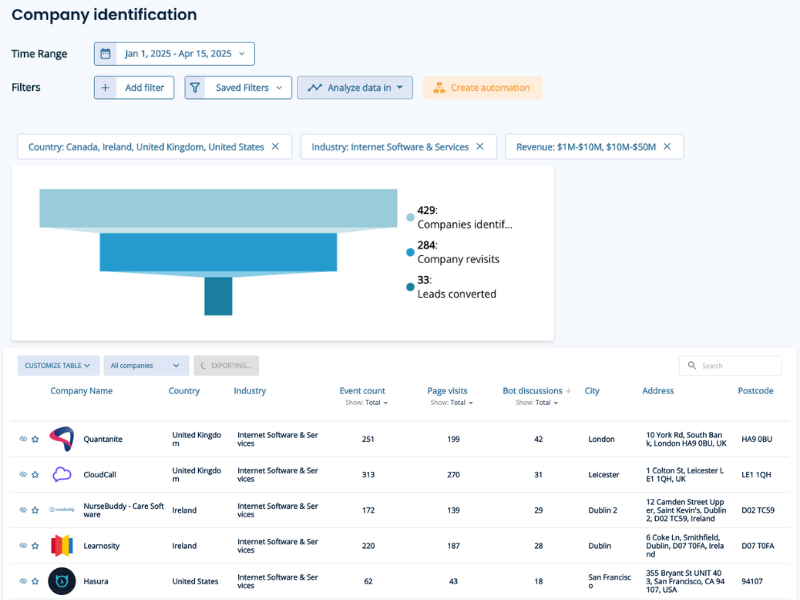
Leadoo isn’t just about creating super engaging bots to activate your website visitors! Oh no, it’s much more than that. Did you know that we help you identify anonymous website visitors? Using our unique tracking script we can identify visitors to your website and which company they belong to!
“The ability to reconnect with the majority of people who weren’t ready to convert upon their first interaction with your brand is what makes retargeting the most powerful piece of your digital marketing campaign.” – Forbes
Using the data you’ll get from Leadoo’s Company Identification tool is a great way to improve your campaigns and specifically digital ads, which can be a risky and expensive investment! By retargeting an already engaged audience you’ll see:
It couldn’t be easier, the hard work is all done in the background by having the Leadoo tracking script on your website. This will start tracking your anonymous website visitors and identify the companies they belong too! Now all you have to do is create a target list for your campaigns.
By creating persona-specific filters, such as company size, industry, which pages they’ve visited, etc., you can create a targeted list of potential prospects. Not only have these prospects visited your website, but you now have a clearer picture of who they are and what they are interested in.

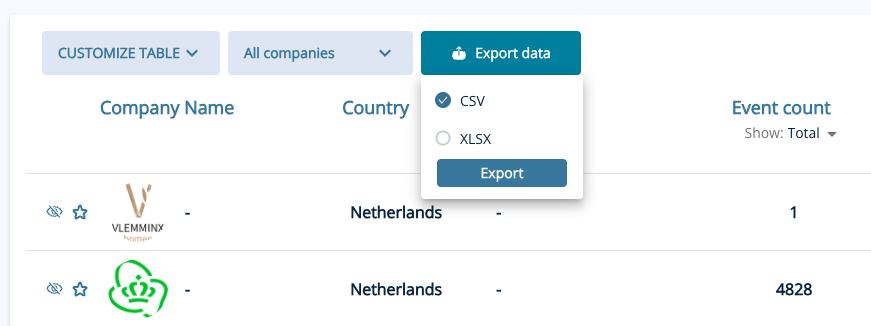
Once you’ve created your filters, it’s time to export the data. By clicking on the export button it will automatically select all companies within your chosen filter. You can also choose either a CSV or XLSX format.

Once it’s ready to download you’ll be prompted to download now, the time for the file to be processed will vary depending on how many companies are in your filters.
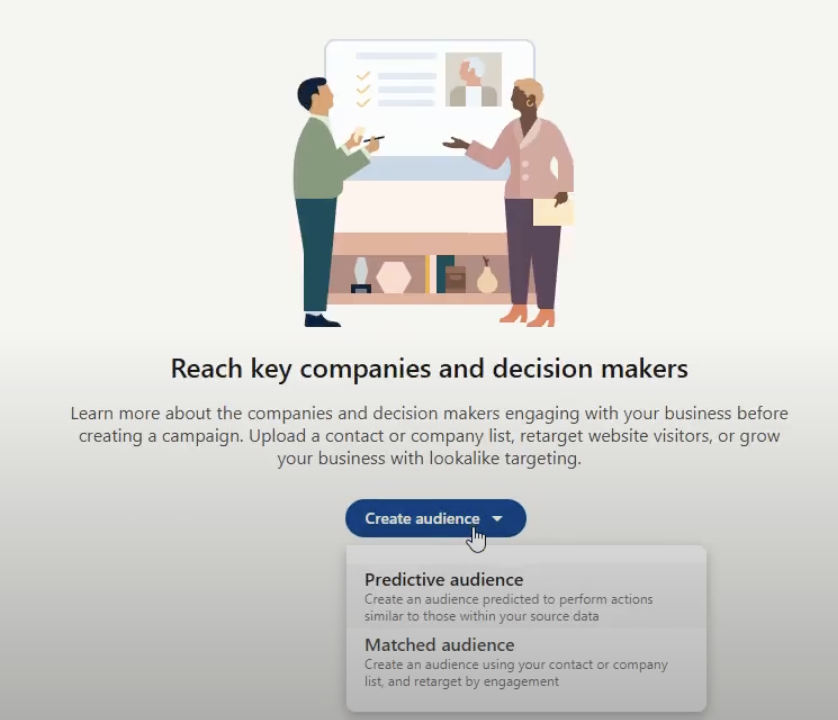
To add a customer list in LinkedIn, you’ll be using the LinkedIn Ads Campaign Manager for uploading and creating Matched Audiences. This involves creating a new audience, selecting “Matched Audience” and then “Company” and finally uploading your list after downloading the appropriate template. Here’s a step-by-step breakdown:
Leadoo’s calendar integration feature allows you to schedule meetings directly into your calendar using Leadoo tools, which can help speed up the sales process. You can find more details about this feature here.
To provide this functionality to our customers, we have partnered with a calendar integration provider called Cronofy. You can review Cronofy’s privacy policy and our data processing and subcontractors by visiting the following links: https://www.cronofy.com/privacy
https://leadoo.com/data-protection-and-gdpr/
One of the reasons we chose to collaborate with Cronofy is because of their strong compliance reporting, which is publicly available on their website here: https://www.cronofy.com/compliance-center. Cronofy holds ISO 27001, ISO 27018, and ISO 27701 certificates and undergoes SOC 2 Type 2 audits annually. For more detailed compliance information or reports, please contact Cronofy directly.
Cronofy obtains its own set of tokens to access the individual’s synced calendar, which is stored in the Cronofy database. At Leadoo, we do not access these tokens. Instead, we call Cronofy to make requests to the calendar using free/busy read/write permissions. This allows us to create new events and view busy times without accessing or seeing any data in the calendar itself. For more detailed information about our method, please visit https://docs.cronofy.com/developers/authorization/individual-connect/.
If you have any questions about Leadoo’s calendar integration please contact your Customer Success Manager or our support team at [email protected].
If you wish to request the deletion of your account, please use the bot below to request account deletion. This will begin the formal procedure for account and data deletion.
Please note that once your request is processed, all associated data will be permanently deleted and cannot be recovered.
Should you have any questions or require further assistance, please do not hesitate to contact our support team at [email protected]
How Company Identification works:
Leadoo collects information about visiting companies based on the public IP address of the company. So, the visiting person’s IP address is identified -> checked if it belongs to a company. If it does, the company is shown in the company listing. If it doesn’t, the information isn’t displayed – in either case, the IP address isn’t stored anywhere.
We have a partner company called Clearbit. So, the IP address information goes there and company information comes back from their database. Visitor profiles (if in use) are then linked to these companies either via IP or according to company information given in the bot (i.e., manually filled in the company name into the bot). If there are additional questions / need for clarification, I am happy to answer.
Where Clearbit gets its data:
In short, from public sources. Clearbit probably won’t tell where they get their data but almost all such actors (for example, Leadfeeder in Finland, Lead Forensics in UK) make use of several different sources; they have people who browse the web, they use public data sources, etc. However, it’s important to note that these are not personal data, but Clearbit, Leadfeeder etc. link the company’s IP space to the company’s name and its public information. For example, if Nokia Oy owns the IP space 109.68.1.1-109.68.1.45, then whenever a visitor comes from those addresses, it is recognized that the visitor works at Nokia.
Another important thing is, from Clearbit’s point of view they never know whose sites the visitor has even visited and from your site there never goes a call to Clearbit. All traffic to them goes through Leadoo. So, they don’t know whether the person working at Nokia has visited hs.fi, leadoo.com, or etuovi.fi. They don’t even know about the existence of any of these or any information about the person.
How Visitor Tracking works:
Personal data comes from the information people leave in the bot. Before that, we can “identify” the devices that have been used to visit the sites. These people are “unknown visitors” until they leave their contact details through the bot. Identification is done based on the etag left by the device and browser (works the same way as a cookie, but different technology). So how it works: A person comes to the site -> tracking is on if cookies are accepted -> x device is identified. -> person leaves the site -> an “unknown visitor” profile is created -> The person returns to the site the next day with the same device -> the same etag is recognized, meaning the person visiting with the same device is recognized -> the information from the previous day and new information are combined under the same profile -> person leaves their own information in the bot -> “Unknown visitor” becomes an identified person based on lead information.
Tracking Options:
There is 4 different tracking options you can set up on Leadoo’s control panel.
There is also on options to override user tracking options if you want to only track companies. In that case you would choose “Never track” and in Company tracking you’d choose “Always track”.
If you want to add Leadoo tracking to your cookie acceptance but your CMP isn’t TCFv2 compliant you have to use Custom Consent Handling
How Custom Consent Handling works:
So how this should work is that Leadoo loads two types of scripts in different ways depending on whether the user accepts statistical cookies or not. So if the user does not accept statistics, the bots will load, but the analytics script will not load. As a result of this loading, cookies etc load correctly automatically. Below is how to make this work like this:
Leadoo’s bots can be loaded directly onto the website. However, Leadoo’s tracking can be put behind cookie acceptance. This happens in the following way:
From Leadoo’s tracking settings, the option “never” is activated <- tracking doesn’t automatically start. By default, Leadoo’s settings are ‘always track’, but it can be changed from Leadoo’s control panel. At the same time, the following script is added to your CMP that overrides the “never” rule after cookie acceptance and Leadoo’s tracking starts to work:
if (!window.ldanalytics) window.ldanalytics = [];
window.ldanalytics.push(function(a) {
a.toggleTracking(true, false);
});
More information here: http://docs.leadoo.io/docs/analytics-tracking#custom-consent-handling
And here’s which category each cookie falls into: https://leadoo.com/help/does-leadoo-use-cookies/. But as mentioned, with the way above, they load correctly depending on cookie acceptance.
At Leadoo we take tracking seriously from a legal and personal privacy point of view. We understand that businesses want to maximize their advertising spend and thus targeting and have built in features that make this better and easier from a business point of view. But we also appreciate and put the individual users at center stage when designing our tools. Leadoo has thus built in support for completely airgapping our conversion tools (e.g. bots and visual forms) from the analytics tracking and e.g. google tag manager integrations. As a design principle we build relationships with one customer at a time and that customer decides what to do with our tooling. We do not build global user profiles which would enable sharing or selling of user data across customers, unlike many of our competitors.
This page is built as a way to communicate that from a technical point of view and to help you make yourself compliant. You will among others find what to include in your CMP (Consent Management Platform or “cookie popup”).
As third-party cookies are being phased out by most browsers we no longer rely on them. In addition, it’s also common for users to periodically empty their browser’s cache. Even if you had a cookie popup and your customers clicked “I approve” their iPhone would not install the 3rd party cookie – and you wouldn’t be able to follow them. Even if they approved it. Cookies are dead. Thus cookies are no longer a technical measure to track users. But from a legal point of view, we include all ways of enabling tracking into our design of “cookie support” for our customers.
Whenever we talk about cookies, we include eTags, sessions storages, IP address tracking, hashing of various metrics and behaviors (such as use agents). This does not remove the fact that user agents, IP addresses etc are used for technically enabling any kind of web traffic, including using Leadoo’s tooling – but we do not use these for creating profiles. All technologies to create profiles are listed below.
Leadoo is designed to completely separate the tooling into 1) bots that behave like and replace forms and 2) analytics that is made for tracking. The latter is most commonly (depending on local legislation) put behind a cookie popup, or CMP.
ETags are a way to track different browsers, similar to how cookies are used. Technically the implementation details are a bit different. ETags are built for recognizing if the web browser already has an asset (such as an image or video) so that the server doesn’t need to send it over the wire again.
In practice, eTags are used in a similar way to cookies to fingerprint a user and to know that a browser that visits the site right now is the same one that visited the site a week ago.
Leadoo also uses session storage, which is a storage in the browser.
Functional cookies below are things that don’t track you but are needed for the bots. Analytical cookies below are things that can be used for tracking users.
FUNCTIONAL
session storage “ld_session_origin“ – The ld_session_origin serves as a reference to the domain where the current session initiated. It’s used to recognise when there’s a domain shift and determine if a new session should begin.
session storage “ld_al_exp” – Session expiry timestamp.
local storage “ld_bot_consent” – Set after the user has interacted with the bot. After this Leadoo Analytics may be activated.
ld_BOTID_open_time where BOTID is the numerical ID of a bot (used for tracking open visual bot modals were opened)
session storage “ld_env” – storing UTM parameters and referrer, for the purpose of managing referrals across pages.
ANALYTICAL
Etag “iapi.leadoo.com” – eTags is used for connecting one visitor session with the next. (Technically all websites always use “hundreds” of etags)
local storage “Id_id” – Set by Leadoo Analytics for detecting device being used
session storage “ld_co” – unique id of the company profile identified by analytics script (for the current session only).
session storage “ld_cinf” – Basic information about the company, without identifiable data, resolved during company identification process.
session storage “ld_session_id” – Application session to distinguish client server connections from each other.
ld_wse – The ld_wse is a buffer for website events, designed to temporarily collect user actions such as link clicks and form submissions. When a user clicks on a link, they are immediately redirected to the new page. On the second page visit, the system attempts to send any buffered events that weren’t previously sent. This ensures that all user interactions are captured and processed for analytics.
Other
You may encounter other cookies and such as well like
cookie “__cfduid” – This relates to content delivery network called Cloudflare. See Understanding the Cloudflare Cookies
Cookie “ga” and similarly – See Google Analytics and how they use cookies. (if using Google Tag Manager)
Leadoo is fully GDPR compliant. In addition to complying with the regulation ourselves, it is important for us to help our customers with their compliance efforts. This goal is achieved through training, instruction, and technical development of our software. See our full GDPR statement here.
In essence, you can decide for yourself how to use Leadoo – you can use it in fully anonymous mode, in which case no marketing tracking is done. Most often, however, you will want to use it for marketing and analytics purposes – just like you’re using Google Analytics today – and this requires permission from the user. Leadoo bots can do this for you, or your own website can ask for consent and hand over that information to Leadoo.
When you start using the Leadoo service, your customer success manager will help you ensure that your website complies with GDPR.
For our own site, Leadoo.com, Leadoo operates as both the Processor and Controller for the data. However, for our customer’s sites, we only operate as the Processor. To understand what this means you can go to the specific explanation in our Privacy Policy here.
If you want to know more in-depth how we keep your data safe read this.
In short, reverse IP lookup, is what happens when a user visits your site from a business IP address. Leadoo then identifies the company name, revenue, size, industry and more firmographic information that enriches your user database (i.e. Leadoo’s Smart Customer profiles).
Technically the following is what happens: First, your customer’s web browser calls your website’s server and asks for a page. Next, the server can look up the owner of the IP address either by using public registers or private IP address databases. Because the IP will be registered to a business, it also means you can see which companies have visited your site. So even if the individual user keeps their identity withheld, you know what and how many times a company has visited your site.
If you’d like a fuller understanding of how it works and how we use it, then you can read about it in more detail from our blog.
When you are either an Owner-user or Admin-user, you can access your Leadoo backend’s settings.
From settings, you need to go to “General” and then to the tab “Other”. The first field you see is “Privacy Policy link” and you can add your own privacy policy link there. This will show up as a “By clicking or typing you accept our Terms of Service”. Terms of Service -part will be a hyperlink to your privacy policy site.
If you happen to have different privacy policies for recruitment and for other purposes, you can choose “Bot specific privacy policy” to be on “Yes” and then you’ll have the privacy policy link field in each of your bots’ settings.
Yes, it is but it must be GDPR compliant. This means that the people and organizations with access and the networks under which the data is stored are both secure, confidential, and essential for providing your services. You also need to let your users know if their data goes into 3rd party systems.
Below is an extract from our own GDPR statement which should help understand the rules on data privacy:
“We may process your data on a several different basis: based on your consent, based on our legitimate interests related to such data such as promoting and developing our services and processing contact requests and applications sent to us, to fulfill and execute a contract and to meet legal obligations. The legal basis for data on our customer’s sites is fully the responsibility of our customers.”
A customer needs to ensure that their own Privacy Policy has a statement to the effect that they acknowledge their obligation to keep a customer’s data secure, confidential, and shared only with persons or organizations required to carry out operations. This should include Leadoo as a Processor of visitor and customer data (such as is contained within Smart Profiles). A customer of Leadoo must take full responsibility as the Controller of that data and information.
When setting up the Leadoo tracking codes on your website, they need to be integrated with your GDPR popup for compliance. If you are unsure about this then our Leadoo Customer Success agents are there to help you to understand your obligations regarding setup and data collection.
If you are interested in reading more about how we keep your data safe read this.