This webinar is about to tickle your marketing nerves, help you to think more about personalised experiences with your brand, and allocating your budget where it matters the most.
In this webinar we’ll be covering the following topics:
💡 How to make your advertising hyper-personalised
💡 How to allocate your marketing budget towards the hottest leads
💡 how to avoid wasting spend on non-potential website visitors
Enhance your conversions with Content Marketing Strategy
How to enhance your conversions with Content Marketing Strategy
Content and conversions go hand in hand, but how to effectively enhance your conversions with a Content Marketing Strategy? That’s what we’re going to cover in this event.
You can expect to hear about the following points:
💡 Why every B2B brand needs to apply a content marketing model to their marketing funnel
💡 How to define the purpose behind each piece of content
💡 How to create multiple forms of content at the same time-
💡 Where to apply your various traffic-generating activities to your content marketing model
Not the type we all sat through on repeat from March-July 2020 delivered via Google Meet. We’d be happy never seeing one of those again.
But quizzes can actually be a super easy and fun way to engage an audience on a web page. This is often successfully used on ecommerce sites, where product selectors can help customers find the product they are looking for quickly.
This has uses in lead generation and conversion too – by carefully curating those questions, you can qualify visitors to your site and continue to nurture them after their visit.
How are quizzes an effective tool for conversion and lead generation?
With the rise of inbound marketing and the increasingly important focus on website conversions, quizzes provide an opportunity to activate visitors, engage them with your content, move them through your funnel, qualify them and their needs, and finally to collect their information as a lead.
1. Increased brand awareness and traffic
Quizzes are surprisingly good at generating traffic – our research online, and with our own clients, indicates that they generate traffic well, or moderately well, around 70% of the time. This, when compared with 36% for static content, makes an excellent case for having a quiz somewhere on your site. We’ll give you some ideas of how this could look a bit later in the article.
2. Better customer experience
An interactive quiz makes a users’ experience on your site much more personal – they’ve interacted with your site and your brand and now most likely have some understanding of your product and what you can offer them. This is a perfect time to point them in the right direction based on their position in the funnel – it could be encouraging them to sign up to a newsletter; or to book a demo with a salesperson.
Leadoo’s Conversion Platform not only allows you to create dynamic quizzes with complex logic and calculation functionality, but it also allows you to direct prospects to book a meeting directly onto a sales person’s calendar via our calendar integration function.
3. Adaptability in many situations
One of the best things about quizzes is that they are adaptable to many situations, in any industry or niche. It’s easy to use an Inpage, content-specific bot, or a VisualBot, to create a lead generating quiz, and our experts are always on hand to discuss and help with your industry-specific questions and ideas.
4. Qualification, segmentation and retargeting
By using one of the solutions suggested in point 3, you can create converting conversations that qualify, segment and allow you to retarget and nurture your prospects, to ensure you never miss a lead again. Using Google Tag Manager integration in Leadoo allows you to create super-targeted micro segments for even more specific targeting of campaigns.
5. Real-time, informative analytics
Visitor responses give you an excellent insight into their intent and position in the funnel, and allow you to make better marketing decisions to nurture them better.
Using Leadoo’s Conversion Insights, you get a clean, user-friendly dashboard with all the relevant analytics you need to monitor customer journeys and use this knowledge to increase your conversions. You can even optimise for conversions at the conversational level by using Conversation Analytics, and each bot is created to be fully customisable and bespoke for your business’, and customers’, needs.
Different types of quiz
With Leadoo, you can create a quiz for any purpose, and our Conversion Experts are always on hand to help create your vision, but we thought it might be useful to provide some inspiration and examples of ways quiz bots can be used.
Product Recommendation Quiz
When you provide a product recommendation quiz, not only are you identifying the needs of the customer immediately; you’re also gathering information that can help you to continue to nurture that customer if they aren’t in a position to purchase on that occasion.
If they are ready to purchase, you’re leading them straight to the product they need, by asking qualifying questions and creating unique conversation pathways that are context-specific to each product.
CareCo, the UK’s leading mobility specialists, provide the option for website users to get recommendations from the bot based on carefully selected qualifying questions. This option is provided in the right hand corner pop-up chatbot, which also provides users the option to speak to a live chat representative to get product advice, too.
If the customer wants to use the automated product selector, they can select this option, and the bot will take them through a set of questions to identify their needs and guide them to view products that they might find suitable.
The bot also offers opportunities to educate along the way – not all customers know what exactly they need and so sometimes it’s your job to help them know. For example, on the CareCo bot, when a customer is presented with the option of a power chair or wheelchair, they also have an option to select which will provide them with an explanation between the two. Super handy.
Once you reach the end of the conversation, and the product is selected, it gives you the option to leave contact details so an advisor can call you and continue the buying process from there. This means sales advisors are already armed with the information on what each prospect is looking for prior to speaking to them.
Calculator/scored quiz
Cooling Castle Barn is a wedding venue in Kent, U.K., offering luxury weddings in beautiful surroundings. As with all wedding venues, their prices differ based on day of the week, number of guests, and season, and so to provide pricing to a customer they would need this information.
Asking questions is the perfect opportunity to provide relevant and helpful information to the user – for example, if I were looking for a wedding venue and needed a price quotation, I could check out Cooling Castle Barn’s price calculator to see how much it would cost to get married there.
The customer provides details, and, using logic routing and calculations based on user inputs, it calculates the cost of the price based on pre-set parameters and provides this to the customer. It also allows them to book a tour, book a meeting and ask a question – to provide the opportunity to continue to nurture the customer towards booking their wedding day.
It also means Cooling Castle Barn’s sales team have an idea of the customers’ price range and information about their ideal wedding prior to contacting them, so that they can prepare accordingly and only provide the customer with wedding packages and extras within their budget and needs.
Another basic example of this would be our handy Conversion Rate Calculator – by inputting visitor and conversion numbers in, it provides you with the conversion rate for your site. Check it out 👇
Personality quiz
For something a bit more fun, but still great for engagement, you could try offering a personality quiz. It will depend on the industry and sector you’re in – not many people need to know which sort of roof tile their personality is most like – but something relevant to the customers that visit your site won’t go amiss. As humans, we love to talk about ourselves, and what better way to do that than fill out a personality quiz.
Some of our favourite examples of these come from BuzzFeed, which gained the majority of its reputation and awareness amongst its target audience through providing personality quizzes on a huge range of topics. They’re famed for their not-so-serious quizzes, from ‘Which Harry Potter character are you?” to ‘Can you see all these shades of blue?’.
Obviously BuzzFeed’s examples are much less serious, but there are ways to do these on-brand, whilst gaining some seriously useful information. Pair this with visitor identification, and you have a whole load more data that you can use to make smarter marketing decisions.
In Art Attack style, here’s one we made earlier as a different sort of example:
Key Takeaway
Quizzes can be a super-powerful tool for improving your users’ experience on your site, engaging customers with your brand, and qualifying and collecting lead data. When used with a conversion platform such as Leadoo, you gain excellent Conversion Insights to allow you to optimise your solutions and bots to increase conversions and generate leads on every page of your site.
Get in touch with us or chat to the bot below to find out how we can use quizzes and other solutions to help you up your engagement and conversions 📈
Leadoo AI Support:
How To Filter, Resend, And Export Leads
Lead List
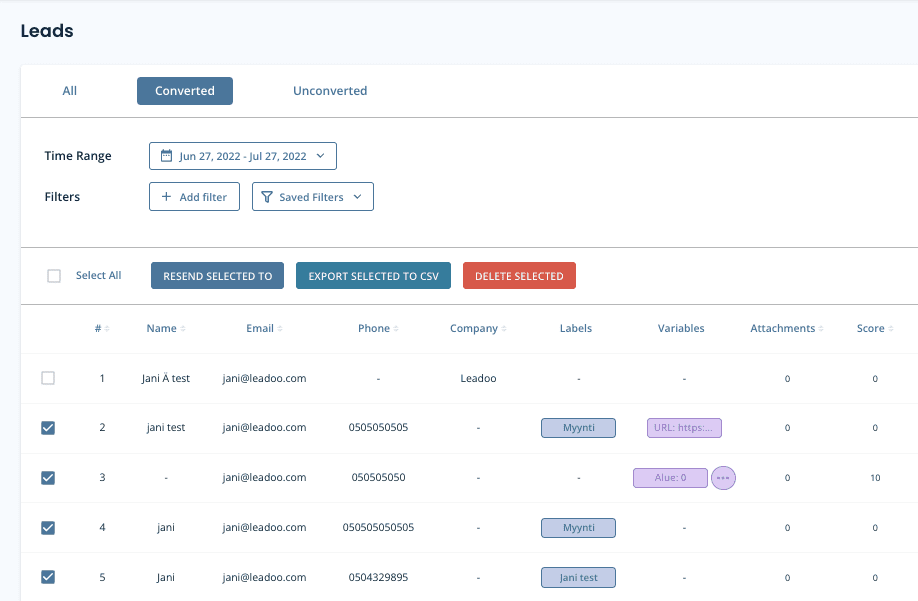
If you have set-up lead notifications on your bots, you will receive an email when a new lead is converted. All your leads are also stored on the platform under the leads tab, you can also filter them to find the exact leads you want.
You can either view Converted leads (default), Unconverted leads or All (has all bot conversations)
Different Filters
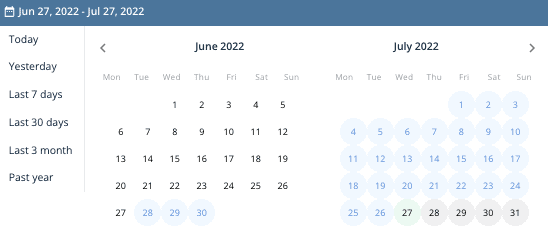
Time range: You can choose the time range of the leads you want to view. You can either pick pre-made time ranges or select specific dates from the calendar view.
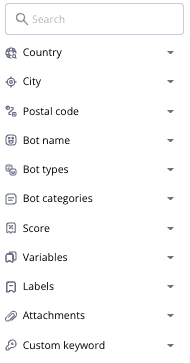
Country: You can filter by country (asked on Form/Location node)
City: You can filter by city (asked on Form/Location node)
Postal code: You can filter by Postal code (asked on Form/Location node)
Bot name: You can filter bot specific leads
Bot types: You can filter and see leads from different bot types
Bot categories: You can filter specific bot categories (ie. All sales bots, all recruitment bots. Bot categories have to be created to use this. Otherwise there is just Default categoryin all bots)
Score: You can filter leads that have gotten score between x-x. Scores can be added to different answers on bot dialogue ie. Recruitment bots (1 year prior experience gets score of 10, 5 years of prior experience gets score of 50)
Variables: You can filter out leads that have used certain variables in the bot dialogue. If you add multiple variables it will check does the lead have variable x AND variable y
Labels: You can filter out leads that have used certain label in the bot dialogue. If you add multiple labels it will check does the lead have label x AND label y
Attachments: If a lead has attachments or not
Custom keyword: Answers given on bot dialogue
Exporting Leads to CSV
First you need to select leads that you want to export. You can either select one by one or select all. You can export leads to CSV and then open up the file in excel, google sheets or some other platform. CSV has all lead details and the bot conversations in it.
Deleting Leads
First you need to select leads that you want to delete. You can either select one by one or select all. After that click ”DELETE SELECTED”*
*Note that deleted leads can’t be restored to the platform
Lead Settings
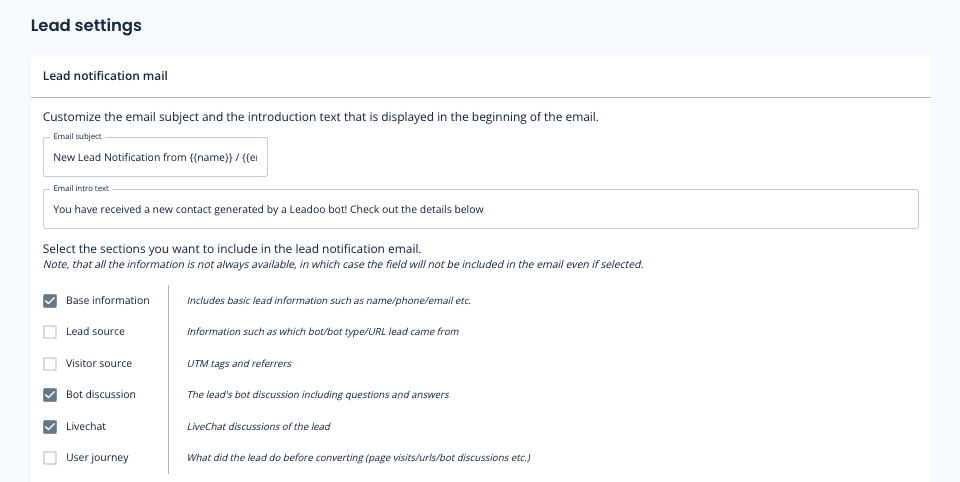
On Lead settings you can define what information you want to include on your lead emails by selecting different sections.*
*Note, that all the information is not always available, in which case the field will not be included in the email even if selected.
You can also define Email subject and intro text. That way you can make the email subject more clearer to the lead recipients. Ie. You can add the email subject to contain name and company of the person that contacted you. You can use following macros:
{{name}}
{{first_name}}
{{last_name}}
{{email}}
{{phone}}
{{total_score}}
{{company_name}}
{{country}}
{{city}}
{{location}}
{{post_code}}
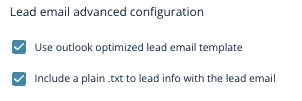
If you use outlook we recommend you to use Outlook optimized email templates.
And if you have issues copying the message from lead emails select ”Include a plain .txt to lead info with the lead email”
Questions?
Contact your Leadoo AI Customer Success Manager or email [email protected]
Leadoo AI Support:
How To Invite and Manage Leadoo AI Team Members
It’s easy to add new members of your team on Leadoo AI. You can also allocate different roles to them depending on their responsibilities!
This way, you have complete flexibility to decide who gets to respond to live chats and who should focus on tasks such as Chatbot development or monitoring reports.
Read this article to find out more about different user types and how to create custom roles.
How To Add Teammates To Leadoo AI?
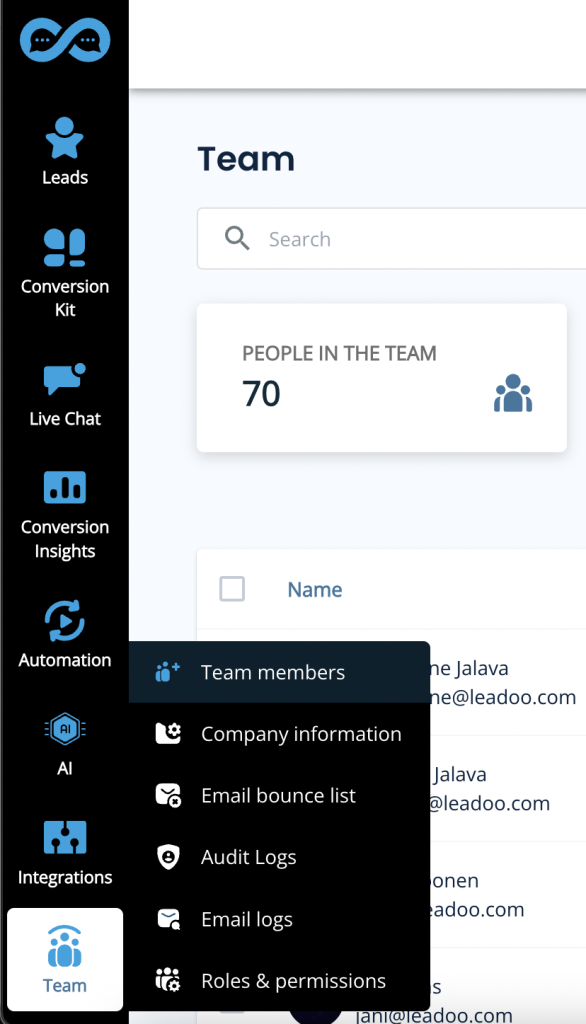
1) Open the “Team” page from the Leadoo Admin panel
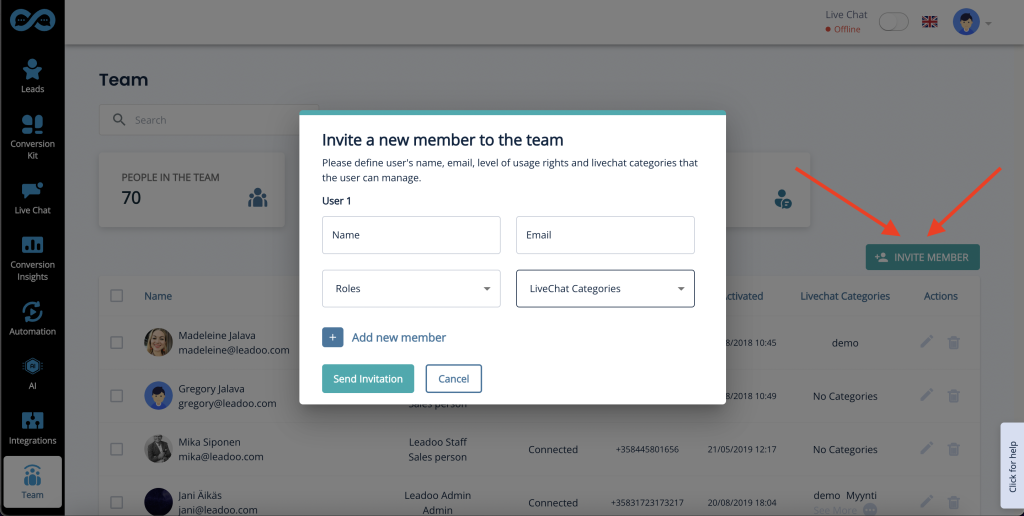
2) Click the “Invite Member” button
3) Add the new user’s email address. Define both their role and if the user is going to be a Livechat agent, make sure you select which category they should have access to.
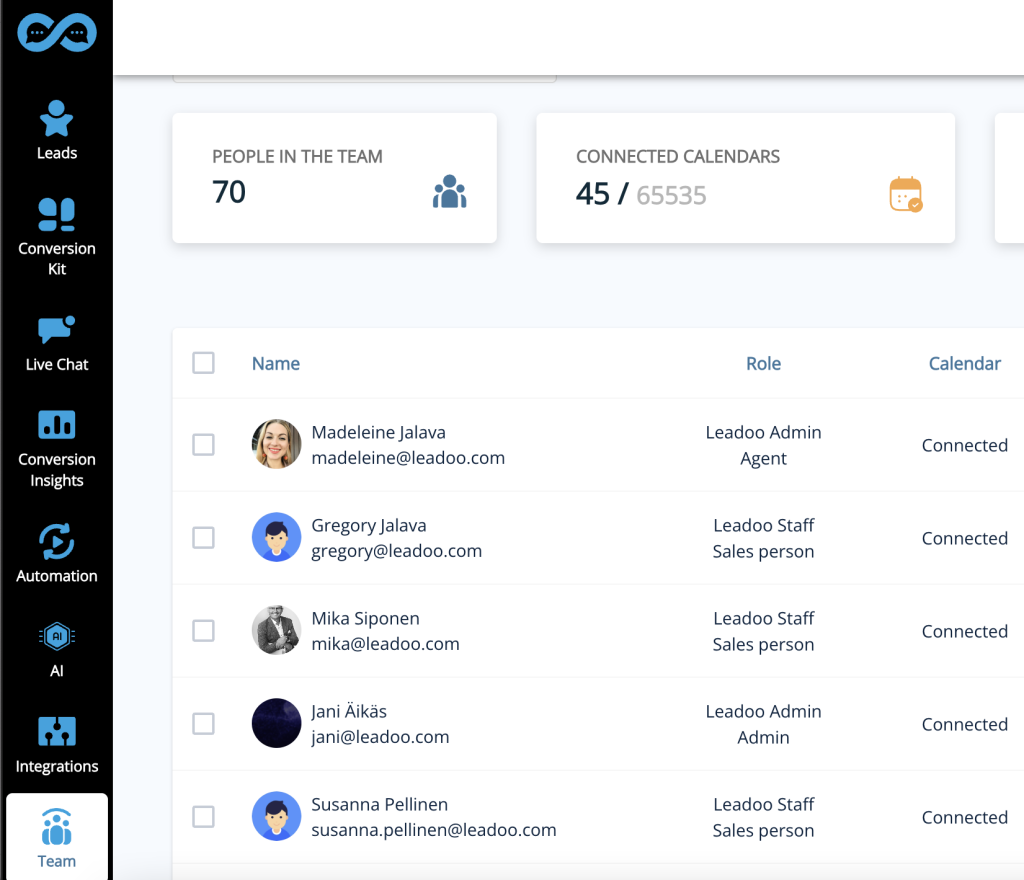
4) Manage your members from the team view by seeing who is online and which categories and roles each member belongs to.
Leadoo AI Support:
How to Sync Your Calendar With Leadoo AI
1. Open Your Profile Settings
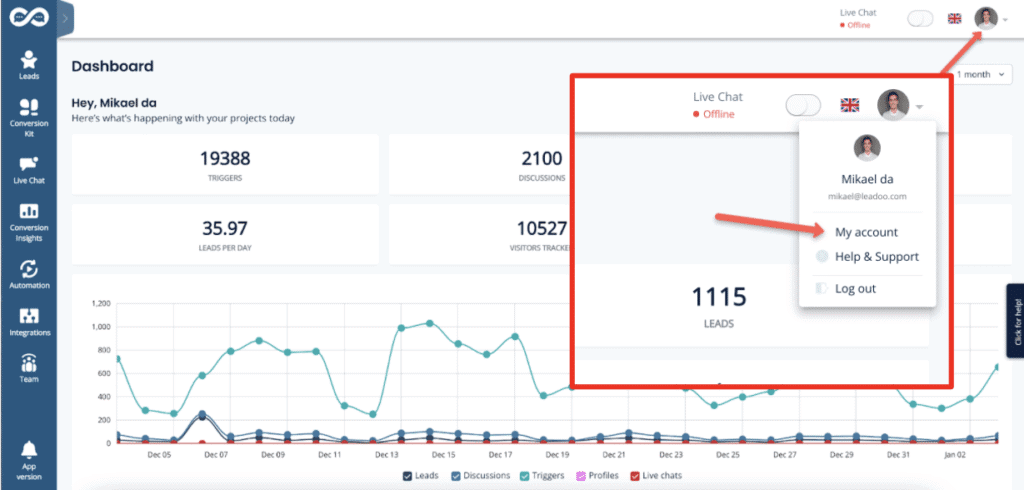
Click your profile image in the top right navigation open your profile menu. In the menu, select “My account” to open the profile.
2. Find Calendar Sync
Scroll down the page to find the section called “Calendar sync“.
3. Check Which Email You Want To Sync To Your Profile
If you want to use Google Hangouts conferencing links in your meetings → use a Google account email.
If you want to use Teams conferencing links in your meetings → use a Microsoft account email.
Office 365 -> for business Microsoft calendars
Outlook -> for personal calendars
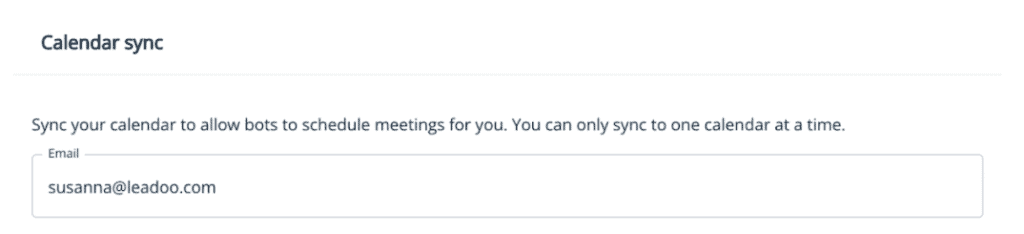
*The system prefills the email field with the address you use in your Leadoo account.
If you want to use another email, replace the prefilled text with the preferred email address.
Also make sure your calendar is not in read-only mode! (Only publicly available calendars can be synced)
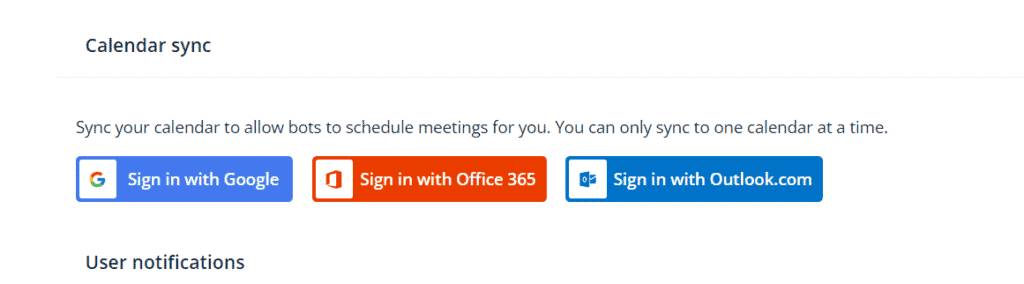
If you are unable to edit your email address or click on the Sign with XX ask your Customer Success Manager to check that the feature is enabled for you 👇
4. Sign In To Correct Service According To Your Email Address
Select sign in button depending on the type of calendar service your email uses.
Google Calendar → Sign in with Google
Outlook calendar→ Sign in with Microsoft personal calendars
Office 365→ Sign in with Microsoft business calendars
5. Authorise Your Email Account
Allow Leadoo AI to manage your calendar
A separate third-party popup will open to finalize the sync.
In order for the calendar sync to succeed, make sure to check all boxes to give Leadoo full permissions to read and modify your calendar, i.e. handle meeting bookings for you.
Leadoo AI will not use these rights to anything else than making incoming bookings through bots that have booking node where your calendar is linked. Leadoo will not e.g. in any circumstance delete any meetings from your calendar.
6. Check Sync Status
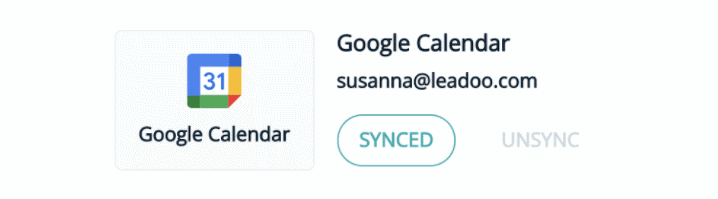
When you see this or similar view, your calendar sync was successful. If this doesn’t appear or you get error messages, the sync has failed.
Some reasons why sync might fail:
Check if your calendar permissions are in read-only mode. If yes, remove the read-only status. The calendar needs to be available for the system to read. Note that it might take a moment for the new settings to take effect.
You’re using a free Microsoft account. Unfortunately we only support official organization accounts.
7. Update Your Booking Preferences
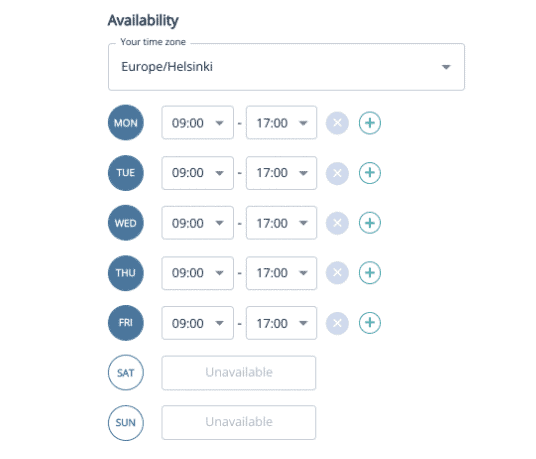
After the calendar shows synced choose to which hours in the day, how far in future and in what intervals calendar bookings can be made to your calendar.
Availability allows you to choose your time zone and the hours within which calendar bookings can be made each day. Ie. Always from 9am to 12pm and 1pm to 5pm (if you want to block bookings over lunch) or Mondays from 10pm to 5pm so you can start your week by emails and planning.
Remember that despite these availability hours the existing bookings in your calendar will also block anyone from scheduling overlapping meetings. Ie if you have a recurring team meeting every Monday morning this will automatically be unavailable in your calendar.
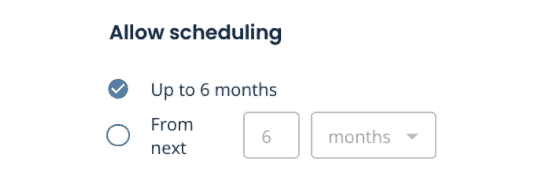
Allow scheduling Here you can decide how far in future your calendar can be viewed and meetings scheduled.
Buffer time This comes handy if you want to always have a short break in between meetings so that meetings cannot be booked back to back in your calendar.
Don’t allow scheduling If you want to make sure there will be no surprise meetings for the same day or no new meetings for next X hours or days. With this rule your calendar can only be viewed and booked starting after the set time. This is also the minimum time that you will have for preparing for the meeting.
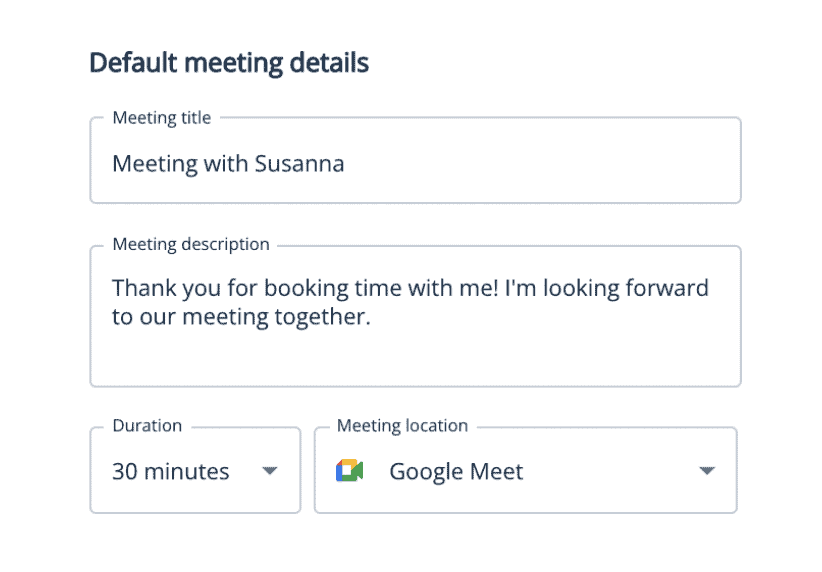
8. Add Meeting Details
Once a meeting has been scheduled from your calendar both you and the scheduler will get an calendar invite. In default meeting details you can choose what will this calendar invitation state.
Google Calendar → Select Google Meet
Outlook calendar→ Select Teams
Office 365→ Select Teams
NB! If you have included the scheduling of different meeting types you can also set the meeting details per bot or dialogue branch within the bot editor.
9. Leadoo CSM Adds You As Lead Recipient
Once the setup is complete your Leadoo Customer SUccess Manager will add you to receive any leads that come through your own personal calendar integration. This way you will both get the calendar invitation as well as the bot dialogue and other lead details collected on the bot.
10. Test Your Calendar Sync
Once the setup is complete your Leadoo Customer Success Manager will add you to receive any leads that come through your own personal calendar integration.
This way you will both get the calendar invitation as well as the bot dialogue and other lead details collected on the bot.
Agenda
1.
Why you should consider using webinars
2.
The overall webinar process
3.
How to sell without feeling like you’re selling
Register here, it’s free!
Leave your details and your questions about webinars👇
Webinars are here to stay – now it’s time to turn them into sales 🚨
Webinars are a great one-to-many way of communication, gathering masses of your target audience to hear your message.
At least ideally.
In this webinar, we’re revealing the secrets of webinars. How to create one, how to choose a compelling topic, how to market it, and ensure you get your audience there – and how to turn your webinar into sales.
Sign up and take your webinar game to the next level! 🚀
Teresa Heath-Wareing is an award-winning international speaker and one the UK’s leading marketing influencers. She is going to walk you through the webinar process and how to turn your webinar into sales.
Jemmi Laaninen from Leadoo Marketing Technologies will pitch in with her experience in conversions and converting from conversations. She’s also our good news fairy, responsible for distributing the good news of each conversion with a touch of pixie dust ✨
Use our free Conversion Rate calculator to calculate your website’s conversion rate:
Use our free Conversion Rate calculator to calculate your website’s conversion rate:
What is a Conversion?
A conversion is simply any desired action a visitor to your website has taken in order to interact with you in some way. What this looks like is determined by you, and can depend on different things – your industry, your aims, your market.
Micro-Conversions
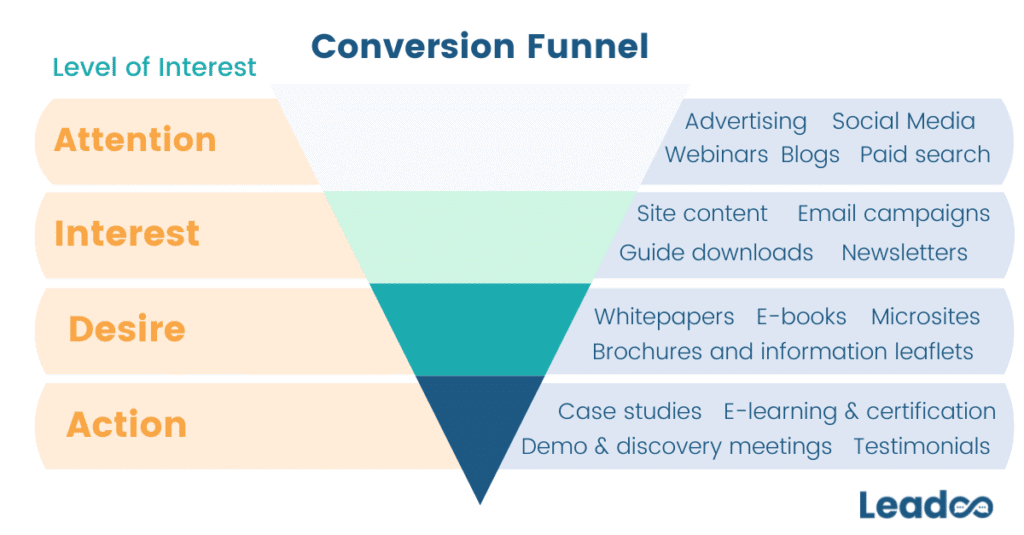
Micro-conversions are smaller conversions that happen en route to the customer making the final conversion or purchase. They tell us where the prospect is in the conversion funnel and means we can target them based on their level of intent. The type of conversion also gives us a clue into how far into the buying process each customer is.
For example, someone who downloads a resource (such as a guide) isn’t going to be as far along in the decision-making process as a client looking for a demo. Downloading a resource could mean that someone is just looking for information, but requesting a demo means they’re more likely to be seriously considering making a purchase and are at the point where they might be making comparisons across competing products.
See the conversion funnel below, along with some typical conversions/activity you might expect customers to engage with at different times in the buying process.
Keeping one eye on micro-conversions is important because every buying process looks different, and potential customers can enter the funnel at any point. The more you know about each visitor and their intentions, the more you can do to nurture each lead and get them to that final conversion point – and that’s what we’re aiming for, isn’t it?
How to calculate and interpret Conversion Rate
Obviously we’ve provided a helpful conversion rate calculator above so you don’t have to do the maths yourself (ain’t nobody got time for that). But if you want to understand how we got to the final number, calculating conversion rate looks like this;
Conversions (desired actions taken) x 100
Website Visitors
For example, if your website received 10,000 visitors a month, you get 200 conversions or leads a month, then your conversion rate would be calculated as:
200 x 100 = 2% conversion rate.
10,000
This means that for every 100 visitors you receive on your site, 2 of them on average will convert.
Is that a decent conversion rate?
A ‘good’ conversion rate is a bit of a contentious topic, but our rule of thumb is: no matter what your conversion rate is, you should aim to improve it. Obviously, if you’re some sort of unicorn managing to somehow convert close to 100% of your traffic, this doesn’t apply to you (and maybe you’d like a job as a conversion specialist…?).
Another helpful way to interpret your conversion rate is to compare it to benchmarks for your industry. We put together a helpful guide with some benchmarks for different industries, based on a variety of different types of conversion, and with a bunch of top tips on improving your rate.
Where can it be used?
The above calculation can be used to work out the conversion rate for traffic to your site, but not for traffic on individual pages on your site. Conversion rate looks at the overall number of people converting.
There are a few ways to check on a landing-page level, but it’s not as reliable as the overall conversion rate and only really tells you their conversion rate if they landed on that page immediately and converted. In practice, most people navigate through more than one page before finding what they’re looking for and converting, and so there are drawbacks to calculating it in different ways:
If you calculate it using conversions/sessions (including a specific page) then you will end up inadvertently including conversions that happened elsewhere on the site.
The same thing will happen if you calculate it as conversions/users, as users will likely have visited multiple pages and maybe even have multiple sessions.
Therefore, the best way to work this out is likely to be by looking at conversions/unique page views as this will allow you to look at how likely someone who visits this page is to convert.
Key Takeaway
👉 Conversion rate is calculated by taking Conversions/Visitors x 100.
👉 A ‘good’ conversion rate is hard to define, but you can use industry benchmarks and close monitoring of your rate to ensure you make the most of every visitor.
👉 Conversion rate only really works for the whole site – it becomes complicated if you want to work out the conversion rates for individual pages.
Get in touch with us or chat to the bot below if you need help calculating, interpreting and improving your conversion rate. If you want to know what return you could get from having Leadoo on your website, check out our ROI calculator.
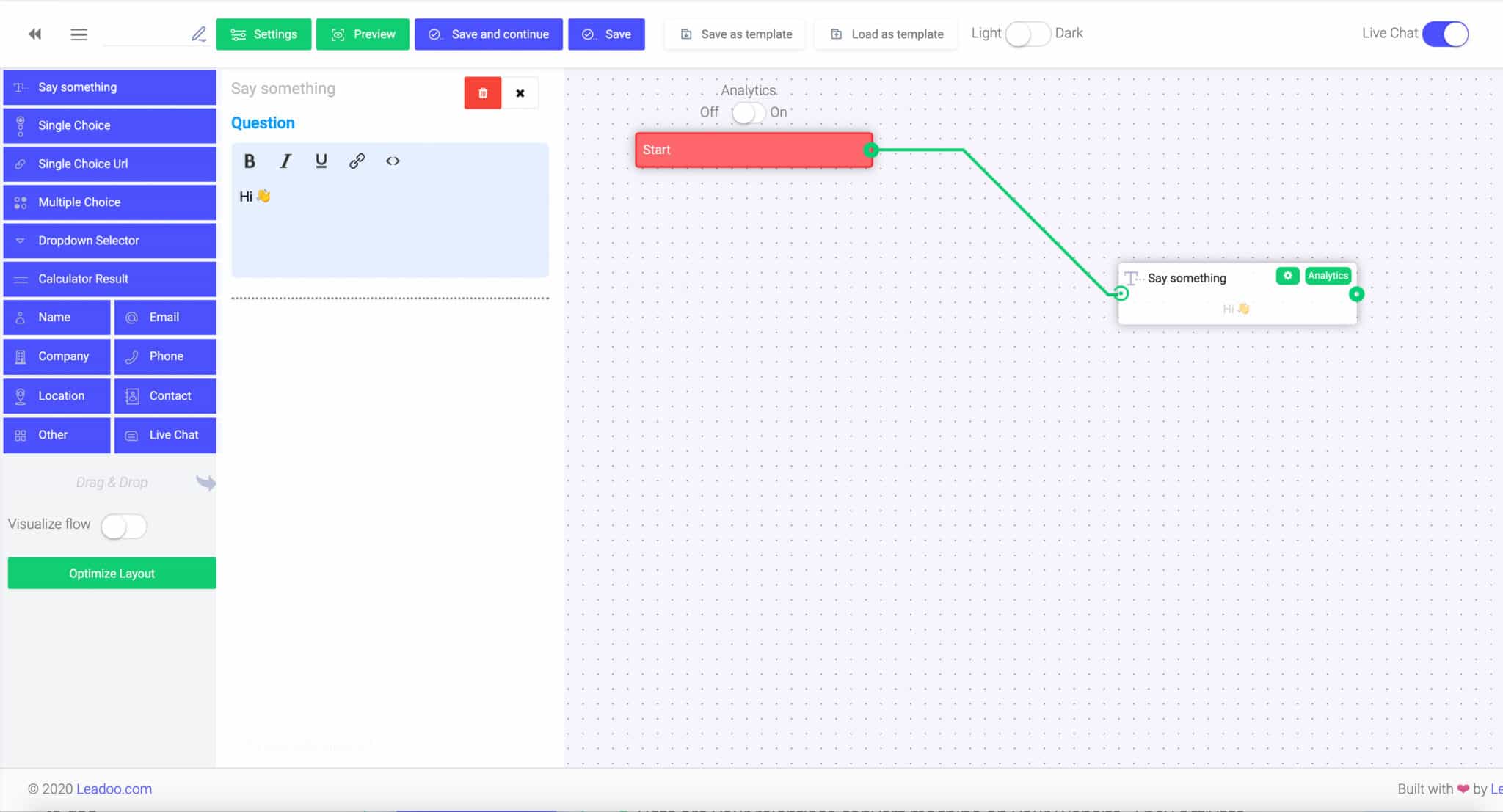
Building chatbots with Leadoo visual bot builder is easy. In the following article, you’ll learn how to build a simple chatbot that asks the user about their needs and then converts them into a lead.
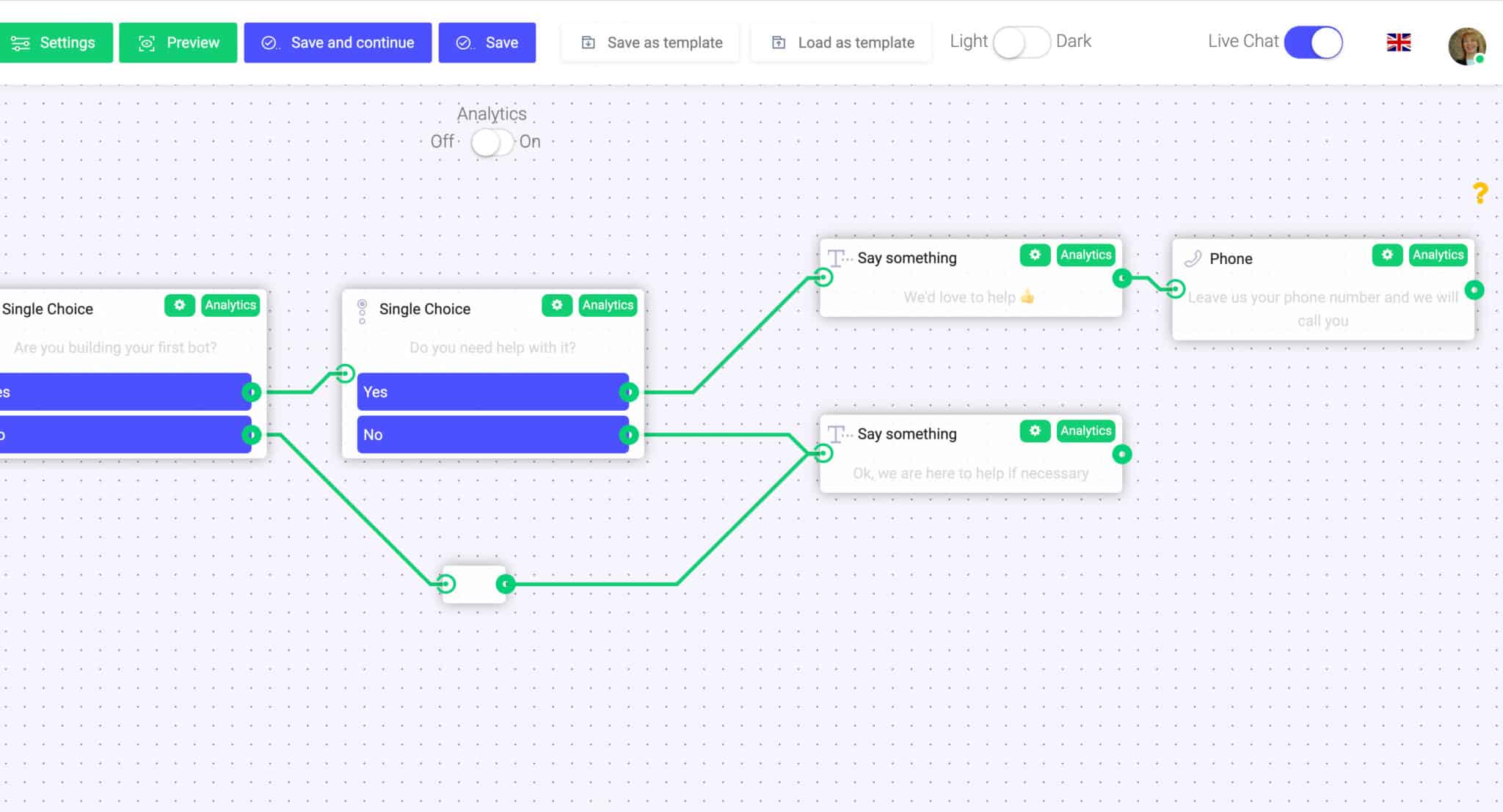
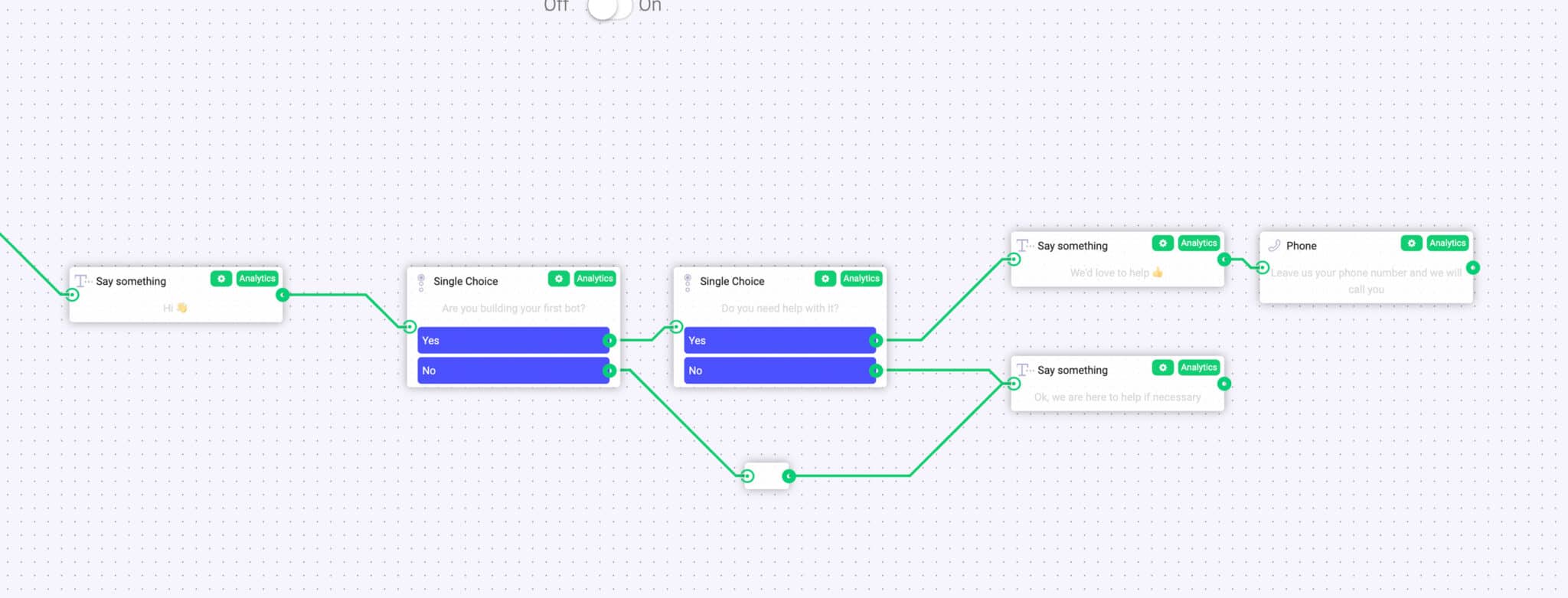
Outline of the example
1. Greeting users and reacting to their answers with “Say Something” node.
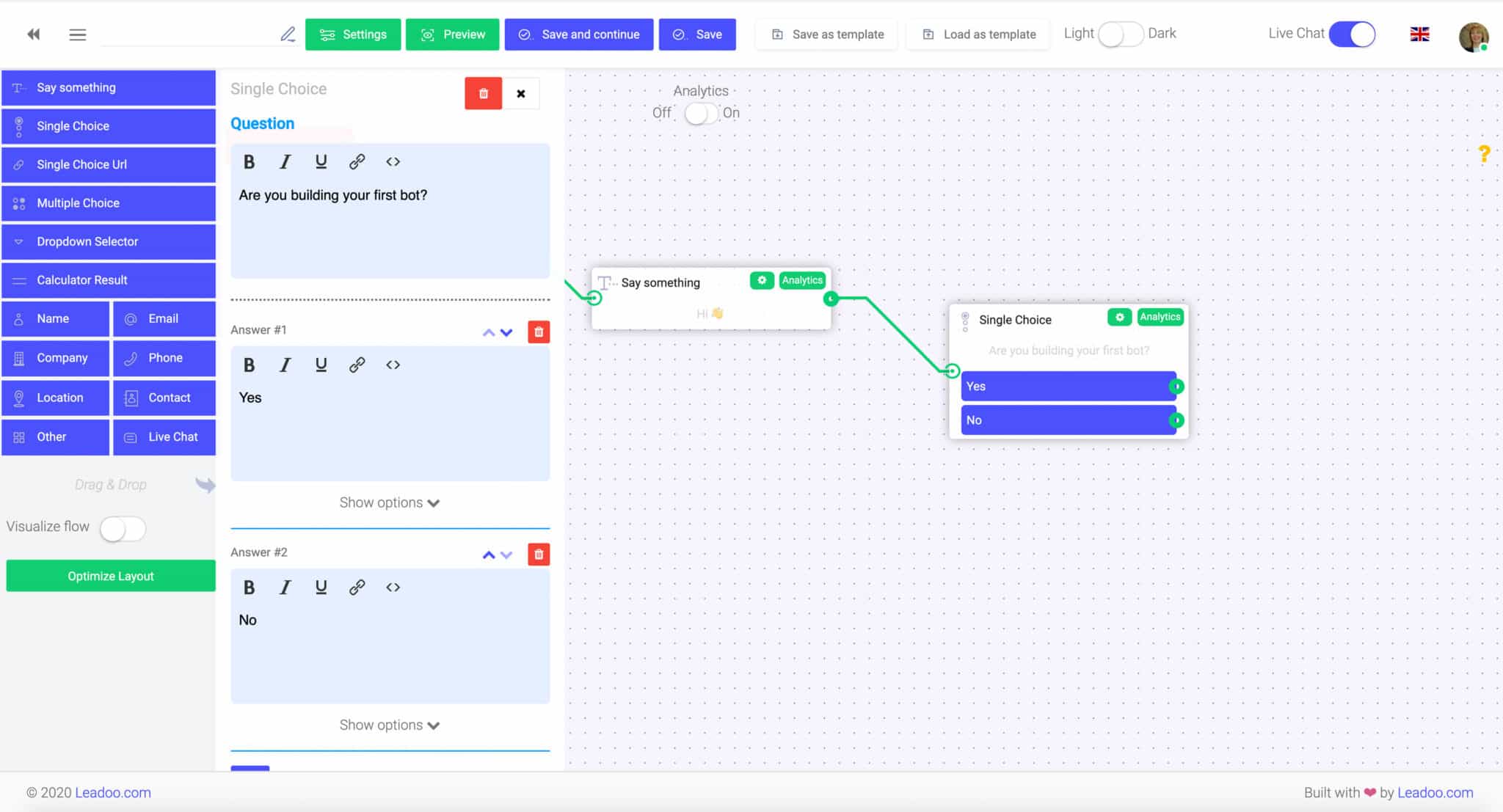
2. Asking qualifying questions from the user with the “Single choice” node.
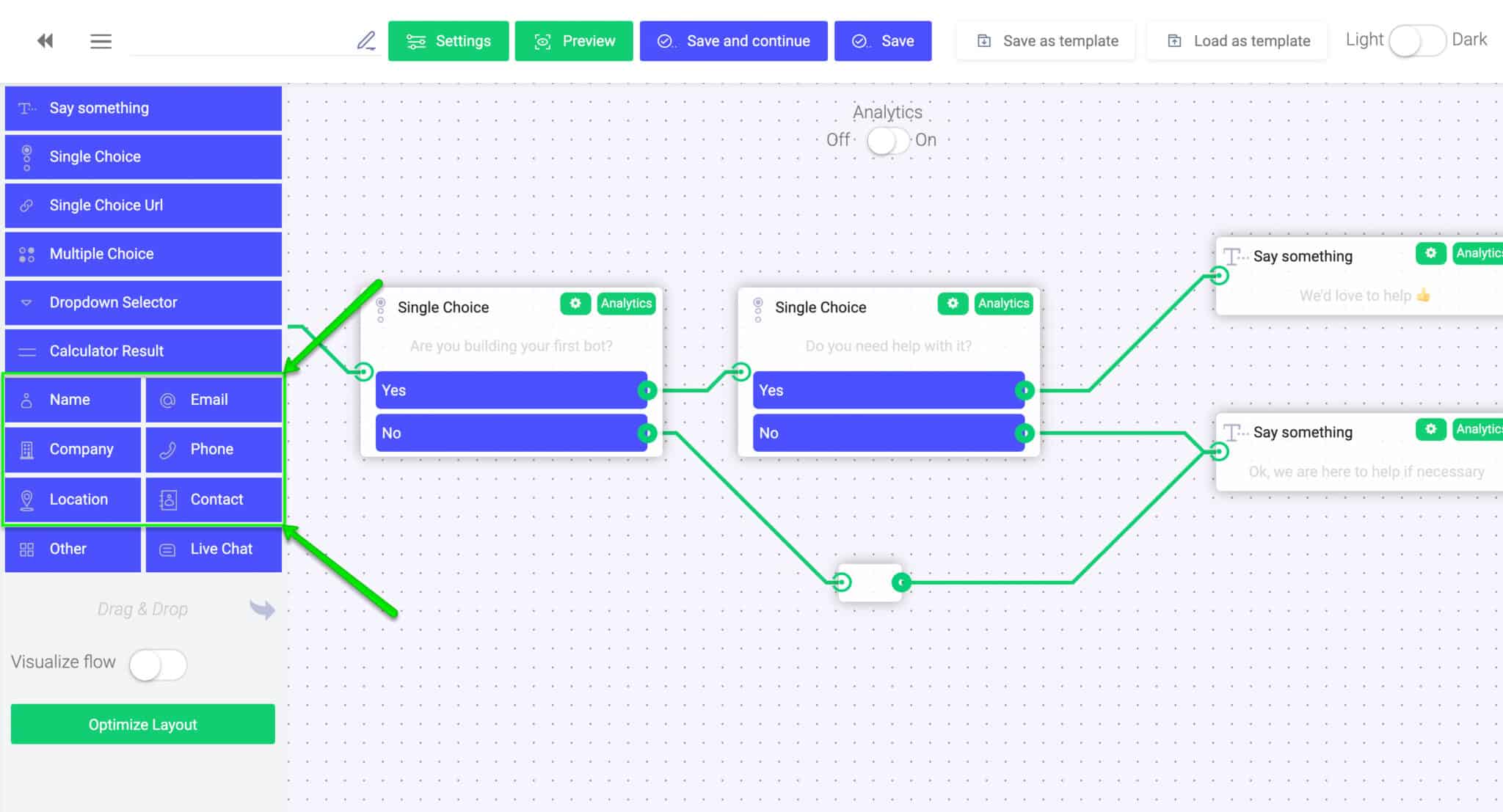
3. Providing solution in exchange for contact information with a contact node, such as the “Phone”.
Elements you can use while building the chatbot
“Say Something”-node:
This one-way interaction field is used for a salutation, a statement, reaction or for a simple intro on your product or service. With this field, you cannot create a question or an enquiry that includes two-way interaction, such as a direct answer from the user. Rather, it is just a great way to make the conversation more lively and human-like!
“Single Choice”-node:
With a “Single choice” node you can to create questions with answer choices such as “yes” or “no”, which require an answer from the user. For each answer choice, you can choose to guide the user to a different dialogue path/conversation flow. This can be done easily by dragging a line from the green dot to the next node you want to use.
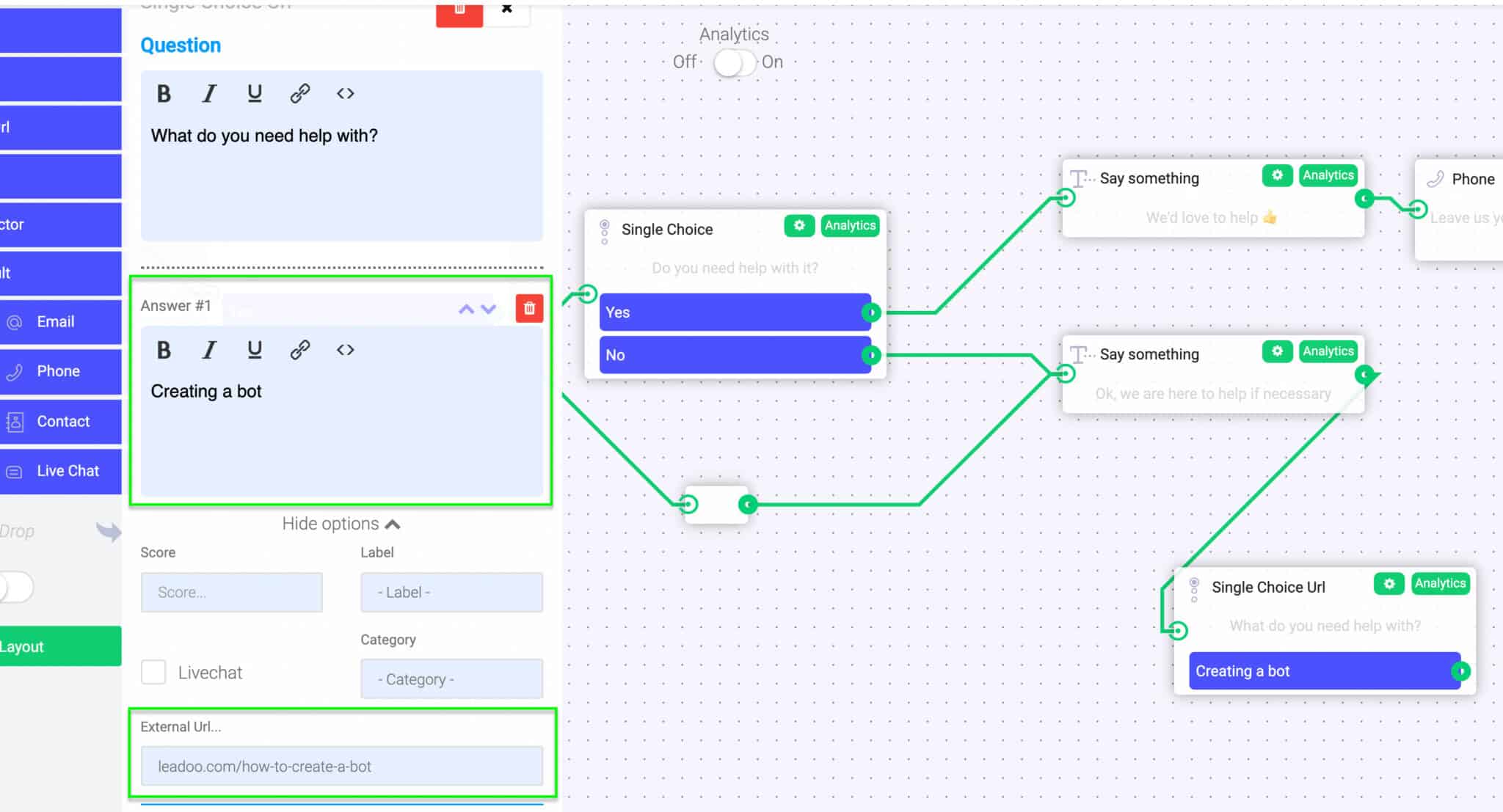
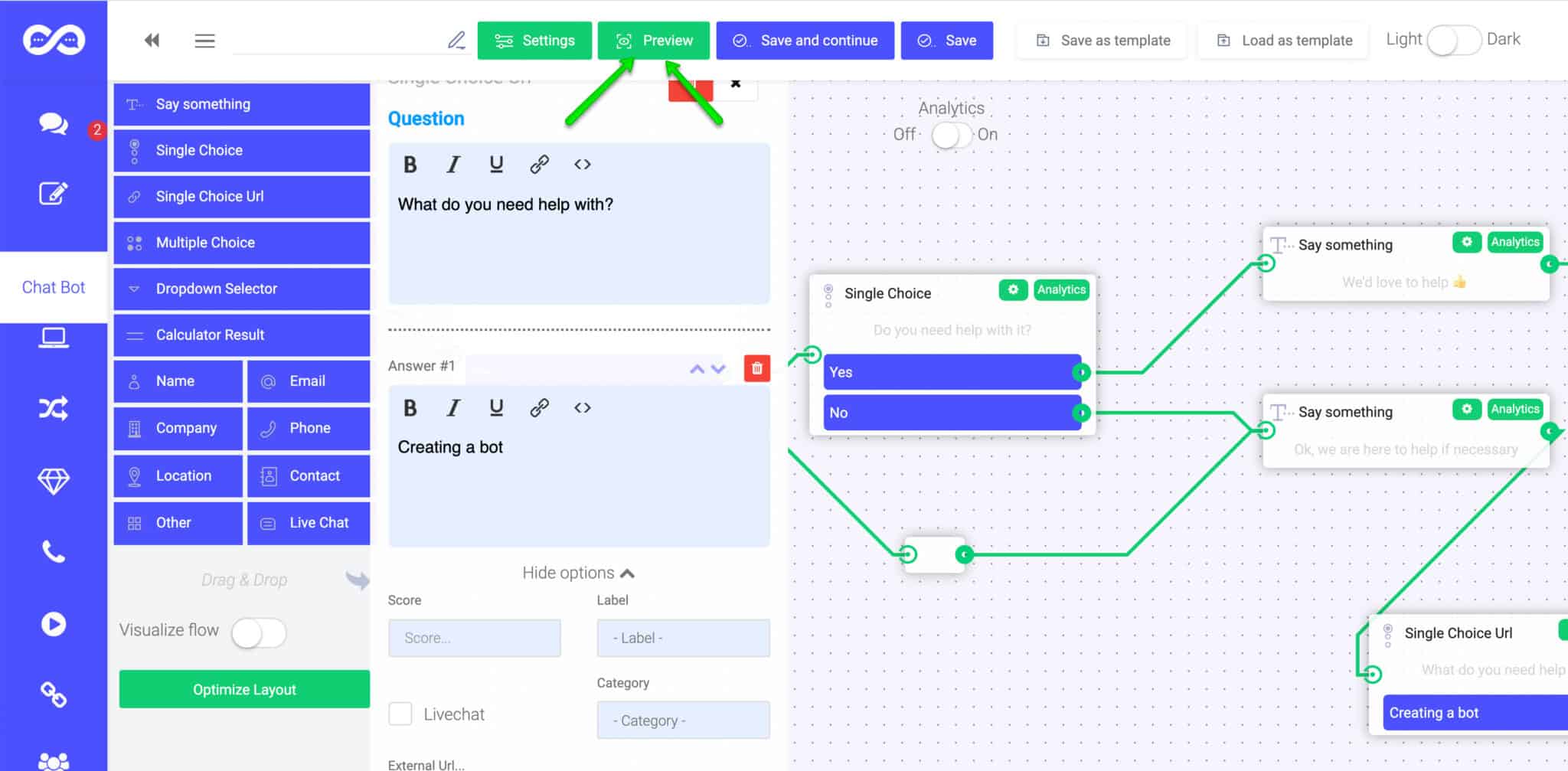
“Single Choice URL”: “Single choice with url” is just like Single Choice, except that you can choose to connect an URL to each answer choice. This node is perfect when you want to guide user to a specific landing page straight from their answer choice. For example, asking an e-commerce visitor what kind of product he/she is looking for, you can easily direct them straight to the appropriate landing page from a single interaction with the chatbot.
“Let’s get in touch!” -nodes (Name/Email/Phone/Company/Location/Contact):
When you want to collect contact information, you can choose between five different nodes: name, phone number, email address, company, location or a full contact form-like field. Each chosen field will give the answerer an empty field to respond. This option is usually used towards the end of the bot conversation when contact details are needed to proceed. These are the nodes that are most often used to define leads generated by the bot!
“Other/Message”-node: This field allows you to ask an open-ended question to which the user can answer by writing freely. An open text field is usually used to ask a more specific or personal question that you can’t come up with a predefined answer choice for.
Creating a dialogue path
A key part of creating a usable bot is to define the exact paths that the user can take in the dialogue. You can do this easily by dragging connections between different nodes.
Previewing your bot
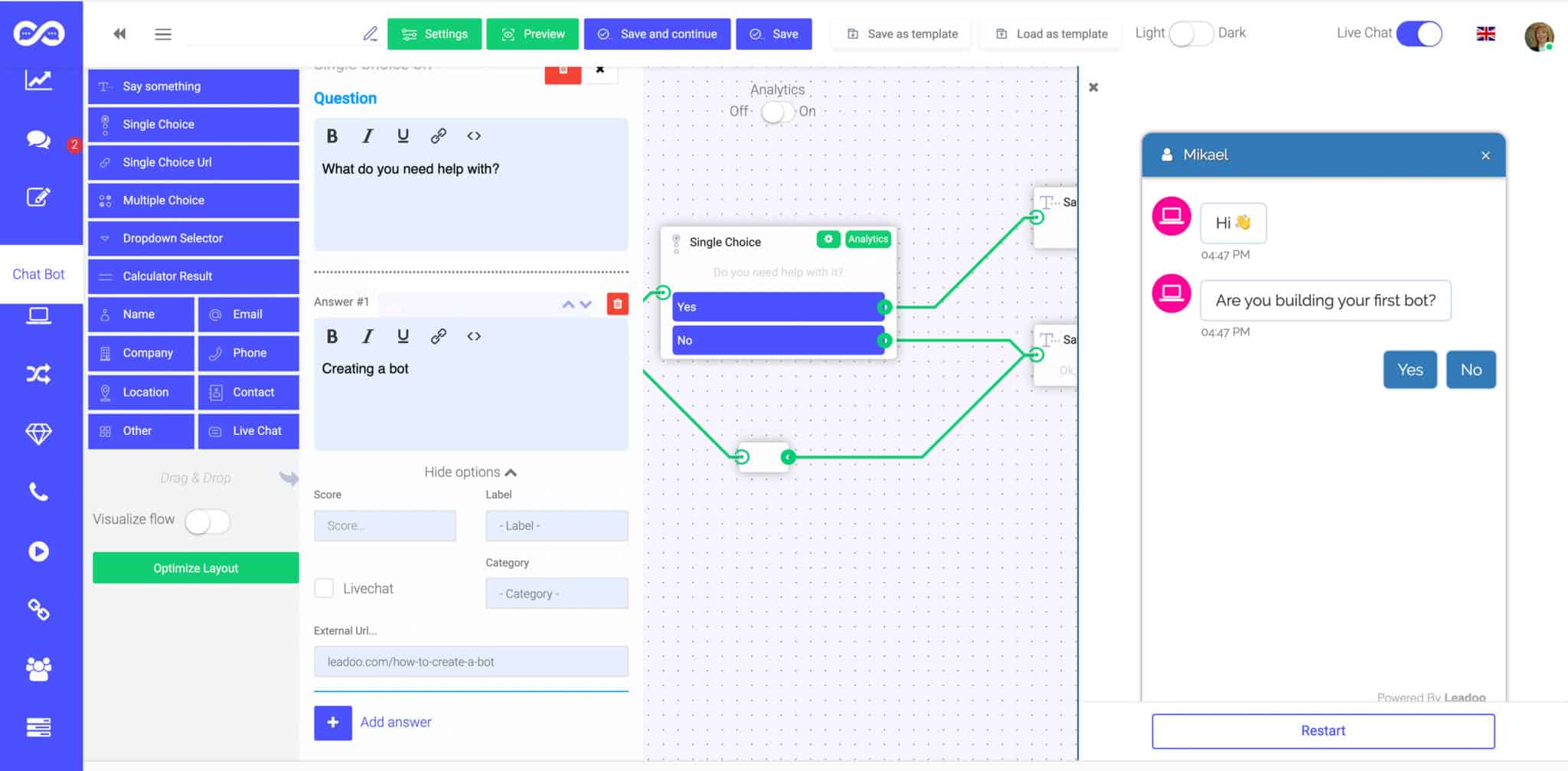
After you finish building your dialogue paths, you can easily preview and test the conversation yourself before publishing it by clicking the “Preview” button on the top.
A preview window will open to the right side of your screen. By clicking the “Restart” button you can restart the discussion in the preview window to experiment different discussions flows.
Every manager in charge of recruitment for their team has been there – a huge pile of applications to sift through, working out who is suitable for the role (and who isn’t), and then having to deal with the expectation of providing feedback to each applicant individually on how their application doesn’t match the criteria – an unrealistic and daunting expectation when there are many applicants and only one of you.
At the moment, actually finding enough applicants is tough. The Great Resignation is in full swing, with a reported 1 in 4 UK employees actively planning a change of role. Mix that in with all the other fun we’ve got going on in the UK right now, and what we’ve got is an employee’s market. Demand outstrips supply of skilled workers. So how do you ensure that you still continue to have a steady stream of suitable applicants to your roles?
Well, the answer is: you grab them at every opportunity. Think how many times potentially great candidates glaze over your job advert and don’t actually commit to applying. Once they’ve left the page, they’re lost to the ether and you might never find that candidate again.
And, let’s be honest, there’s lots to put them off – the length of an application, the job title is a bit obscure, or the job description isn’t particularly clear. It doesn’t really matter. You want as many of these potential people to engage as possible – it is infinitely better for you to have the choice out of hundreds of qualified candidates than trying to pick the best of a bad five.
You’re probably thinking – hang on a minute, if I have that many applicants then surely that’s a load more work for me. But what if the candidates qualified themselves without you even having to be involved?
Just like magic, in steps the Recruitment Bot, part of the Leadoo platform offering and a tool that can make your recruitment process as streamlined as a bottlenose dolphin. A bit of context – Leadoo is a conversion platform that provides tools to help its customers increase the number of conversions and quality leads received via their website. In addition, our tools are well able to facilitate the recruitment process, increasing the number of applicants for each role but without increasing your workload, making it convenient, easy and rewarding for everyone involved.
In this article, we present the many possibilities of our solutions in recruitment and how they currently work for us, and our client base. We’re always up for looking at how we can create unique use cases with our solutions, so if you’re wanting to do something a bit different, get in touch with us!
If you’re impatient (like us!) and want to go straight to testing out the bot, go ahead and skip to the end of this article 👇
Bots and recruitment – what’s the benefit?
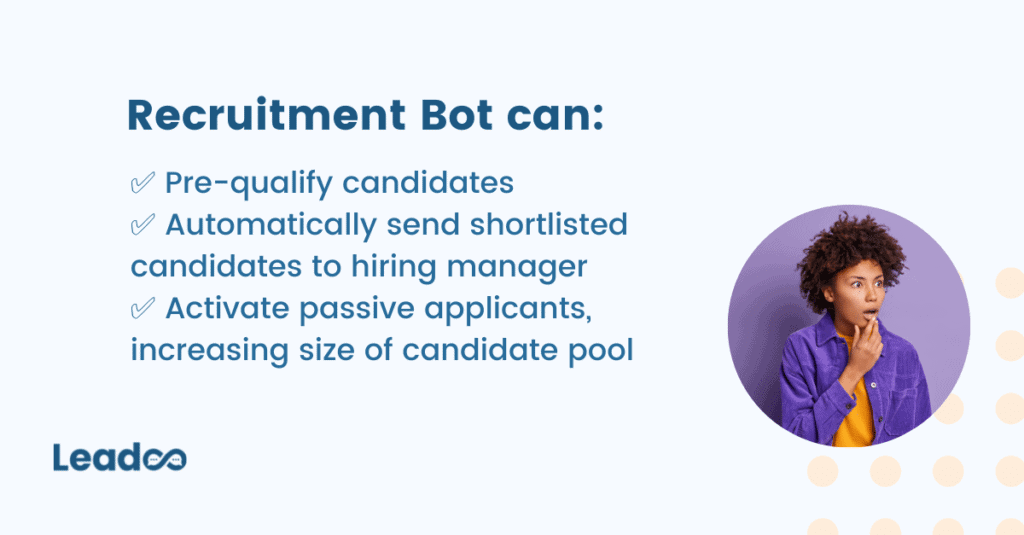
There are many benefits to be had here. Firstly, from the candidate’s perspective, they’ll receive a direct answer to their application. If they meet the requirements of the job, and/or have answered personality and culture questions and scored well, then the bot can ask for their contact details, which will be sent directly to you, the hiring manager, to continue the process.
In the same vein, the bot can immediately tell the candidate if they are not suitable for the role. This means that you’ll only receive the information for the candidates who were invited to leave their contact details, i.e. those who passed your initial qualification process via the bot. You could even refer unsuitable candidates to other, more suitable roles for them, if, for example, they scored well on culture and personality, but are not suitable for this particular role.
Sounds a bit easier on you, eh? It makes the whole process much smoother, manages expectations on both sides of the table, and means you don’t have to be the one to send soulless rejection emails to a thousand inappropriate candidates. Winning.
Speeding up the recruitment process is not the only benefit you get from recruiting. As we’ve already highlighted in this article, the benefits are huge;
It’s the ultimate in brand consistency and corporate branding. A good, consistent image helps you to recruit the right kinds of candidates into the right kinds of roles, and ensures candidates know what kind of culture and vibe they can expect from their new potential workplace.
The recruiter also activates passive applicants; it goes without saying that it’s much easier to apply for a job through a bot, where the conversation flows more naturally (and you can cut straight to the chase in terms of asking questions). People are going to be more inclined to engage with this. You’re therefore more likely to receive applications from candidates who would not otherwise have submitted an application – meaning you might find that diamond in the rough you’ve been looking for 💎
It is therefore entirely up to you whether your next jaunt into the recruitment process is a long and arduous one, or whether it’s a bit quicker, easier and more streamlined for everyone involved.
Screening applicants and streamlining the recruitment process
Picture the scene: you’re looking for a new employee. You need this employee to have some experience, a degree – preferably in the relevant field – and for them to have access to a vehicle to get to work or travel between locations. You write a (very) comprehensive job post listing the qualities you’re looking for. So far, so good.
Then, once the advert has gone live, the applications flood in. You go through your inbox one by one, only to find that most applicants don’t have the experience, education, or access to transport that you’re going to need them to have. Those applicants have wasted their time applying, and you’ve wasted an hour and a half sifting through applications with little joy – and to top it off, you’re going to have to be the one to send those soulless templated rejection emails.
Sounds a bit crap. But, what if you’d have had the tools at your disposal to qualify the visitors to your careers pages, and screen any suitable applicants prior to you even having had a browse through their CVs?
Well, you’d have saved time, that’s for sure. Let’s imagine the same situation again, but this time, you have some virtual helping hands sorting through your candidates, making your recruitment process much easier, and taking care of the hard work for you.
We use our own solution for recruitment. Obvs.
For each job posting, we create an InpageBot which will ask post-specific questions to pre-qualify each candidate, effectively conducting an interview with them on your behalf. For job postings that receive high volumes of applicants, this is a time saving mechanism to prevent you having to sift through thousands of CVs, and then spend hours conducting interviews to no avail. And the best bit? It works seamlessly on mobile and desktop, meaning candidates can leave an application no matter what device they’re using.
Check out how we work it here 👇
From a candidate perspective, this is also ingenious. The biggest barrier for candidates when applying for roles is often the process itself – draconian and bureaucratic, it puts people off and gives them what is perhaps an unfair reflection that your company is also draconian. We shouldn’t expect candidates to jump through a series of difficult hoops in order to leave their details with us either, because all that will do is minimise the pool of potentials you get to pick from as the hiring manager.
By making use of something as simple as an InpageBot, we make the candidate feel comfortable. The activity of engaging with a bot is perceived as low-stake, and there’s much less stress involved in answering questions if the person asking them isn’t real. There’s a psychology and magic to it that even we can’t quite put our fingers on.
And, this is a story familiar to around 90% of our Leadooers; many of whom have ended up working for Leadoo ‘by complete accident after playing around with a bot on a job advert…’
Tests and pre-qualification
Everybody loves the challenge of a test. And low-stakes quizzes such as the ones we and our clients create using our bots encourage engagement because the user doesn’t see there as being any risk in answering the questions. They haven’t committed to applying.
Take Zure, for example. Zure provide end-to-end services based around Microsoft Azure and they have a diverse team; from developers, to marketers, to architects and more, Zure has an excellent culture which they aim to maintain. One easy way for them to do this is to pre-screen applicants to their open positions, such as below:
By pre-screening all candidates for their prior experience, it reduces the time taken by the hiring manager to filter applications as this process is carried out automatically by the bot.
Increased numbers of applicants
Guidant Global made use of an Inpagebot on their Social Work Talent Hub to help to increase the number of qualified social worker applications they receive. It allows Guidant Global to identify potential candidates who otherwise may not have engaged with the site, increasing the size of the candidate pool in an industry which expects to have 1 million vacant jobs by 2025. This mismatch between supply and demand makes engagement of any potential candidate that much more important, but obviously more difficult. And that’s where the Leadoo bots step in:
Guidant both collect contact details prior to, and carry out, pre-qualification questions. This works well for industries with more complex specialisms, such as social work, and means that candidates can be automatically sent to the appropriate hiring manager.
Divide the workload – before they fill out a contact form
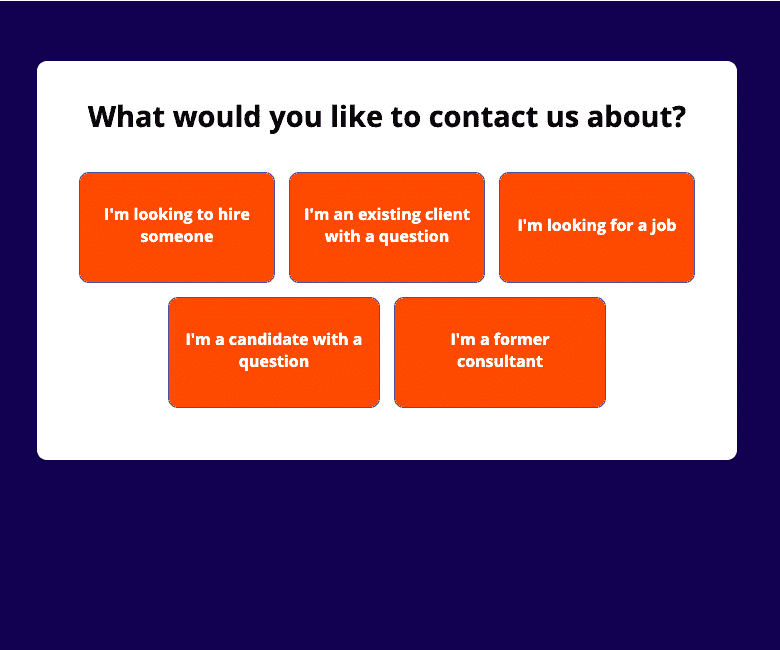
Revel IT, a US-based IT and Artificial Intelligence recruitment company, make use of a VisualBot on their front page to allow them to qualify visitors, work out what each visitor needs, and ensure their details go to the right person. They engage the visitor first, before asking for contact information – but now are able to determine why the visitor is making contact, and the right person can be sent their details automatically by the bot depending on what answers they provide.
Where and how can I get recruitment bots for my site?
You can get recruitment bots as part of your Leadoo package if you’re already one of our clients – just chat to your Customer Success Manager who can hook you up and advise on how best to use the bots for what you need.
If you’re not already on the Leadoo bus, find out how you can hop aboard by getting in touch today.