This post has been brought to you by our friends from Cookie Information! They are true experts when it comes to cookie consents and staying extra safe with GDPR.
GDPR + marketing
98% of your website visitors just leave, without any kind of conversion. What if you could turn some of these 98% into loyal customers? Here’s how you can better understand your customers’ journey to target new audiences and retarget existing clients.
Only 2% of your website visitors convert.
The rest just come and go.
Wouldn’t you like to know who they are? And how you make them convert?
So do we.
That’s why we are always looking for new ways to get to know our potential clients a little better. Understanding customer journeys has been the soul of online marketing for years; and it continues to be.
Getting to know your customers requires a lot of data. This probably is not news to anyone. After GDPR it has become crucial to ask website visitors for a consent to collect their data.
Why?
We are constrained by law.
Yes, privacy laws like the ePrivacy Directive (the European cookie law) and the GDPR require us to obtain valid consent from our visitors before we collect their data.
This rule applies to us all.
Transparency and privacy are key factors for how buyers perceive your business.
So, now we’re going to show you how you can collect your users’ data to better understand your customers’ journey; all while being GDPR compliant!
How to collect GDPR compliant data
First, you should look for a good CMP.
What’s a CMP you might ask?
A Consent Management Platform (CMP) is a tool that collects your users’ valid consent to cookies on your websites and apps.
But why should you get a Consent Management Platform?
Because obtaining consent to cookies isn’t simply showing your visitors a banner on your website saying: “we use cookies – ok”.
GDPR consent is much more complex.
So, here is GDPR consent in a simplified form:
When you use cookies on your websites or apps that collect your visitors’ personal data (cookies from Google Analytics, Facebook, LinkedIn, TikTok or any other third-party service), you must:
Inform your users of the cookies you use and what data they collect (use a cookie banner).
Ask your users if you may use cookies (it’s a ‘yes’ or a ‘no’ to cookies according to the GDPR).
Allow your users to choose what type of data you may collect (marketing, statistics etc.).
And of course, remember to store all the consents securely for 5 years so you can show them to the Data Protection Authorities if they come knocking at your door. They do that sometimes.
Still sounds complicated?
Don’t worry, it’s not.
You can easily collect valid GDPR consent.
Cookie consent that complies with GDPR
There are actually only a handful of Consent Management Platforms in the world that will enable you to collect a cookie consent that complies with the GDPR.
· Collect valid GDPR consent to cookies from your users · Stay compliant with national cookie rules and the GDPR · Get the support you need to implement and maintain your Consent Solution · Get through an audit by the Data Protection Authorities (we have your back!)
With a solution like Cookie Information, your websites and apps are always up to date with current legislation, so you can focus on collecting the data you need to grow.
Data, of course, is only information until you put it together in the right way. At that point it becomes insights; something you can act upon.
Transform information into insights
One of the ways to transform all the data you collect into insights is by using a Conversion Platform.
Now, what’s that?
A conversion platform is a tool designed to collect and analyse your website’s conversions.
“Yeah, but I got Google Analytics“, you might say.
Sure, it’s undoubtedly a great tool. Still, GA will only take you so far if you sell B2B.
A conversion platform is more than just endless amounts of raw data in graphs and pie charts. It activates and converts your visitors with deeper insights and automation.
A conversion platform has many built-in conversion tools to convert and nurture your website visitors.
One platform we have been happy to discover is Leadoo AI.
Leadoo AI is a Conversion and Customer Experience Platform. It collects and displays your potential buyers’ data so your marketing and sales department can understand each step of the buyers’ journey.
Leadoo AI activates and engages your leads, so you start building a rapport with them. This means that you can nurture them all the way to a hard conversion. 🚀
And that is the goal of any business, right?
But as said earlier, collecting data requires attention to data privacy regulations like the GDPR.
When you use a conversion platform like Leadoo, it is built on the premise that you ask your website visitors’ permission to collect and use their data.
How to integrate Cookie Information with Leadoo AI
When Cookie Information is your Consent Management Platform, it’s easy to integrate it with Leadoo AI.
You can use this simple javascript, which is actually the only thing you need to do to integrate the two tools.
This webinar is about to tickle your marketing nerves, help you to think more about personalised experiences with your brand, and allocating your budget where it matters the most.
In this webinar we’ll be covering the following topics:
💡 How to make your advertising hyper-personalised
💡 How to allocate your marketing budget towards the hottest leads
💡 how to avoid wasting spend on non-potential website visitors
Enhance your conversions with Content Marketing Strategy
How to enhance your conversions with Content Marketing Strategy
Content and conversions go hand in hand, but how to effectively enhance your conversions with a Content Marketing Strategy? That’s what we’re going to cover in this event.
You can expect to hear about the following points:
💡 Why every B2B brand needs to apply a content marketing model to their marketing funnel
💡 How to define the purpose behind each piece of content
💡 How to create multiple forms of content at the same time-
💡 Where to apply your various traffic-generating activities to your content marketing model
Not the type we all sat through on repeat from March-July 2020 delivered via Google Meet. We’d be happy never seeing one of those again.
But quizzes can actually be a super easy and fun way to engage an audience on a web page. This is often successfully used on ecommerce sites, where product selectors can help customers find the product they are looking for quickly.
This has uses in lead generation and conversion too – by carefully curating those questions, you can qualify visitors to your site and continue to nurture them after their visit.
How are quizzes an effective tool for conversion and lead generation?
With the rise of inbound marketing and the increasingly important focus on website conversions, quizzes provide an opportunity to activate visitors, engage them with your content, move them through your funnel, qualify them and their needs, and finally to collect their information as a lead.
1. Increased brand awareness and traffic
Quizzes are surprisingly good at generating traffic – our research online, and with our own clients, indicates that they generate traffic well, or moderately well, around 70% of the time. This, when compared with 36% for static content, makes an excellent case for having a quiz somewhere on your site. We’ll give you some ideas of how this could look a bit later in the article.
2. Better customer experience
An interactive quiz makes a users’ experience on your site much more personal – they’ve interacted with your site and your brand and now most likely have some understanding of your product and what you can offer them. This is a perfect time to point them in the right direction based on their position in the funnel – it could be encouraging them to sign up to a newsletter; or to book a demo with a salesperson.
Leadoo’s Conversion Platform not only allows you to create dynamic quizzes with complex logic and calculation functionality, but it also allows you to direct prospects to book a meeting directly onto a sales person’s calendar via our calendar integration function.
3. Adaptability in many situations
One of the best things about quizzes is that they are adaptable to many situations, in any industry or niche. It’s easy to use an Inpage, content-specific bot, or a VisualBot, to create a lead generating quiz, and our experts are always on hand to discuss and help with your industry-specific questions and ideas.
4. Qualification, segmentation and retargeting
By using one of the solutions suggested in point 3, you can create converting conversations that qualify, segment and allow you to retarget and nurture your prospects, to ensure you never miss a lead again. Using Google Tag Manager integration in Leadoo allows you to create super-targeted micro segments for even more specific targeting of campaigns.
5. Real-time, informative analytics
Visitor responses give you an excellent insight into their intent and position in the funnel, and allow you to make better marketing decisions to nurture them better.
Using Leadoo’s Conversion Insights, you get a clean, user-friendly dashboard with all the relevant analytics you need to monitor customer journeys and use this knowledge to increase your conversions. You can even optimise for conversions at the conversational level by using Conversation Analytics, and each bot is created to be fully customisable and bespoke for your business’, and customers’, needs.
Different types of quiz
With Leadoo, you can create a quiz for any purpose, and our Conversion Experts are always on hand to help create your vision, but we thought it might be useful to provide some inspiration and examples of ways quiz bots can be used.
Product Recommendation Quiz
When you provide a product recommendation quiz, not only are you identifying the needs of the customer immediately; you’re also gathering information that can help you to continue to nurture that customer if they aren’t in a position to purchase on that occasion.
If they are ready to purchase, you’re leading them straight to the product they need, by asking qualifying questions and creating unique conversation pathways that are context-specific to each product.
CareCo, the UK’s leading mobility specialists, provide the option for website users to get recommendations from the bot based on carefully selected qualifying questions. This option is provided in the right hand corner pop-up chatbot, which also provides users the option to speak to a live chat representative to get product advice, too.
If the customer wants to use the automated product selector, they can select this option, and the bot will take them through a set of questions to identify their needs and guide them to view products that they might find suitable.
The bot also offers opportunities to educate along the way – not all customers know what exactly they need and so sometimes it’s your job to help them know. For example, on the CareCo bot, when a customer is presented with the option of a power chair or wheelchair, they also have an option to select which will provide them with an explanation between the two. Super handy.
Once you reach the end of the conversation, and the product is selected, it gives you the option to leave contact details so an advisor can call you and continue the buying process from there. This means sales advisors are already armed with the information on what each prospect is looking for prior to speaking to them.
Calculator/scored quiz
Cooling Castle Barn is a wedding venue in Kent, U.K., offering luxury weddings in beautiful surroundings. As with all wedding venues, their prices differ based on day of the week, number of guests, and season, and so to provide pricing to a customer they would need this information.
Asking questions is the perfect opportunity to provide relevant and helpful information to the user – for example, if I were looking for a wedding venue and needed a price quotation, I could check out Cooling Castle Barn’s price calculator to see how much it would cost to get married there.
The customer provides details, and, using logic routing and calculations based on user inputs, it calculates the cost of the price based on pre-set parameters and provides this to the customer. It also allows them to book a tour, book a meeting and ask a question – to provide the opportunity to continue to nurture the customer towards booking their wedding day.
It also means Cooling Castle Barn’s sales team have an idea of the customers’ price range and information about their ideal wedding prior to contacting them, so that they can prepare accordingly and only provide the customer with wedding packages and extras within their budget and needs.
Another basic example of this would be our handy Conversion Rate Calculator – by inputting visitor and conversion numbers in, it provides you with the conversion rate for your site. Check it out 👇
Personality quiz
For something a bit more fun, but still great for engagement, you could try offering a personality quiz. It will depend on the industry and sector you’re in – not many people need to know which sort of roof tile their personality is most like – but something relevant to the customers that visit your site won’t go amiss. As humans, we love to talk about ourselves, and what better way to do that than fill out a personality quiz.
Some of our favourite examples of these come from BuzzFeed, which gained the majority of its reputation and awareness amongst its target audience through providing personality quizzes on a huge range of topics. They’re famed for their not-so-serious quizzes, from ‘Which Harry Potter character are you?” to ‘Can you see all these shades of blue?’.
Obviously BuzzFeed’s examples are much less serious, but there are ways to do these on-brand, whilst gaining some seriously useful information. Pair this with visitor identification, and you have a whole load more data that you can use to make smarter marketing decisions.
In Art Attack style, here’s one we made earlier as a different sort of example:
Key Takeaway
Quizzes can be a super-powerful tool for improving your users’ experience on your site, engaging customers with your brand, and qualifying and collecting lead data. When used with a conversion platform such as Leadoo, you gain excellent Conversion Insights to allow you to optimise your solutions and bots to increase conversions and generate leads on every page of your site.
Get in touch with us or chat to the bot below to find out how we can use quizzes and other solutions to help you up your engagement and conversions 📈
Leadoo AI Support:
How To Filter, Resend, And Export Leads
Lead List
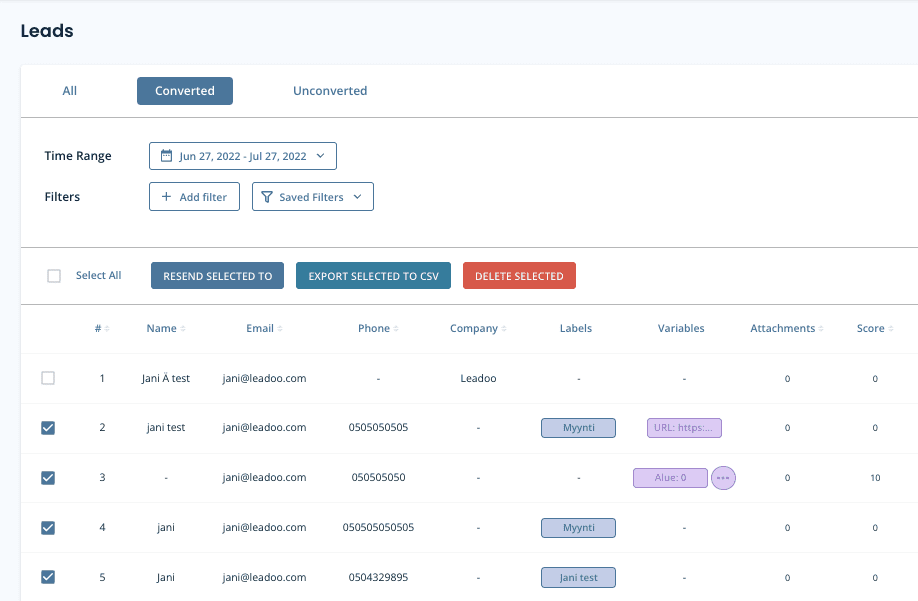
If you have set-up lead notifications on your bots, you will receive an email when a new lead is converted. All your leads are also stored on the platform under the leads tab, you can also filter them to find the exact leads you want.
You can either view Converted leads (default), Unconverted leads or All (has all bot conversations)
Different Filters
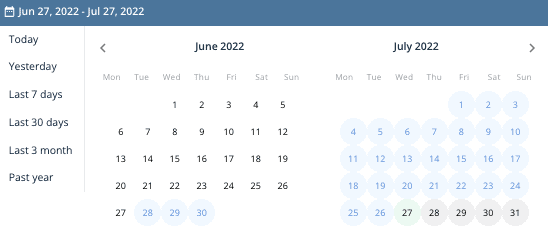
Time range: You can choose the time range of the leads you want to view. You can either pick pre-made time ranges or select specific dates from the calendar view.
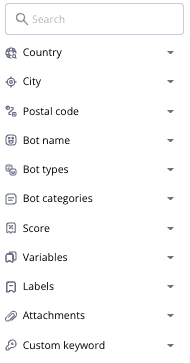
Country: You can filter by country (asked on Form/Location node)
City: You can filter by city (asked on Form/Location node)
Postal code: You can filter by Postal code (asked on Form/Location node)
Bot name: You can filter bot specific leads
Bot types: You can filter and see leads from different bot types
Bot categories: You can filter specific bot categories (ie. All sales bots, all recruitment bots. Bot categories have to be created to use this. Otherwise there is just Default categoryin all bots)
Score: You can filter leads that have gotten score between x-x. Scores can be added to different answers on bot dialogue ie. Recruitment bots (1 year prior experience gets score of 10, 5 years of prior experience gets score of 50)
Variables: You can filter out leads that have used certain variables in the bot dialogue. If you add multiple variables it will check does the lead have variable x AND variable y
Labels: You can filter out leads that have used certain label in the bot dialogue. If you add multiple labels it will check does the lead have label x AND label y
Attachments: If a lead has attachments or not
Custom keyword: Answers given on bot dialogue
Exporting Leads to CSV
First you need to select leads that you want to export. You can either select one by one or select all. You can export leads to CSV and then open up the file in excel, google sheets or some other platform. CSV has all lead details and the bot conversations in it.
Deleting Leads
First you need to select leads that you want to delete. You can either select one by one or select all. After that click ”DELETE SELECTED”*
*Note that deleted leads can’t be restored to the platform
Lead Settings
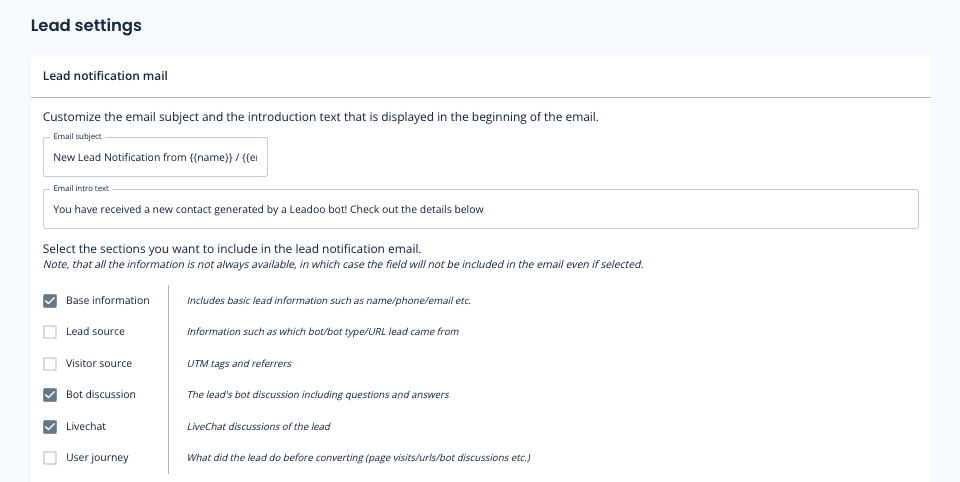
On Lead settings you can define what information you want to include on your lead emails by selecting different sections.*
*Note, that all the information is not always available, in which case the field will not be included in the email even if selected.
You can also define Email subject and intro text. That way you can make the email subject more clearer to the lead recipients. Ie. You can add the email subject to contain name and company of the person that contacted you. You can use following macros:
{{name}}
{{first_name}}
{{last_name}}
{{email}}
{{phone}}
{{total_score}}
{{company_name}}
{{country}}
{{city}}
{{location}}
{{post_code}}
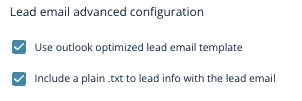
If you use outlook we recommend you to use Outlook optimized email templates.
And if you have issues copying the message from lead emails select ”Include a plain .txt to lead info with the lead email”
Questions?
Contact your Leadoo AI Customer Success Manager or email [email protected]
Leadoo AI Support:
How To Invite and Manage Leadoo AI Team Members
It’s easy to add new members of your team on Leadoo AI. You can also allocate different roles to them depending on their responsibilities!
This way, you have complete flexibility to decide who gets to respond to live chats and who should focus on tasks such as Chatbot development or monitoring reports.
Read this article to find out more about different user types and how to create custom roles.
How To Add Teammates To Leadoo AI?
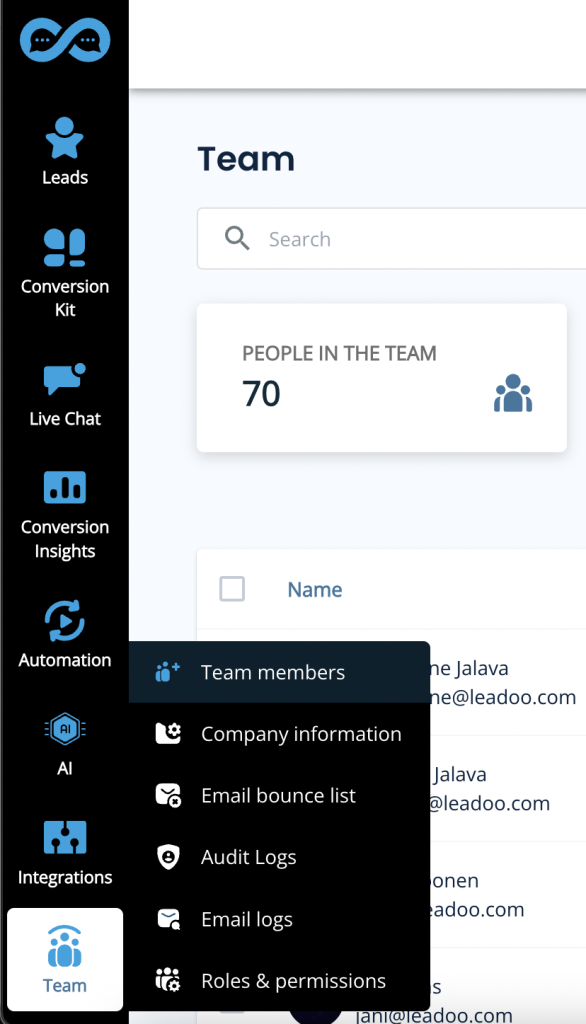
1) Open the “Team” page from the Leadoo Admin panel
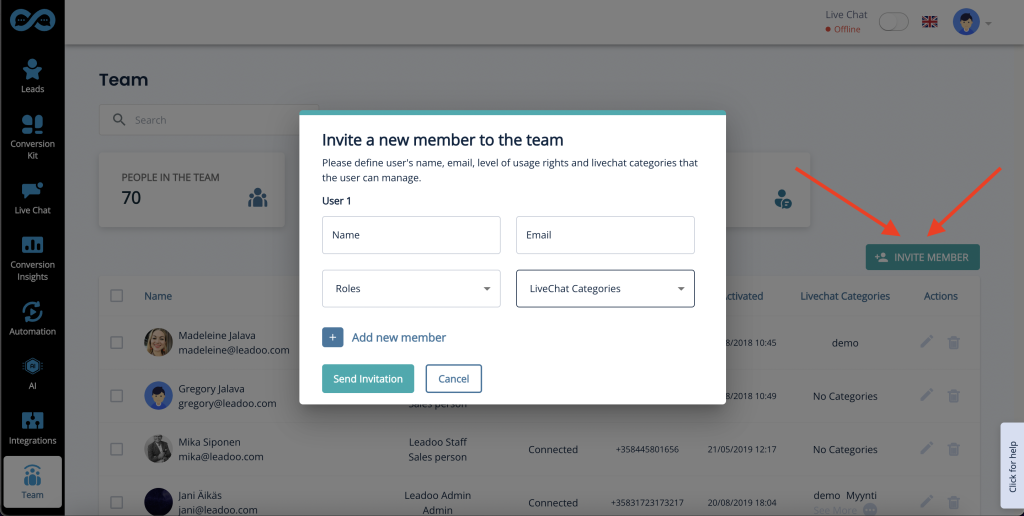
2) Click the “Invite Member” button
3) Add the new user’s email address. Define both their role and if the user is going to be a Livechat agent, make sure you select which category they should have access to.
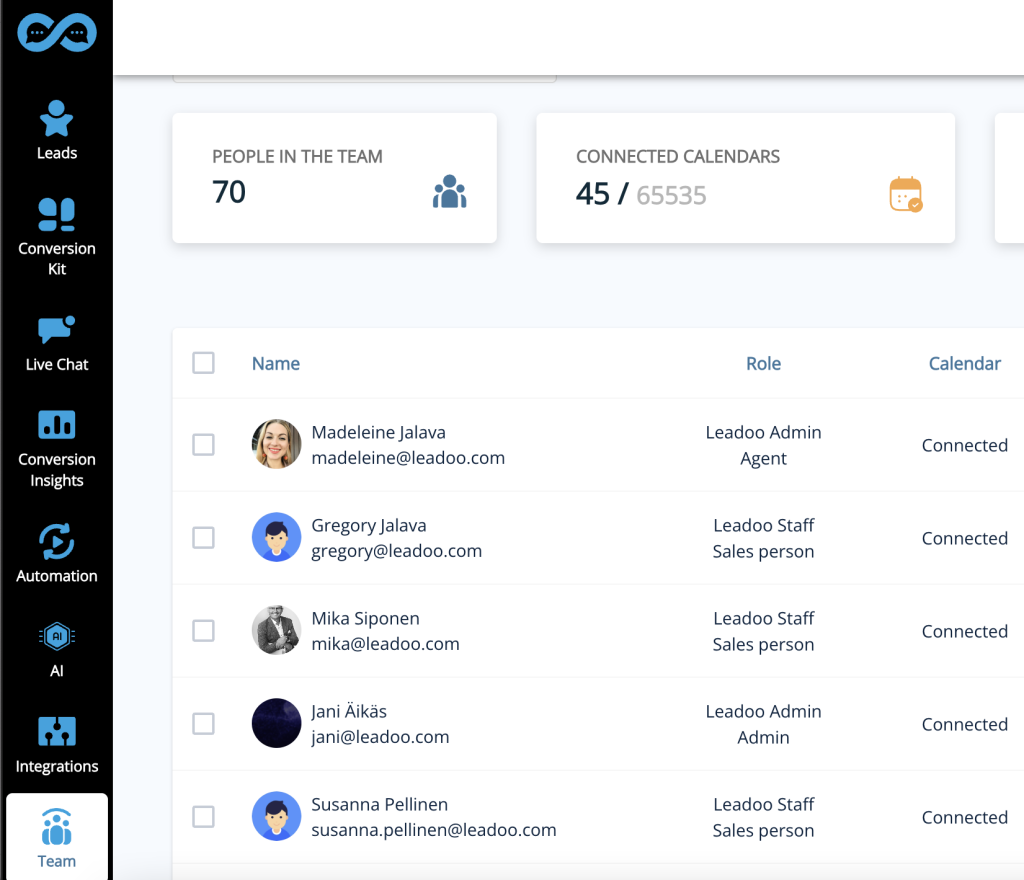
4) Manage your members from the team view by seeing who is online and which categories and roles each member belongs to.
Leadoo AI Support:
How to Sync Your Calendar With Leadoo AI
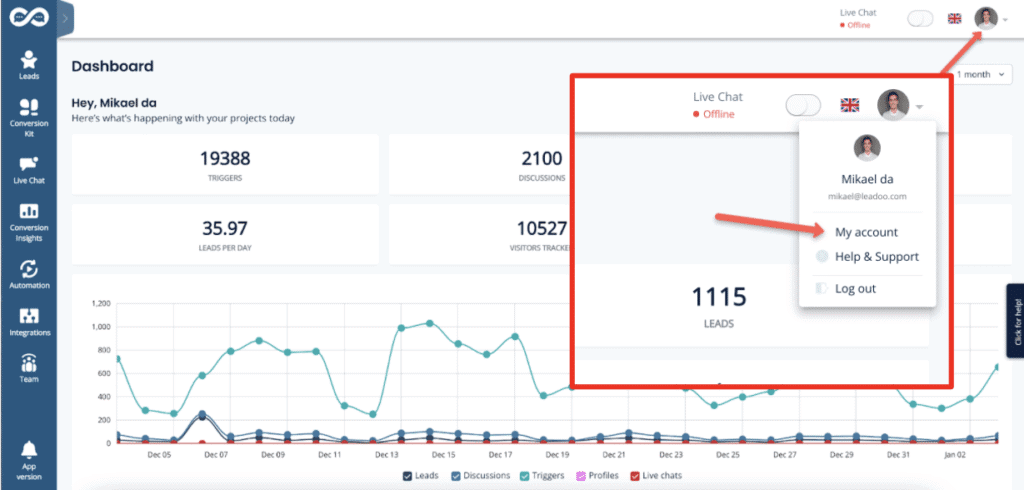
1. Open Your Profile Settings
Click your profile image in the top right navigation open your profile menu. In the menu, select “My account” to open the profile.
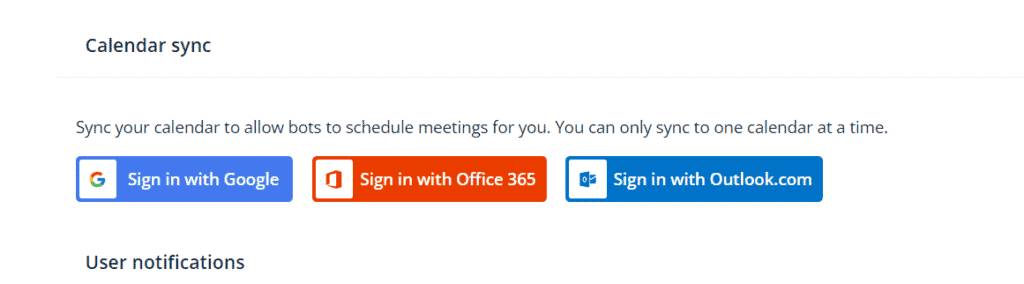
2. Find Calendar Sync
Scroll down the page to find the section called “Calendar sync“.
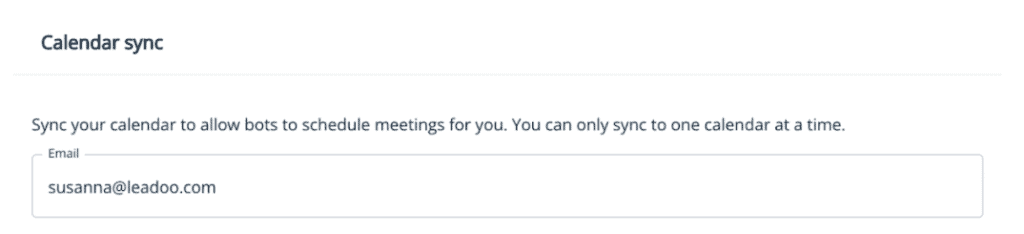
3. Check Which Email You Want To Sync To Your Profile
If you want to use Google Hangouts conferencing links in your meetings → use a Google account email.
If you want to use Teams conferencing links in your meetings → use a Microsoft account email.
Office 365 -> for business Microsoft calendars
Outlook -> for personal calendars
*The system prefills the email field with the address you use in your Leadoo account.
If you want to use another email, replace the prefilled text with the preferred email address.
Also make sure your calendar is not in read-only mode! (Only publicly available calendars can be synced)
If you are unable to edit your email address or click on the Sign with XX ask your Customer Success Manager to check that the feature is enabled for you 👇
4. Sign In To Correct Service According To Your Email Address
Select sign in button depending on the type of calendar service your email uses.
Google Calendar → Sign in with Google
Outlook calendar→ Sign in with Microsoft personal calendars
Office 365→ Sign in with Microsoft business calendars
5. Authorise Your Email Account
Allow Leadoo AI to manage your calendar
A separate third-party popup will open to finalize the sync.
In order for the calendar sync to succeed, make sure to check all boxes to give Leadoo full permissions to read and modify your calendar, i.e. handle meeting bookings for you.
Leadoo AI will not use these rights to anything else than making incoming bookings through bots that have booking node where your calendar is linked. Leadoo will not e.g. in any circumstance delete any meetings from your calendar.
6. Check Sync Status
When you see this or similar view, your calendar sync was successful. If this doesn’t appear or you get error messages, the sync has failed.
Some reasons why sync might fail:
Check if your calendar permissions are in read-only mode. If yes, remove the read-only status. The calendar needs to be available for the system to read. Note that it might take a moment for the new settings to take effect.
You’re using a free Microsoft account. Unfortunately we only support official organization accounts.
7. Update Your Booking Preferences
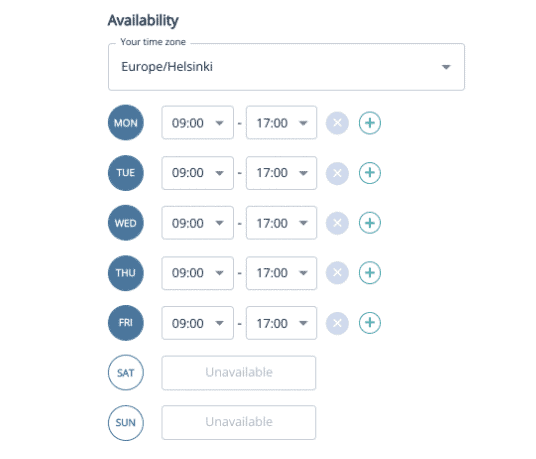
After the calendar shows synced choose to which hours in the day, how far in future and in what intervals calendar bookings can be made to your calendar.
Availability allows you to choose your time zone and the hours within which calendar bookings can be made each day. Ie. Always from 9am to 12pm and 1pm to 5pm (if you want to block bookings over lunch) or Mondays from 10pm to 5pm so you can start your week by emails and planning.
Remember that despite these availability hours the existing bookings in your calendar will also block anyone from scheduling overlapping meetings. Ie if you have a recurring team meeting every Monday morning this will automatically be unavailable in your calendar.
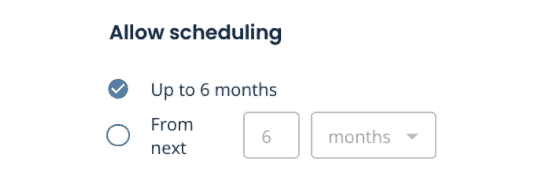
Allow scheduling Here you can decide how far in future your calendar can be viewed and meetings scheduled.
Buffer time This comes handy if you want to always have a short break in between meetings so that meetings cannot be booked back to back in your calendar.
Don’t allow scheduling If you want to make sure there will be no surprise meetings for the same day or no new meetings for next X hours or days. With this rule your calendar can only be viewed and booked starting after the set time. This is also the minimum time that you will have for preparing for the meeting.
8. Add Meeting Details
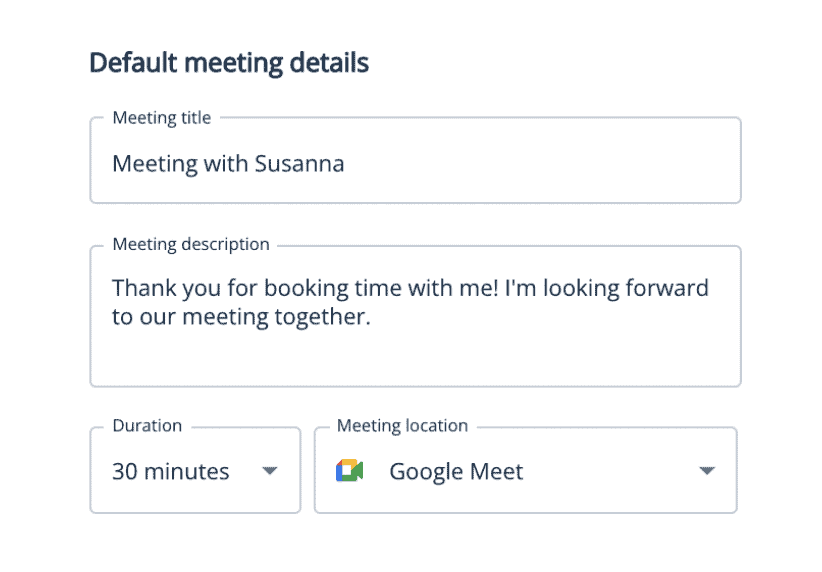
Once a meeting has been scheduled from your calendar both you and the scheduler will get an calendar invite. In default meeting details you can choose what will this calendar invitation state.
Google Calendar → Select Google Meet
Outlook calendar→ Select Teams
Office 365→ Select Teams
NB! If you have included the scheduling of different meeting types you can also set the meeting details per bot or dialogue branch within the bot editor.
9. Leadoo CSM Adds You As Lead Recipient
Once the setup is complete your Leadoo Customer SUccess Manager will add you to receive any leads that come through your own personal calendar integration. This way you will both get the calendar invitation as well as the bot dialogue and other lead details collected on the bot.
10. Test Your Calendar Sync
Once the setup is complete your Leadoo Customer Success Manager will add you to receive any leads that come through your own personal calendar integration.
This way you will both get the calendar invitation as well as the bot dialogue and other lead details collected on the bot.
Agenda
1.
Why you should consider using webinars
2.
The overall webinar process
3.
How to sell without feeling like you’re selling
Register here, it’s free!
Leave your details and your questions about webinars👇
Webinars are here to stay – now it’s time to turn them into sales 🚨
Webinars are a great one-to-many way of communication, gathering masses of your target audience to hear your message.
At least ideally.
In this webinar, we’re revealing the secrets of webinars. How to create one, how to choose a compelling topic, how to market it, and ensure you get your audience there – and how to turn your webinar into sales.
Sign up and take your webinar game to the next level! 🚀
Teresa Heath-Wareing is an award-winning international speaker and one the UK’s leading marketing influencers. She is going to walk you through the webinar process and how to turn your webinar into sales.
Jemmi Laaninen from Leadoo Marketing Technologies will pitch in with her experience in conversions and converting from conversations. She’s also our good news fairy, responsible for distributing the good news of each conversion with a touch of pixie dust ✨
Use our free Conversion Rate calculator to calculate your website’s conversion rate:
Use our free Conversion Rate calculator to calculate your website’s conversion rate:
What is a Conversion?
A conversion is simply any desired action a visitor to your website has taken in order to interact with you in some way. What this looks like is determined by you, and can depend on different things – your industry, your aims, your market.
Micro-Conversions
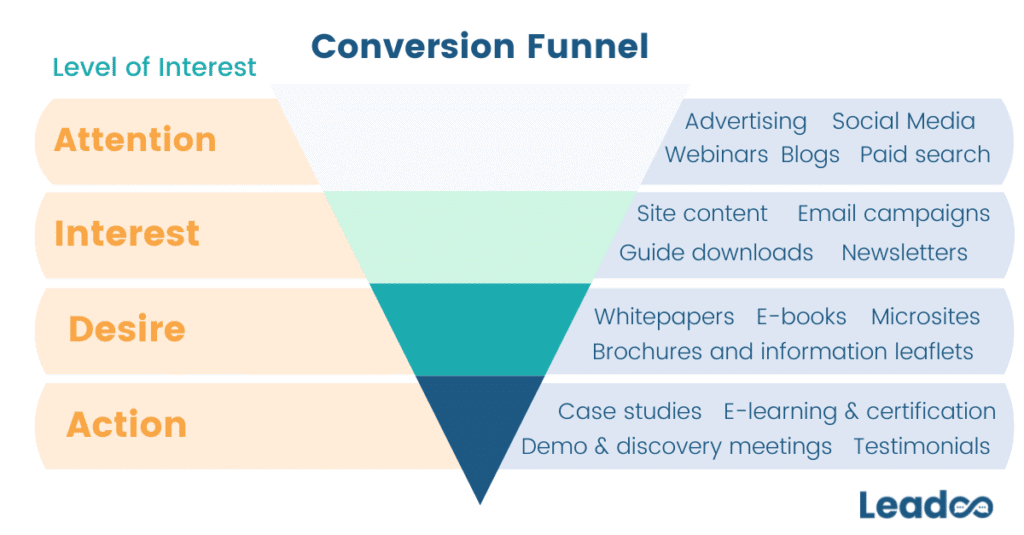
Micro-conversions are smaller conversions that happen en route to the customer making the final conversion or purchase. They tell us where the prospect is in the conversion funnel and means we can target them based on their level of intent. The type of conversion also gives us a clue into how far into the buying process each customer is.
For example, someone who downloads a resource (such as a guide) isn’t going to be as far along in the decision-making process as a client looking for a demo. Downloading a resource could mean that someone is just looking for information, but requesting a demo means they’re more likely to be seriously considering making a purchase and are at the point where they might be making comparisons across competing products.
See the conversion funnel below, along with some typical conversions/activity you might expect customers to engage with at different times in the buying process.
Keeping one eye on micro-conversions is important because every buying process looks different, and potential customers can enter the funnel at any point. The more you know about each visitor and their intentions, the more you can do to nurture each lead and get them to that final conversion point – and that’s what we’re aiming for, isn’t it?
How to calculate and interpret Conversion Rate
Obviously we’ve provided a helpful conversion rate calculator above so you don’t have to do the maths yourself (ain’t nobody got time for that). But if you want to understand how we got to the final number, calculating conversion rate looks like this;
Conversions (desired actions taken) x 100
Website Visitors
For example, if your website received 10,000 visitors a month, you get 200 conversions or leads a month, then your conversion rate would be calculated as:
200 x 100 = 2% conversion rate.
10,000
This means that for every 100 visitors you receive on your site, 2 of them on average will convert.
Is that a decent conversion rate?
A ‘good’ conversion rate is a bit of a contentious topic, but our rule of thumb is: no matter what your conversion rate is, you should aim to improve it. Obviously, if you’re some sort of unicorn managing to somehow convert close to 100% of your traffic, this doesn’t apply to you (and maybe you’d like a job as a conversion specialist…?).
Another helpful way to interpret your conversion rate is to compare it to benchmarks for your industry. We put together a helpful guide with some benchmarks for different industries, based on a variety of different types of conversion, and with a bunch of top tips on improving your rate.
Where can it be used?
The above calculation can be used to work out the conversion rate for traffic to your site, but not for traffic on individual pages on your site. Conversion rate looks at the overall number of people converting.
There are a few ways to check on a landing-page level, but it’s not as reliable as the overall conversion rate and only really tells you their conversion rate if they landed on that page immediately and converted. In practice, most people navigate through more than one page before finding what they’re looking for and converting, and so there are drawbacks to calculating it in different ways:
If you calculate it using conversions/sessions (including a specific page) then you will end up inadvertently including conversions that happened elsewhere on the site.
The same thing will happen if you calculate it as conversions/users, as users will likely have visited multiple pages and maybe even have multiple sessions.
Therefore, the best way to work this out is likely to be by looking at conversions/unique page views as this will allow you to look at how likely someone who visits this page is to convert.
Key Takeaway
👉 Conversion rate is calculated by taking Conversions/Visitors x 100.
👉 A ‘good’ conversion rate is hard to define, but you can use industry benchmarks and close monitoring of your rate to ensure you make the most of every visitor.
👉 Conversion rate only really works for the whole site – it becomes complicated if you want to work out the conversion rates for individual pages.
Get in touch with us or chat to the bot below if you need help calculating, interpreting and improving your conversion rate. If you want to know what return you could get from having Leadoo on your website, check out our ROI calculator.