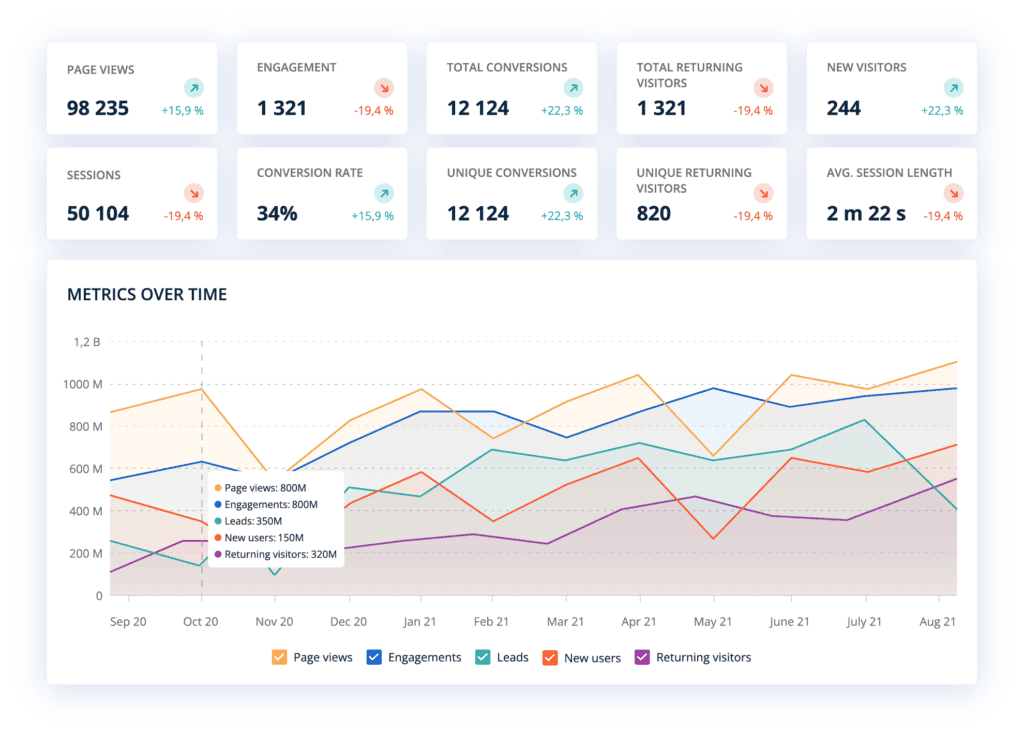
Leadoo Website Analytics is automatically added to all existing Leadoo subscriptions and it doesn’t cost anything. You can find it from the navigation by clicking “Conversion Insights”.
To view your Leadoo Website Analytics… 1. Log into your Leadoo account (free for all existing customers) 2. Make sure to copy the Leadoo dynamic script to your website header if you haven’t already done so 3. Dive into your website analytics!
If you can’t find Leadoo Website Analytics on your Leadoo account, please contact your Customer Success Manager or [email protected]
We are proud to release Leadoo Website Analytics as a part of the Leadoo Analytics family! With Website Analytics you will see all the website statistics from visitors, pages, sources, visit durations and more.
Now that Google’s Universal Analytics is being faded out in June 2023, many of our customers started looking for alternatives to GA4, with data stored in the EU/EEA instead of sending it to the US. And because Leadoo already has very extensive conversion data we decided to develop this new Website Analytics feature and include it for free to all our existing customers.
If you are not a Leadoo user you can sign-up for our waitlist now. You will be the first to know when we release this to a wider audience.
You can read the full feature list here or watch how our founder Mikael da Costa explains the ins and outs of Leadoo Website Analytics.
How to get started?
Leadoo Website Analytics is automatically added to all existing Leadoo subscriptions and it doesn’t cost anything. You can find it from the navigation by clicking “Conversion Insights”.
To view your Leadoo Website Analytics… 1. Log into your Leadoo account (free for all existing customers) 2. Make sure to copy the Leadoo dynamic script to your website header if you haven’t already done so 3. Dive into your website analytics!
…of course you can always contact your dedicated Customer Success person if you have any questions when setting up Leadoo Website Analytics! 🤩
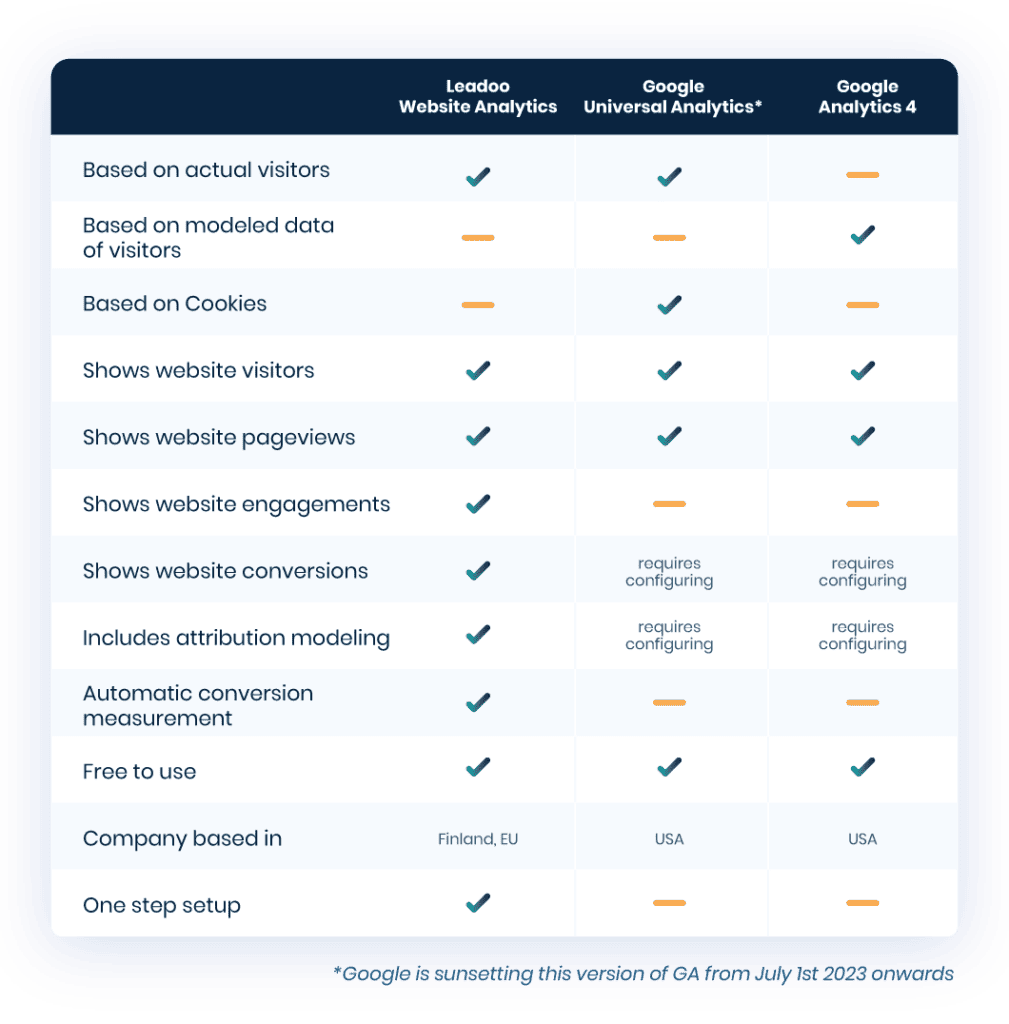
How does Leadoo Website Analytics compare against other known website analytics tools? Check the comparison below.
Leadoo Insights now consist of:
Bot insights – see which bots convert what and where
Source insights – see which sources are responsible for your conversions, did FB perhaps bring in more job application conversions but LI more customers?
Website analytics – see analytics on sources, campaigns and pages and how they perform
Every contact request made through a website almost always requires communication and coordination to find a suitable meeting time for everyone’s calendar.
That’s why we created the calendar integration feature in Leadoo. This way, a lead coming from a website can conveniently book the most suitable time for themselves from a predefined calendar, keeping the sales process fast-paced throughout!
Use cases for Calendar Integration
Where can this feature be used?
Short answer: anywhere.
Since the answer above doesn’t explain much on its own, we’ve listed some excellent use cases for calendar integration below!
Sales Meetings Directly from Your Website
We all love quality inbound leads, but they’re even better when they appear directly in your calendar!
Using calendar integration allows a person requesting a quote or product demo from your website to book the most suitable time with your expert.
The bot can first ask qualifying questions, then offer the option to book a calendar appointment, and all the salesperson needs to do is be present at the scheduled time.
Customer Service
Everyone wants to serve their customers as personally and quickly as possible.
Leadoo’s tools enable your customers to have an interactive, conversational way to get in touch 24/7 and book meeting times according to predefined rules.
This way, customer service representatives can focus exceptionally well on each encounter and provide the best possible customer experience for each customer, as these frustrating “would this work for you” email chains can be completely eliminated.
Recruitment
Scheduling interview times with multiple candidates is laborious and time-consuming.
It might also be nice to offer potential job seekers the opportunity to take a 15-minute virtual coffee break with their future supervisor, but manually scheduling it? No, thank you.
That’s where calendar integration comes to save the day! You can easily connect the recruiting supervisor’s calendar to Leadoo’s bot and manage the entire application process through this bot.
If you want to learn more about how to use Leadoo in recruitment, check out this post!
Landing Page Conversion Point
Landing pages are a great opportunity to convert a visiting user – provided the landing page is well-designed.
Too often, the landing page is cold and only allows one type of conversion, such as sending a demo request. This way, much potential is wasted.
By adding Leadoo’s calendar integration solution to the landing page, you enable not only lead qualification but also convincing and converting visitors at different stages of their purchase journey into comfortable calendar meetings.
Practical Questions on Your Mind
Do I have to be a Leadoo user to use this feature?
Is there a free version to test?
What calendars can be integrated?
4 reasons why calendar integration is essential for you
Save Time
No more back-and-forth emails and numerous updating calendar invitations. Get meetings directly into your calendar without extra hassle.
Boost Sales Process
By giving prospects the opportunity to book a meeting directly from your calendar, you save time at a crucial point and make working with you as easy as possible.
Better Meeting Quality
When a prospect or existing customer can choose the best time for them, they are typically more committed to attending and are genuinely ready for the meeting. In addition, Leadoo’s solutions enable easy qualification and gathering additional information about the lead at the same time as the calendar booking, so you get a well-qualified and committed lead to your meeting.
Improve Customer Experience
Whether it’s a potential or existing customer, you want to provide them with the best possible experience. This starts by making their lives as easy as possible. Give them the opportunity to contact you when it suits them best and book the most suitable meeting time.
If you’re already a Leadoo customer you can create your own Leadoo Sales Assistant or add calendar bookings to your existing bots by following the videos below.
Come join us for a morning of conversion-focused conversation 💡
We know that increasing your web conversions is still something that marketers from all industries find to be a challenge. So, we thought we’d gather some of the industry’s brightest and have a morning of conversion focused conversation at the BIG Conversion Meet up.
Why should you attend…?
🔥 5 awesome keynotes about conversions and CRO
🔥 Discover the latest tactics and strategies for increasing your conversion rates
🔥 Network with like-minded marketing professionals
🔥 Coffee, tea and breakfast at a prime location Everyman Cinema, Kings Cross
What have previous meetup visitors said about the event…?
“Great talks, inspiring conversations with peers and lovely breakfast! What more could you ask?!”
“I really enjoyed the keynotes. The one about website as a sales channel inspired me to demand more from our business. There’s a big opportunity we are missing out on!”
“Conversations with like-minded marketers are so valuable. Glad that you organised this and that live events are back!”
09:30 am — The Art of Conversions in a Data-Driven World – Mikael da Costa, Leadoo Marketing Technologies
10:00 am — Testing, testing: Optimising your way to more conversions – Jack Brown, Hallam
10:30 am — Mid-morning break & refreshments
11:00 am — CRO EEAT or Eat Crow: How trust signifiers can convert customers and satisfy searchers – Alex Murphy, Balance
11:30 am— Are Facebook ads still relevant in 2023? – James Urquhart, Let’s Run Marketing
12:00 am — The power of combining search and UX – Rachel Tooke-Marchant and Ian Miller, Crafted
12:30 am — Networking & refreshments
Keynote Session Details 🔎
The Art of Conversions in a Data-Driven World – Mikael da Costa, Leadoo
Marketers and sales teams have never been more reliant on data. However most websites convert at most a single-digit percentage of visitors into leads, and in many cases, 2% and under. Leadoo founder Mikael da Costa will talk about how this disparity inspired him to build and perfect a conversion platform, and how modern marketers should treat conversions as both an art and a science to truly start turning website traffic into commercial success. You can also walk away with a free copy of his hot-off-the-presses new book: ‘The Art of Conversion: A Roadmap to Effective Lead Generation’.
Testing, testing: Optimising your way to more conversions – Jack Brown, Hallam
Discover the secrets to unlocking the full potential of your paid advertising. In this talk, Jack will show you how small tests in your paid media strategy add up to make big commercial differences. Using real life examples of testing successes, Jack’s talk will give you actionable insights on how to structure tests, implement the activity and interpret results to boost conversion rates. You’ll walk away with a concrete testing strategy you can put into practice right away on your paid campaigns!
CRO EEAT or Eat Crow: How trust signifiers can convert customers and satisfy searchers simultaneously– Alex Murphy, Balance
CMO and Founder of the financial services digital marketing agency – Balance, Alex Murphy will draw on his experience at organisations like The Royal Mint, GoCompare and Admiral to explain how fulfilling Google’s organic E-E-A-T guidelines is not just an SEO imperative, but a conversion one too. You’ll leave with a fuller understanding of how good CRO can boost your website in Google’s algorithm, and how SEO should be part of an overall strategy to drive higher conversion rates.
Are Facebook ads still relevant in 2023?– James Urquhart, Let’s Run Marketing
The buzz around Facebook Ads seems to be polarising. Some are shouting “Facebook Ads Are Dead” and “Facebook Is Failing,” while others sing its praises, touting it as the reigning champ of social networks that you’d be foolish to ignore. Which side should you believe when it comes to capturing more conversions? Find out from James.
The power of combining search and UX– Rachel Tooke-Marchant and Ian Miller, Crafted
Crafted’s CEO, Ian, and Search & Insights Director, Rachel, will highlight the conversion superpower of bringing the disciplines of SEO and UX together. They’ll both provide insight into how they’ve made it a reality with recent client stories, and leave you with a fresh perspective on what UX success looks like. You’ll leave with a better understanding of the interplay between UX and SEO, how to avoid common UX pitfalls, and how to find themes in your UX data.
Leadoo AI is fully integrated to Google Tag Manager, meaning that custom events can be triggered for every interaction any visitor has with Leadoo’s conversational tools.
Here’s how to implement Google Tag Manager to work with Leadoo AI:
1. Add your Google Tag Manager container ID to your Leadoo admin panel
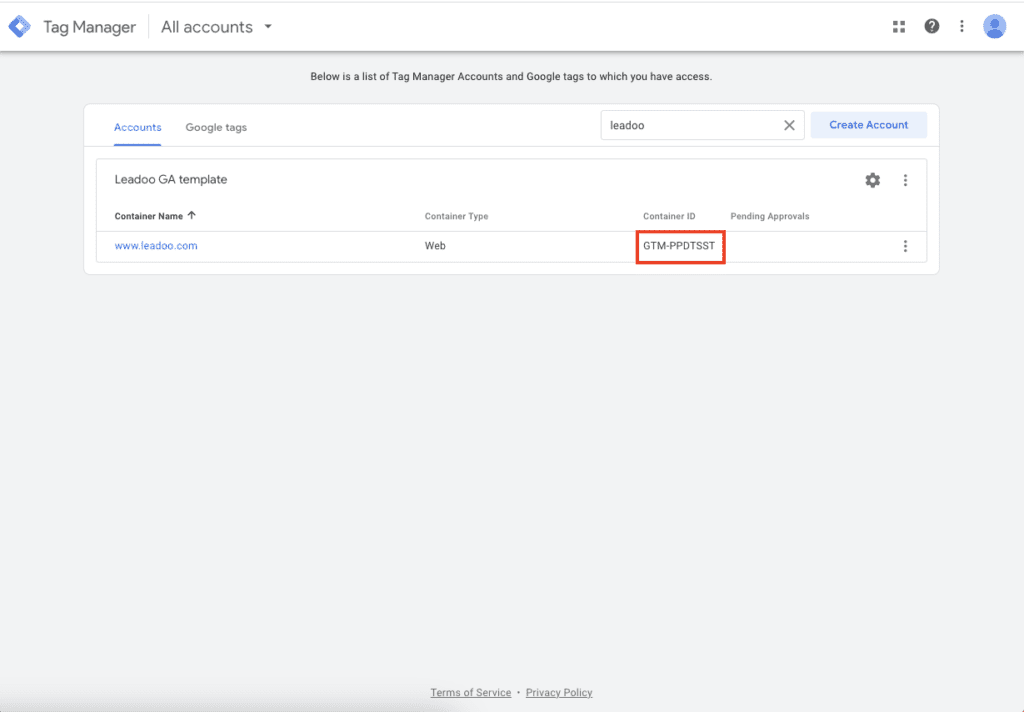
You can find your GTM container ID after logging in to Tag Manager. Copy your GTM container ID.
More advanced Google Tag Manager users can also leverage the information sent over on the data layer. The following details can be used to create custom variables
category <- Bot type (embed, chat, cta, modal) bot_category <- For each bot you can set a bot category on the Leadoo backend, this allows you to create for example separate analytics for sales and recruitment bots label <- For each multi select answer you can create custom labels. These can be for example interest type of the customer text <- Info of what text was written on the bot. bot_name <- Name of the bot bot_nickname <- Name given on bot settings
You can use these data layer variables to create more accurate retargeting groups and lookalike audiences
If you need any help setting up the integration you can contact [email protected]
Leadoo AI Support:
Setting up an integration to Google Analytics 4 using templates
Leadoo AI is fully integrated to Google Tag Manager, meaning that custom events can be triggered for every interaction any visitor does with Leadoo chatbots. Here’s how to implement Google Tag Manager to work with Leadoo AI.
1. Add your Google Tag Manager container ID to your Leadoo admin panel
You can find your GTM container ID after logging in to Tag Manager. Copy your GTM container ID.
After that log in to app.leadoo.com/sign-in
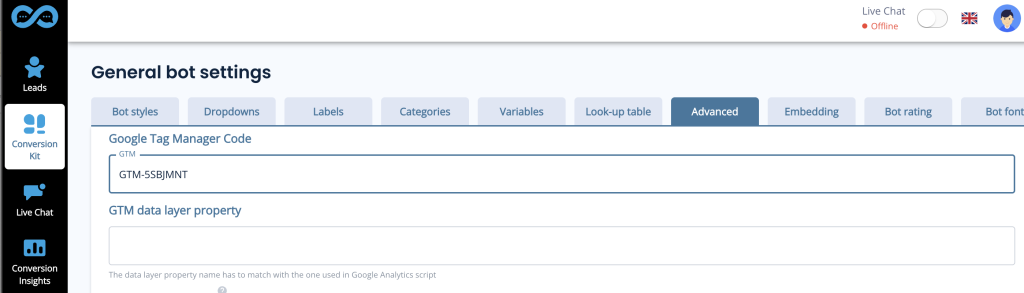
Go to Conversion Kit -> General bot settings -> Advanced
Add your GTM container ID to the Google Tag Manager Code field *In most cases you can leave GTM data layer property field empty.
After this has been set your bots will start sending events.
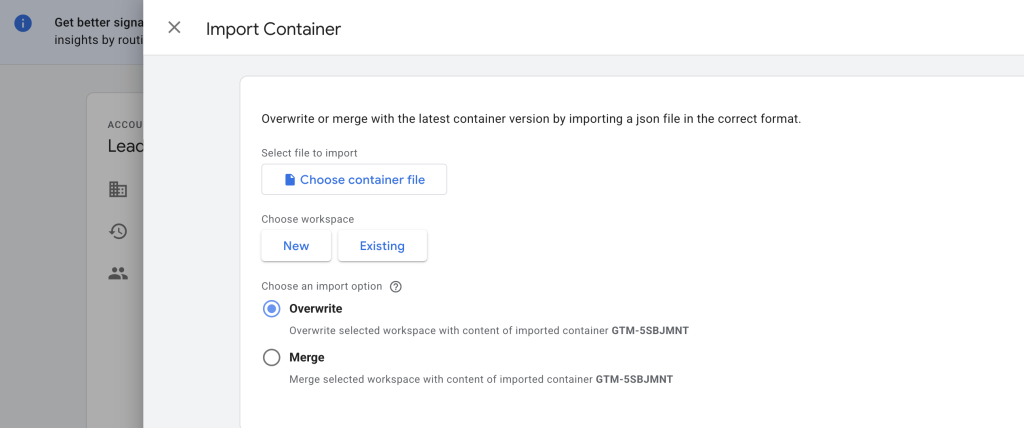
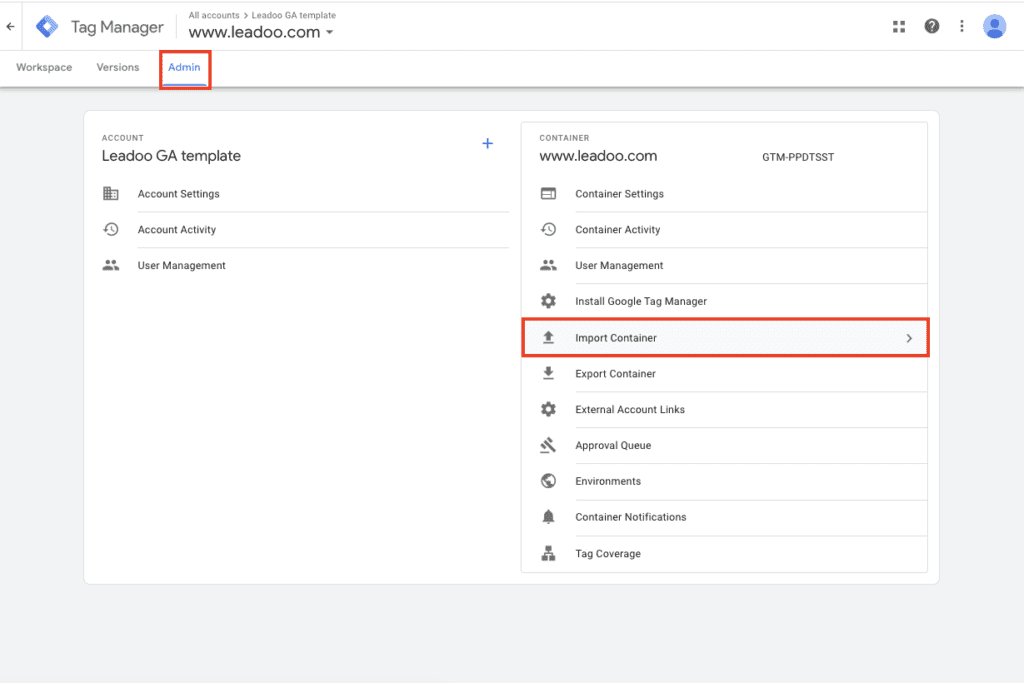
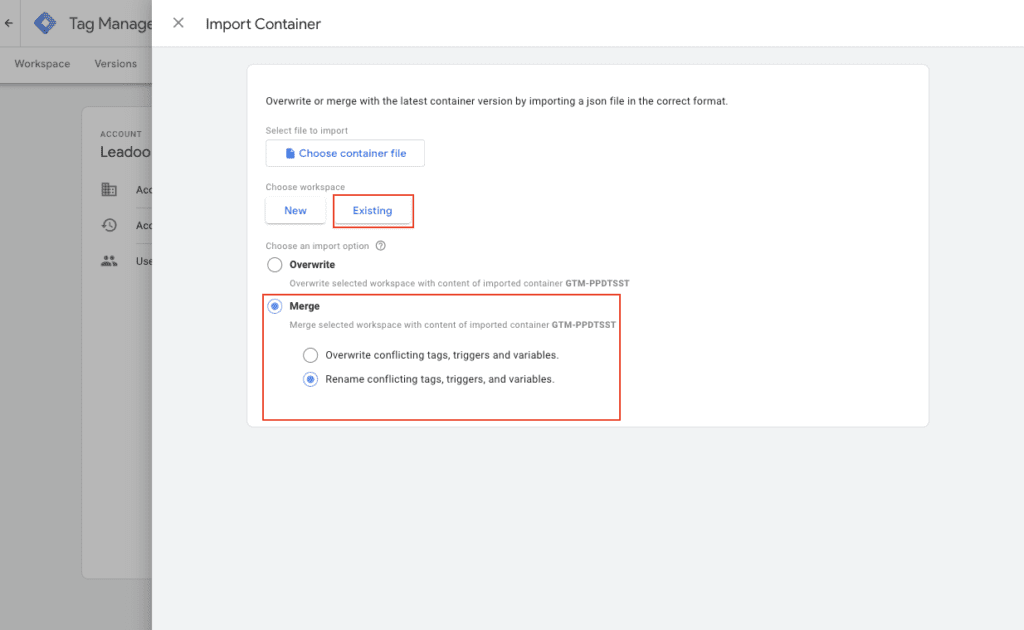
After this choose an import option. You can merge conflicting tags, triggers and variables
Submit new tags, triggers, variables and templates
Go to Tags -> Add your GA4 configuration tag to the tags you’ve just created -> publish changes
You’ve now connected Leadoo to your Google Analytics 4
*If you haven’t connected GTM and GA4 you can connect the two applications. In your GTM container, create a new tag using the following steps:
Click New Tag
Label your new GA4 Configuration Tag
Choose the Google Analytics: GA4 Configuration
Input Your Measurement ID from GA4*
Click the box “Send a page view event when this configuration loads”
Click save
* You can find Measurement ID from GA4 under Admin -> Data Stream -> click account -> copy Measurement ID
If you need any help setting up the integration you can contact [email protected]
I need to update my website.
The famous words upon almost every marketer’s lips, it seems. The idea of updating your website may evoke some unpleasant feelings – it often seems like a laborious project that requires both time and financial resources. However, websites are one of the most important sales channels for almost all companies, if not the most important. Today’s buyer acts more independently (at arms’ length!), and is less bothered about being in contact with the seller before making a purchase decision – therefore websites must serve customers in the way they want, and not try to fit a square peg in a round hole, so to say.
Many companies face at least some kind of website updates semi-regularly. This can come from product updates, changes in the market, changes in brand or positioning and more. And, even if the pages themselves offer a lot of information, many other things affect the user experience, such as loading speed, clarity and other user-friendliness. We want answers from websites, and we want them now.
Website renewal is no mean feat. So why on earth would now be a good time to introduce any new services or tools? Doesn’t that just complicate things? 🤔
Well, we think not – at least not in the case of Leadoo – and we spoke with expert Customer Success Managers to find out four reasons why Leadoo’s tools should be used when updating or renewing your website.
1. Fix all elements of the site at the same time
When we start to work with a client and they’re doing a big website revamp, it’s actually easier for both parties to plan ahead – we can kill two birds with one stone. You already know what your new website will be like, what you’re aiming to do with it, and what kind of conversion tools you might want there. Leadoo can slide seamlessly into this plan.
After the first onboarding meeting, we have a comprehensive understanding of your needs, and we know how to design conversion tools exactly according to the needs of your customer base – our onboarding teams have helped over 1000 companies to improve their conversion rates, and have vast experience in working closely with clients during website renewal to ensure it’s optimised for conversions. Once the new web pages are ready, you will immediately get the perks of efficient, interactive and data-gathering conversion points, rather than having to then do it as a whole extra project afterwards, and retrospectively fit it to your site.
2. Collect data to inform the improvements you make
Ah, wonderful yet horrible data. Sometimes it’s difficult to decide what all the data should be collected and how to properly utilise it, but one thing is certain – you can never have too much information about the stages of the customer’s purchase path and the various touch points they have had on your site. This information is gold for both your marketing and sales teams – and pretty important when considering a redesign of your site. You want it to be as easy as possible for a customer to get the support they need to make a purchase, and this starts with tailoring your site to the needs and wants of your customer base.
It is good to remember that Leadoo’s conversion tools can also be used on slightly unfinished or old pages. Leadoo’s conversion tools collect a lot of information about the stages of website visitors’ purchase paths and what kind of information visitors want to find. Based on this data, planning and implementing new websites can also be a faster process, because it is easier for you to produce content that is of real value to website visitors.
Updating your website (sadly) is not a one-time project, but in fact its optimisation continues over time. The data collected by the conversion tools is crucial for web page conversion optimisation, as the behaviour of the visitors and the conversations they have with the conversion tools give a lot of clues about how the pages can be modified and improved to be even more effective.
3. The benefit of conversion points, identified by experts
With Leadoo’s conversion tools, you can eliminate at least one point from your website redesign – having to create conversion points.
It’s good to have a wide range of different conversion points on websites, so that every customer, regardless of the stage of the purchase path, can find a conversion point that is just right for them. Forget static forms and simple “request a quote” buttons, after which you ask the customer to fill in everything from their horoscope to their shoe size. Ain’t nobody got time for that. They need lighter conversion points – perhaps additional information that can be read independently, or an expert’s guidance on how to proceed.
Either way, you’ll have the support of our expert team to identify the best places on your site for conversion opportunities using our tools, and where you might add in extra conversion points to capture the soft conversions (i.e. those at an earlier stage in the funnel).
4. Versatile and interactive pages
No more flat, boring websites. Leadoo’s tools are about activating and engaging your visitors, and the way we do that is by making it a personalised, conversational experience. This could be through a simple set of questions to find a suitable service or, for example, calculate a price estimate directly using an interactive calculator. Nowadays, personalisation is expected by customers. We’ve even taken this to a whole new level – with Leadoo Personaliser, for example, you can provide personalised conversations based on a previous touchpoint or piece of information, such as the visitor’s industry, number of visits or other filters you want 🤩
So if you’re wondering if it’s worth using Leadoo if a website update is around the corner – the answer is yes, it’s worth it!
We want to help you accumulate conversions on your existing or new websites. From us, you get conversion tools carefully thought out for your needs, designed by an expert, which bring more interactivity to your website and mean help is available 24/7. Find out more about our tools here, for example, or take a look at the success stories of our happy customers here 💙
If you want to hear more about the suitability of Leadoo for you, chat our assistant below 👇🤖
The BIG Conversion Meetup
Hosted by Leadoo AI and Blame it on Marketing
Everyman Cinema, Kings Cross, London
Wednesday 18th March, 2026; 8:30am – 1:30pm
Join us for a free morning of insights on all things Conversions 💡
It’s back! Our London BIG Conversion Meet-ups were such a success that we’re hosting another!
This time though, we’re changing up the format. You’ll still hear expert guests talk about their Marketing specialisms, but in the format of a live podcast, followed by a live website audit.
So not only will you get all the insights of a Blame It On Marketing episode; you’ll be able to see a live audit from experts on how to apply those lessons to achieve better website results, and more Conversions!
We are even opening up the live Website Audits to audience members in the second half of the day. So if you want to volunteer your website, you’ll get free advice from our guest experts and fellow Marketers on how it could convert your users better.
Let us know if you’d like your website audited when you fill in the registration form.
What it’s like to attend a BIG Conversion Meet-up at Everyman King’s Cross? Watch for yourself!
Emma Davies & Ruta Sudmantaite – Founders, Blame It On Marketing
Alicia Torres – Marketing Manager, Force24
Jade Falcounbridge – Founder, DataCloud
Greg Landon – VP Marketing, Leadoo
Leadoo AI Support:
Visual Bot Builder: Bot Editor Nodes Explained
When building a Leadoo bot, you can choose from a variety of nodes to create engaging and highly tailored user experiences.
Most bots share the same node functionality, though LiveChat is exclusive to ChatBot, while Range Selector is unique to VisualBot. VisualBot nodes also offer enhanced design options, including fields for headings, subheadings, descriptions, and easy image integration for richer answer displays.
This guide details each node type, illustrating how to use them effectively to personalise interactions and optimise visitor engagement.
Nodes Available in ChatBot, InpageBot and VisualBot
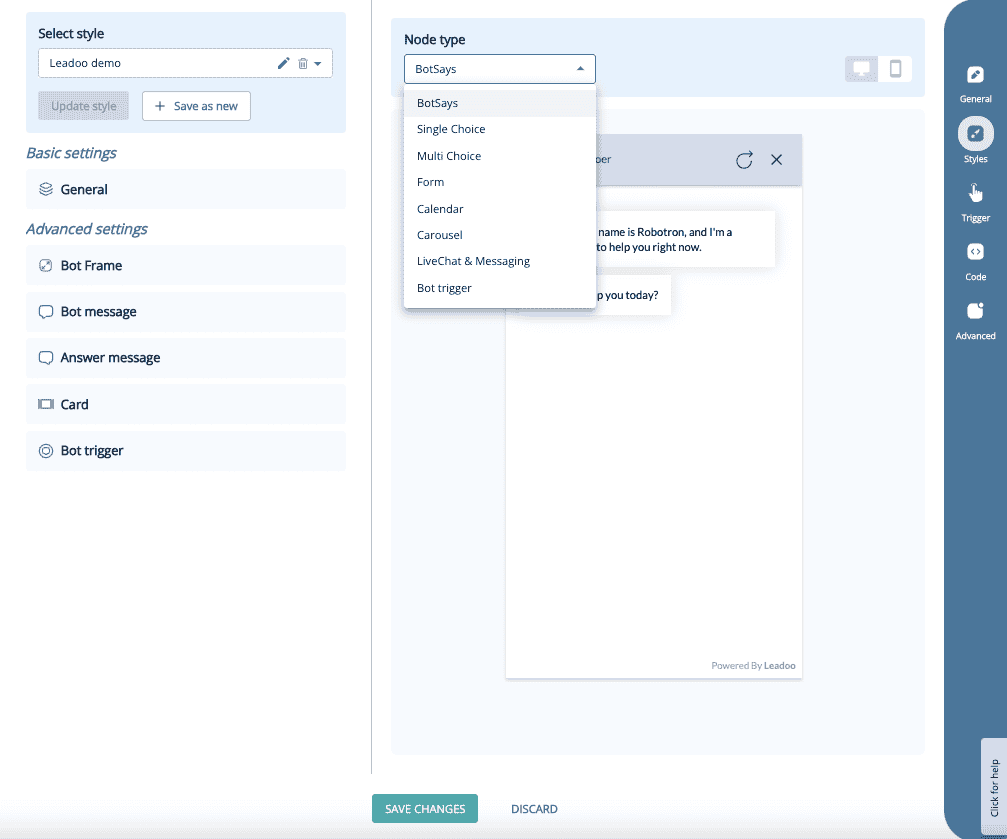
There are 14 different node types which you can use to personalise your conversations.
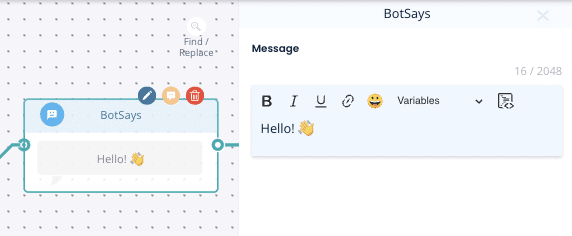
1. Bot Says – Displays a message to the visitor without offering options and then continues the conversation.
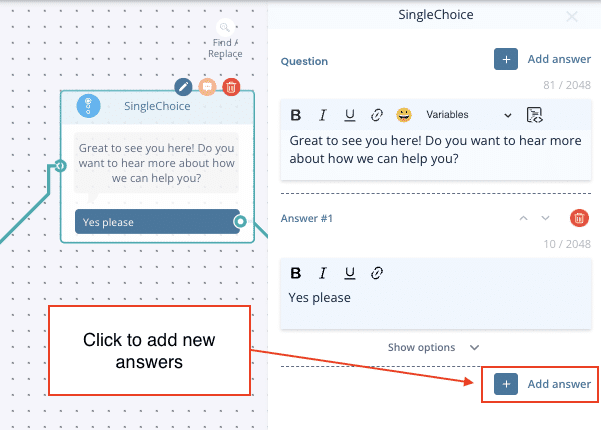
2. Single Choice – Allows the visitor to select one option, which can direct them down specific paths. You can also turn these options into hyperlinks by expanding Show options.
3. Multiple Choice – Allows multiple selections before moving to the next step.
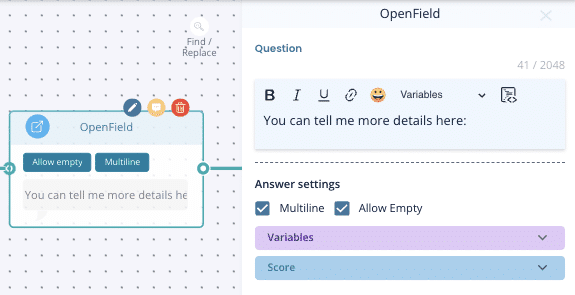
5. Open field – A free text field for open-ended responses.
6. Carousel – Create visually engaging carousels to showcase content interactively. Ideal for product finders and features that benefit from a dynamic, scrollable format to boost user engagement.
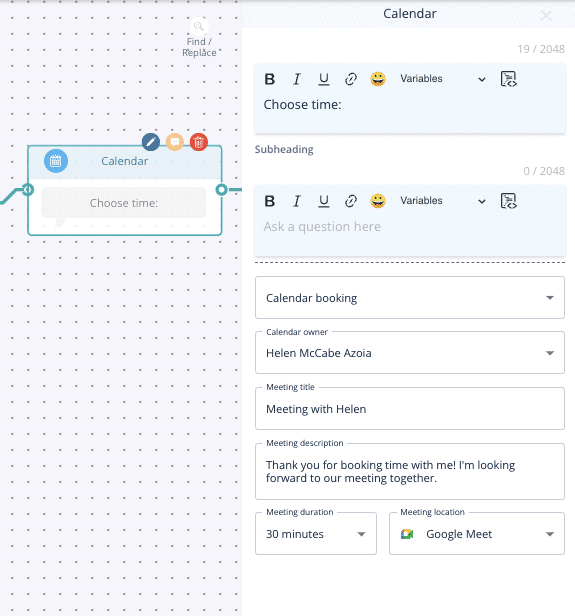
7. Calendar
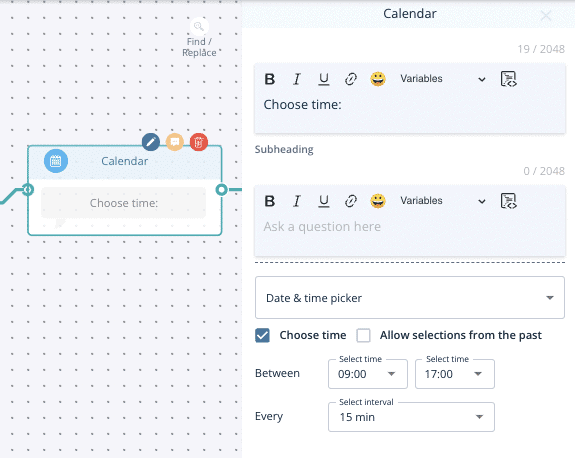
Date & Time Picker:Allows visitors to select a date and time but does not sync with a calendar.
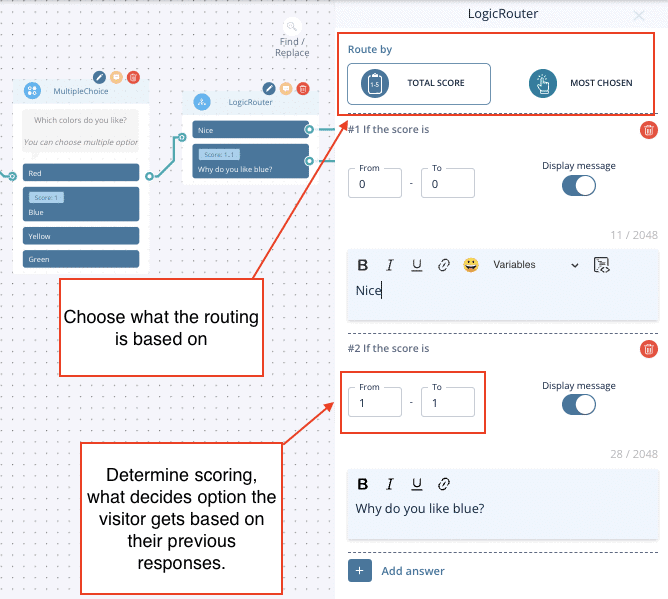
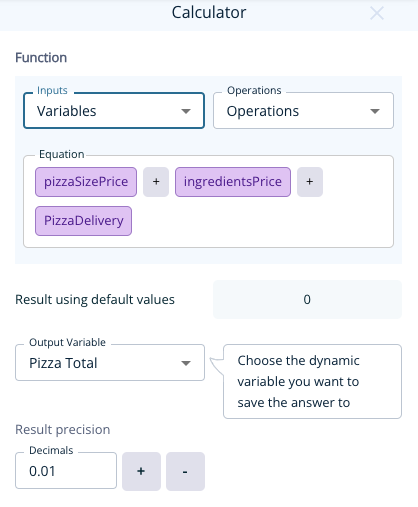
9. Advanced Logic Router – Provides more complex routing. You can set up IF/AND/OR conditions based on things like previously selected labels or dynamic variable data. Learn about Advanced Logic Router Operations here.
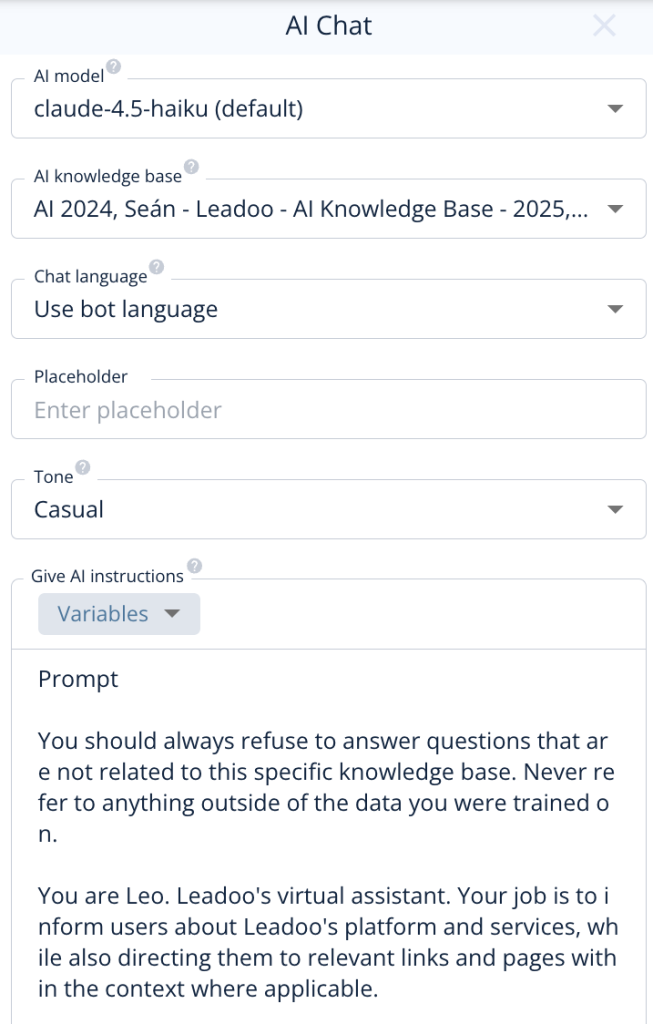
11. AI Chat – For those with AI in their subscription, this node adds Leadoo AI functionality to conversations, enabling responsive, AI-driven interactions tailored to your visitors’ questions.
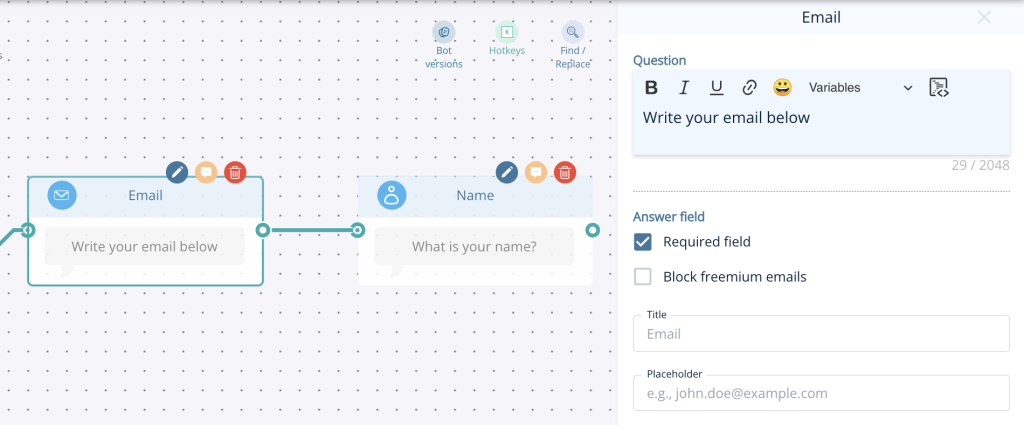
12. Standard contact nodes – Collect contact information in individual nodes.
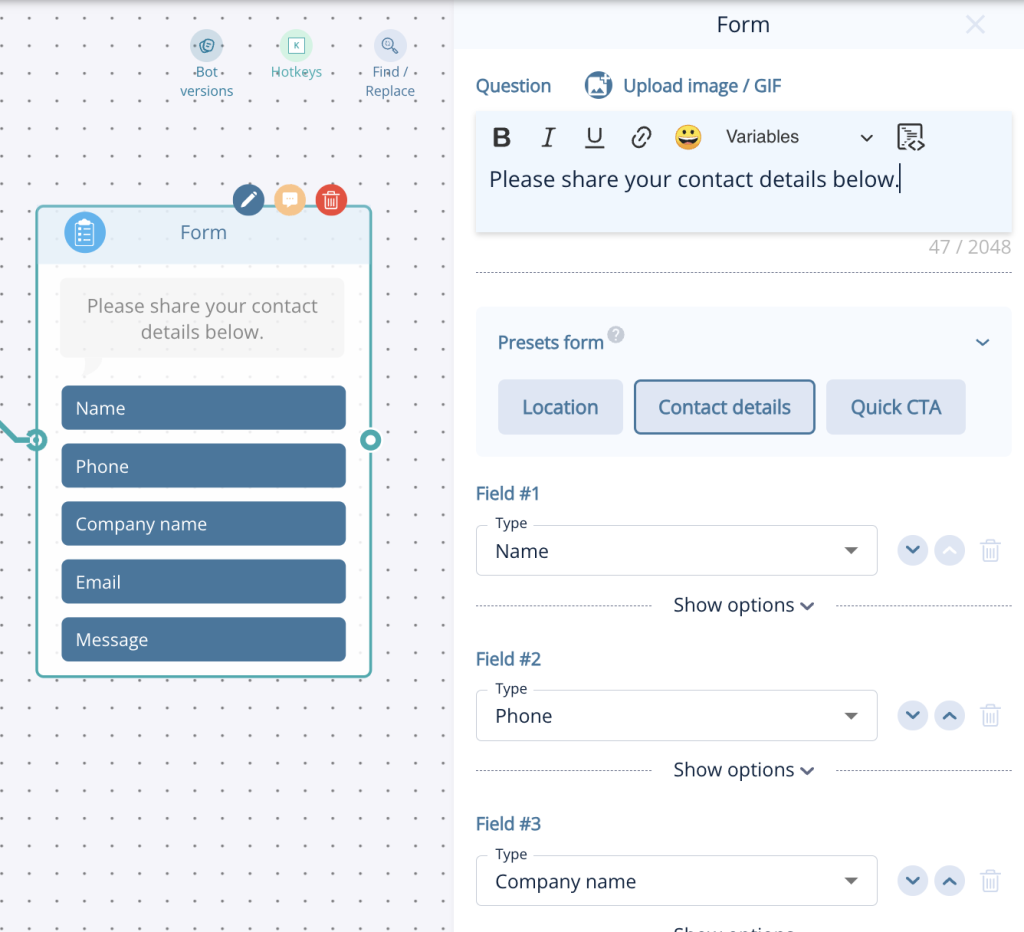
13. Form node – Collect multiple details (name, email, phone, company, address, etc.) in one node.
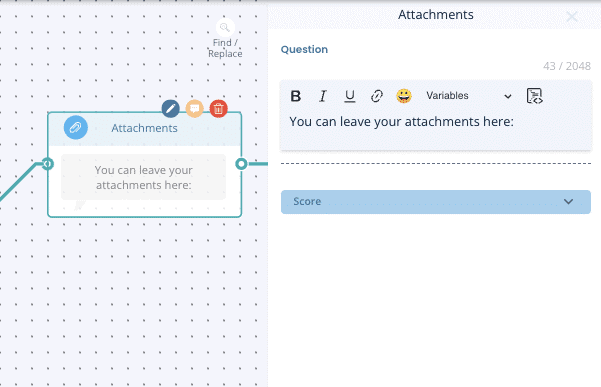
14. Attachments – Enables visitors to upload files, such as CVs or documents.
Still Need Help?
Get in touch with your Customer Success Manager or reach out to our support team at [email protected].
What is Company Identification?
Leadoo AI’s Company Identification enables you to see which companies visit your website. You’ll also see company information such as annual revenue, industry category, and more. You can view all the interactions, conversations, and conversion points visitors have on your website.
How to get the most from Leadoo AI’s Company Identification
Your sales team can make the most out of cold outreach by using Company ID to help them target engaged customers. They can see who is visiting the website as well as which pages they’ve visited and conversations they’ve had.
So, not only can they prioritise customers who already have shown intent but also talk to them about relevant interests based on their activity.
Nurturing
Already chatting with someone from ACME inc. about a deal? Your sales team can identify when they’ve been active on the website and reach out at a time they know they’re most engaged.
Want to know about existing prospect activity automatically? Check out Leadoo Sales Alerts here.
Understand your audience
Help your marketing team get rich insight into their customers from real insights instead of simply guessing what kind of dog Rob owns (personas anyone?).
Use filters to find your ideal customer profile and drill down into individual conversations through visitor analytics whether they have converted or not in Visitor Tracking.
If you need help getting the most out of company ID, reach out to your CS Manager who will be happy to help.